
ARC Remote Access Client
Access ARC desktops with audio redirection and screen sharing for robotics.
- Installs
- 119
- Measured
- Rating
- —
- Ratings
- —
- Version
- Varies with device
- Released
- 13 Jan 2025
- Tracked since 13 May 2026
- Size
- —
Screenshots




About ARC Remote Access Client
The description on the store listing
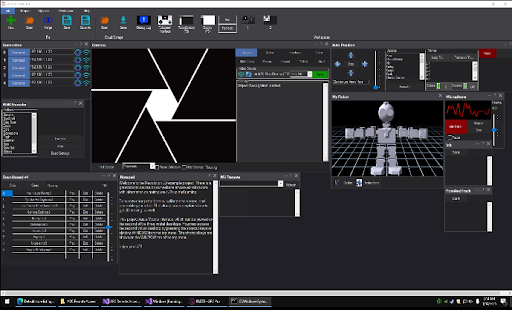
The Remote Access Server enables mobile clients to access the PC's desktop running Synthiam ARC. This unique client/server app gives Chromebooks and Android devices seamless connectivity to a Synthiam ARC instance on a PC. For example, it allows you to use the microphone on your mobile device as a remote mic for the ARC PC speech recognition and the speaker on the remote device as a remote speaker for the ARC PC. Additionally, it provides screen-sharing functionality similar to that of a remote desktop, giving you complete Windows UI on your Chromebook or Android device in the classroom.
Find up-to-date online instructions here: …
Read the full description
The Remote Access Server enables mobile clients to access the PC's desktop running Synthiam ARC. This unique client/server app gives Chromebooks and Android devices seamless connectivity to a Synthiam ARC instance on a PC. For example, it allows you to use the microphone on your mobile device as a remote mic for the ARC PC speech recognition and the speaker on the remote device as a remote speaker for the ARC PC. Additionally, it provides screen-sharing functionality similar to that of a remote desktop, giving you complete Windows UI on your Chromebook or Android device in the classroom. Find up-to-date online instructions here: https://synthiam.com/Support/ARC-Overview/Options-Menu/remote-access-sharing Why Use Remote Access Server? - Robots with onboard SBCs run headless. - In educational institutions, Chromebooks, tablets, or iPads access the ARC experience. Network Configurations Your robot will require a dedicated PC, which can be as cost-effective as an SBC. The SBC will need one of the following network configurations: - Single WiFi & Ethernet: The robot operates in Adhoc mode, with the SBC connecting to the robot's WiFi and to the Internet via Ethernet. The Remote Access client can connect to the WiFi or Ethernet network (generally Ethernet). - Double WiFi: This is similar to the above, but the SBC uses two WiFi interfaces—one for ad hoc mode with the robot and another for internet access. The Remote Access client typically connects to the interface with internet access. - Single WiFi: This is used when the robot doesn’t rely on WiFi (e.g., Arduino via USB) or its WiFi operates in Client mode, connecting to the local network. The SBC and Remote Access client connect to this local network. Using the Remote Access Client Main Screen UI The main screen lets you input the IP address, port, and password. Additionally, any remote access servers on your network will broadcast and appear on the list below. Selecting one still requires you to enter the password. Press the CONNECT button to connect to the specified Remote Access Server. Remote Access UI After connecting to a Synthiam ARC instance, this screen mirrors the ARC PC’s monitor. Clicking or touching the screen simulates mouse clicks on the ARC PC. On devices like Chromebooks, the mouse integrates seamlessly for intuitive use. Audio Redirection The Remote Access Server redirects audio between the client and the server. For example: - The client device’s microphone audio is sent to the ARC PC as its mic input in real-time. - All audio from the ARC PC’s speaker is played through the client device. Audio Redirection Instructions on PC - Install the VB-Cable Virtual Audio Device Driver. - Right-click the speaker icon in the ARC PC taskbar to access sound settings. - Select the Cable Output (VB-Cable Virtual Cable) as the default input device. - Note: Leave the output device to the PC’s default speaker. - To prevent sound duplication, mute the volume on the ARC PC. Enabling Remote Access Server in ARC - From the ARC top menu, select the Options tab. - Click the Preferences button to open the preferences popup window. - Select the Remote Access tab to view the server settings. - Check the Enable box to activate the server. - Enter a memorable password. - Leave other values at their defaults until familiar with their functionality. - Click OK to save your settings. Enabling Remote Access Server in ARC You can verify the server’s status in the ARC Debug Log window. Messages will indicate the Remote Access Server’s activity, including audits of your audio configuration to ensure the VB-Cable virtual device is installed and selected. The example image above shows a successful configuration. The VB-Cable was discovered as the default input source, and RAS was started correctly.
Installs since 15 Nov 2026 Measured
Exact Google Play install counts, collected daily
Daily history starts once this app is in our daily install sample.
Ratings
- 5 ★0.0%
- 4 ★0.0%
- 3 ★0.0%
- 2 ★0.0%
- 1 ★0.0%
Recent reviews
Latest public reviews from the store
- 16 Jun 2024
Best game ever
- 19 Feb 2024
Nice game
- 15 Jan 2024
I REALLY LUV THIS GAME!!!!
Top chart positions
Latest Google Play chart ranks by country, last 10 days
Not in any tracked top chart in the last 10 days.
ARC Remote Access Client history
Release, install milestones, listing and store changes
- First released on the store 13 Jan 2025
Listing keywords
Words and phrases ARC Remote Access Client repeats most in its store listing
Top phrases: remote access (15), remote access server (6), access server (6), arc pc (6), remote access client (5).
Highlighted words also appear in the title. Counts cover the title, short description and description.
Business model and tech
From the store listing and declared permissions
- Business model
- Free to download
- Sensitive access
- No sensitive permission declared
Compliance
What the listing and the app package show
- Store status
- Live
- Registered in
- Canada
- Privacy policy
- Linked on the listing
- Advertising
- No ads declared
- In-app purchases
- None declared
- Age rating
- Everyone
Apps like ARC Remote Access Client
Workbook Maker PDF Pluginaidiary16.9K installs★ 3.3
내공스터디 관리자IronTrain4.6K installs★ 4.9
수원대학교 수강신청수원대학교34.9K installs★ 3.1
تنزيلةTaha Ben Ashur13.6K installs★ 5.0
मध्यकालीन भारत का इतिहासSuren Tech Lab24K installs★ 3.4
365 Morning & Evening PrayersELEGANT X STUDIO™17.5K installs★ 3.71
Chitas GuideThe Saber Team3.7K installs★ 5.0
GradStar AppPlum systems33K installs★ 1.7
- Mars ViewTobias Thierer4K installs★ 3.67
ARC Remote Access Client: questions and answers
How many downloads does ARC Remote Access Client have?
ARC Remote Access Client has 119 installs on Google Play, measured from the store's own count on 15 Nov 2026.
Who makes ARC Remote Access Client?
ARC Remote Access Client is published by Synthiam Inc., a developer based in CA.
Is ARC Remote Access Client free?
Yes. ARC Remote Access Client is free to download.
Is ARC Remote Access Client still available?
Yes. ARC Remote Access Client is live on Google Play as of 15 Nov 2026.
Track ARC Remote Access Client and its competitors
Watch any app for new versions, rating drops, chart moves and removals. Free plan, no card.