Assistive Volume Button
Volume control + booster, power button, auto screen on/off, lower brightness.
- Installs
- 9.08M
- Measured
- Rating
- 4.17
- Ratings
- 19.3K
- 212 reviews
- Version
- Varies with device
- Updated 31 Oct 2026
- Released
- 31 Oct 2018
- Tracked since 13 May 2026
- Size
- 4 MB
- Needs 4.2
Screenshots


About Assistive Volume Button
The description on the store listing
Simulate the phone's physical volume and power keys on the screen.
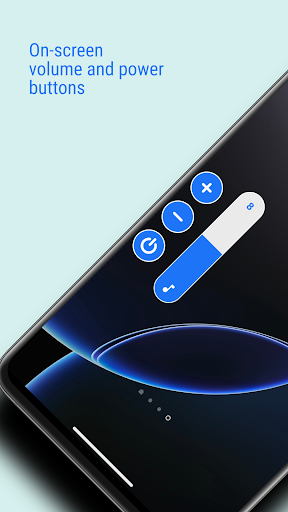
<font color="#3873E0">Assistive Volume Button</font> shows the volume and power buttons on the edge of the screen which simulates the volume control and screen on/off functionality of the phone's physical keys.
App also provide the option to show the app's own volume slider or system volume slider.
Buttons can be moved on the screen to be placed anywhere on the side edge.
Customize buttons and sliders with predefined styles like Android, iOS, MIUI, RGB & more and appearance like size, transparancy, color & more.
<font color="#3873E0">PREMIUM FEATURES</font>
Very useful premium features which can also be …
Read the full description
Simulate the phone's physical volume and power keys on the screen. <font color="#3873E0">Assistive Volume Button</font> shows the volume and power buttons on the edge of the screen which simulates the volume control and screen on/off functionality of the phone's physical keys. App also provide the option to show the app's own volume slider or system volume slider. Buttons can be moved on the screen to be placed anywhere on the side edge. Customize buttons and sliders with predefined styles like Android, iOS, MIUI, RGB & more and appearance like size, transparancy, color & more. <font color="#3873E0">PREMIUM FEATURES</font> Very useful premium features which can also be activated by watching an ad: ☞ Volume booster - Boost the volume of your speakers more than the phone's maximum volume. ☞ Lower brightness - Reduce the screen brightness below system minimum screen brightness. ☞ Auto screen on/off - Based on the proximity sensor input, turn screen on/off without pressing the power key. <font color="#3873E0">SINGLE BUTTON</font> Show only one button on the screen and tap on it will open the sliders you choose: • Media volume • Media booster (Speaker booster / Volume booster) • Ring volume • Notification volume • Call volume • Brightness • Darkness (Lower brightness) With single button, you can control wide range of Media volume from normal to boosted volume and brightness from normal brightness to lower than system minimum brightness. <font color="#3873E0">POWER BUTTON</font> (Android 9+) Shows power button which simulates phone's physical power key to turn screen off. <font color="#3873E0">AUTO SCREEN ON</font> Use proximity sensor to turn the screen on. When you hover over the phone's proximity sensor, the screen will turn on automatically. USECASE: When you take the phone out of your pocket, your phone screen will turn on without pressing any key. So now it truely simulates functionaliy of the power key by turning screen off with power button from the screen and turning screen on by the proximity sensor. <font color="#3873E0">CONFIGURATION PER APP</font> You can set per app volume, brightness and buttons visibility. When you open particular app, your defined configuration will be applied. <font color="#3873E0">KEYBOARD</font> To avoid interruption in typing, app automatically moves the buttons up when keyboard opens so that it won't interrupt with your typing. <font color="#3873E0">WIDGET</font> App offers following widget for home screen: • Volume button • Mute button • Power button <font color="#3873E0">ACCESSIBILITY</font> This app uses accessibility API for the following features to work: • Power button • Configuration per app • Sensitive to keyboard <font color="#3873E0">NOTE</font> App requires permission to run the service in background. Some phones stop the background service. Those users need to follow steps mentioned in the app.
Installs, last 30 days Measured
Exact Google Play install counts, collected daily
Ratings
19,255 ratings, 212 reviews
- 5 ★62%
- 4 ★13%
- 3 ★6.0%
- 2 ★3.8%
- 1 ★15%
Recent reviews
Latest public reviews from the store
- 9 Feb 2022
Very good variant of a Tic Tac Toe game. Enjoyed the color scheme first of all.
- 27 Jan 2022
Fun and amazing Tic Tac Toe Variant Game. Good controls. Love it.
- 6 Sep 2021
The game is nicely designed and the computer's moves are random. The opponent's moves can be in another color
- 4 Sep 2021
Excellent game! Works well and very clean. Props to the developer!
Top chart positions
Latest Google Play chart ranks by country, last 10 days
- Countries ranked
- 2
- Best rank
- #78
- Top 10 placements
- 0
- of 2 chart placements
- Average rank
- #105
Best countries on Google Play
- 🇮🇩 Indonesia · Top free, Music & Audio#78
- 🇮🇳 India · Top free, Music & Audio#132
Assistive Volume Button history
Release, install milestones, listing and store changes
- Reached 5,000,000+ installs 5 Feb 2025
- Reached 1,000,000+ installs 26 Jan 2022
- Reached 500,000+ installs 27 Dec 2020
- Reached 100,000+ installs 10 Nov 2019
- First released on the store 31 Oct 2018
Update frequency
How often Assistive Volume Button ships a new version, month by month
4 updates in the last 12 months. More often than most similar apps: they shipped a median of 3 updates in the same year.
Recent versions
Current version Varies with device
- Version 3.1.41 Apr 2026
- Version 3.1.34 Feb 2026
- Version 3.1.229 Jan 2026
- Version 3.1.131 Dec 2025
Listing keywords
Words and phrases Assistive Volume Button repeats most in its store listing
Top phrases: font color 3873e0 (10), color 3873e0 (10), font color (10), power button (6), screen on off (4).
Highlighted words also appear in the title. Counts cover the title, short description and description.
Business model and tech
From the store listing, the SDKs in the app package and its declared permissions
- Business model
- Free to downloadIn-app purchasesShows ads
- Built with
- No cross-platform framework or game engine detected
- Ad networks (1)
- AdMob
- Subscriptions and payments
- Google Play billing
- Analytics and crash reports
- Firebase
- Sensitive access
- Draws over other appsAdvertising ID
2 ad, attribution and analytics SDKs detected. SDKs are read from the app package and permissions from the store listing, so code that loads later is not seen.
Technology
18 SDKs found in the app package
Ad networks
Advertising and install-attribution SDKs found in the app package
- AdMob
21 permissions
2 special access, 1 sensitive, 18 standard
- Change system settingsSpecial access
- Draw over other appsSpecial access
- Show notificationsPOST_NOTIFICATIONSSensitive
- Ad attribution (Privacy Sandbox)ACCESS_ADSERVICES_ATTRIBUTIONStandard
- Ad topics (Privacy Sandbox)ACCESS_ADSERVICES_TOPICSStandard
- Read how it was installed (install referrer)BIND_GET_INSTALL_REFERRER_SERVICEStandard
- Read the advertising IDAD_IDStandard
- Read the advertising ID (Privacy Sandbox)ACCESS_ADSERVICES_AD_IDStandard
- Ask to skip battery optimisationREQUEST_IGNORE_BATTERY_OPTIMIZATIONSStandard
- Change audio settingsStandard
- Foreground service (special use)FOREGROUND_SERVICE_SPECIAL_USEStandard
- Keep the phone awakeStandard
Compliance
What the listing and the app package show
- Store status
- Live
- Upkeep
- Updated 31 Oct 2026
- Privacy policy
- Linked on the listing
- Advertising
- Shows ads
- In-app purchases
- Offered
- Age rating
- Everyone
- Sensitive permissions
- 1 sensitive, 2 special access of 21
- Location access
- No
- Camera and microphone
- Neither
Apps like Assistive Volume Button
Radio USA online FMRadios Color345K installs★ 4.74
Daily Tunes: All Online RadiosCrystal Missions948K installs★ 4.45
Song Finder: Music IdentifierVirals Dijital Hizmetler A.S.484K installs★ 4.19
Hi Music -mp3&Music downloaderhimusicapp inc.690K installs★ 4.16
Himnario AdventistaDaro Technologies3.8M installs★ 4.39
CloudPlayer™ cloud & offlinedoubleTwist ™1.1M installs★ 3.55
RecForge II - Audio RecorderDje0736M installs★ 3.2
Live Spanish RadiosRadioworld FM447K installs★ 4.9
سورة البقرة كاملة بدون انترنتAmalPro4.2M installs★ 4.87
Assistive Volume Button: questions and answers
How many downloads does Assistive Volume Button have?
Assistive Volume Button has 9,080,828 installs on Google Play, measured from the store's own count on 19 Nov 2026.
Who makes Assistive Volume Button?
Assistive Volume Button is published by mCreations.
When was Assistive Volume Button last updated?
The latest version (Varies with device) was released on 31 Oct 2026.
Is Assistive Volume Button free?
Yes. Assistive Volume Button is free to download and offers in-app purchases, and it shows ads.
Is Assistive Volume Button still available?
Yes. Assistive Volume Button is live on Google Play as of 19 Nov 2026.
Track Assistive Volume Button and its competitors
Watch any app for new versions, rating drops, chart moves and removals. Free plan, no card.