
Authenticator App 2FA Password
Authenticator app enable 2FA to protect all accounts with OTP, Password Manager
- Installs
- 19.77K
- Measured
- Rating
- —
- Ratings
- —
- Version
- Varies with device
- Updated 25 Sep 2024
- Released
- 11 Oct 2022
- Tracked since 14 May 2026
- Size
- —
Screenshots




About Authenticator App 2FA Password
The description on the store listing
Authenticator: 2FA & Password is the best and free app for two-factor authentication (2FA) and password management, trusted by millions of people globally. Easy, safe, and fast!
2FA authentication is recommended by security experts as the most efficient way to add an extra layer of protection for your personal and work accounts by verifying one-time passwords (OTP), which are 6-digit codes for 2-step verification (2SV).
2FA codes generated by Authenticator: 2FA & Password are widely supported and accepted by all online services such as Google, Instagram, Facebook, Discord, Microsoft, Twitter, Twitch, TikTok, LinkedIn, Dropbox, Snapchat, GitHub, Tesla, Coinbase, Binance, Amazon, …
Read the full description
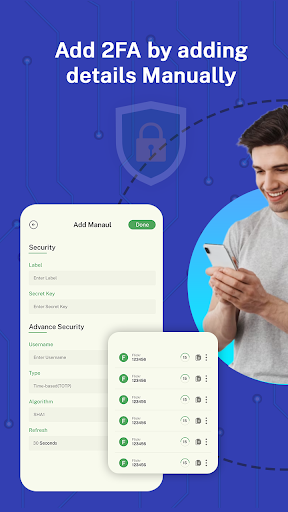
Authenticator: 2FA & Password is the best and free app for two-factor authentication (2FA) and password management, trusted by millions of people globally. Easy, safe, and fast! 2FA authentication is recommended by security experts as the most efficient way to add an extra layer of protection for your personal and work accounts by verifying one-time passwords (OTP), which are 6-digit codes for 2-step verification (2SV). 2FA codes generated by Authenticator: 2FA & Password are widely supported and accepted by all online services such as Google, Instagram, Facebook, Discord, Microsoft, Twitter, Twitch, TikTok, LinkedIn, Dropbox, Snapchat, GitHub, Tesla, Coinbase, Binance, Amazon, Crypto.com, Steam, Epic, and more. These services span across all industries: finance, crypto, bitcoin, insurance, banking, eCommerce, business, securities, social media, gaming, cloud computing, IT, and business. Authenticator: 2FA & Password secures all your accounts with two-factor authentication (2FA or MFA), no matter where you are or what devices you are using. It generates a unique time-based or count-based one-time password (OTP) for each login every 30 seconds, ensuring that only you can access your account after a 2-step verification (2SV). More than an authenticator, Authenticator: 2FA & Password is also a multi-functional security application, designed to secure all your accounts and protect your sensitive information with integrated 2FA Authenticator, Password Manager, Private Browser, and other rich security features. WHY CHOOSE Authenticator: 2FA & Password ⭐ Easy Setup Adding an account has never been easier for both 2FA and MFA. Just scan a 2FA QR code, and it will generate OTP (TOTP or HOTP) every 30 seconds automatically. No internet is required to get the 2FA or MFA code. It also supports manual setup for advanced 2FA users. ⭐ Backup and Recovery Automatically backup all account data to your personal storage, so you never lose your 2FA code or account data when you change or upgrade devices. Recover all your account data with one tap. ⭐ Password Manager As your trusted password keeper/vault, it can generate and save strong passwords for all your accounts securely and efficiently. The password manager can even autofill login and password fields within any app or website on your phone, saving time and reducing input errors without the need to remember lengthy passwords. ⭐ Security Lock Unlock Authenticator: 2FA & Password instantly with your device password to prevent unauthorized access to your app. No more hacking, phishing attacks, or other security threats. Your 2FA codes, MFA codes, logins, and passwords are securely stored in our app. ⭐ Support for All Accounts Supports Google, Instagram, Facebook, Discord, Microsoft, Twitter, Twitch, TikTok, LinkedIn, Dropbox, Snapchat, GitHub, Tesla, Coinbase, Binance, Amazon, Crypto.com, Steam, Epic, and more, across all industries: finance, crypto, bitcoin, insurance, banking, eCommerce, business, securities, social media, gaming, cloud computing, IT, and business. Download Authenticator: 2 Factor & Password Manager app now and enjoy the all-in-one security solution for your digital life with two-factor authentication (2FA or MFA).
Installs Measured
Exact Google Play install counts, collected daily
Daily history starts once this app is in our daily install sample.
Ratings
- 5 ★0.0%
- 4 ★0.0%
- 3 ★0.0%
- 2 ★0.0%
- 1 ★0.0%
Recent reviews
Latest public reviews from the store
- 30 Mar 2026
Salam hi
- 20 Mar 2026
by far the best experience using it. free and not loaded with ads
- 18 Mar 2026
عالیست
- 14 Mar 2026
عبیل
What reviewers bring up
Topics mentioned in the latest 50 reviews, by how many reviews mention them
Liked in good reviews (39 reviews)
- عالی 5
- vpn 4
- دمتون گرم 2
- بسیار 2
Raised in bad reviews (10 reviews)
- وصل 3
- نمیشه 2
Top chart positions
Latest Google Play chart ranks by country, last 10 days
Not in any tracked top chart in the last 10 days.
Authenticator App 2FA Password history
Release, install milestones, listing and store changes
- Reached 10,000+ installs 19 Sep 2023
- Reached 5,000+ installs 20 May 2023
- Reached 1,000+ installs 28 Dec 2022
- Reached 500+ installs 14 Dec 2022
- Reached 10+ installs 14 Nov 2022
- Reached 5+ installs 31 Oct 2022
- Reached 1+ installs 16 Oct 2022
- First released on the store 11 Oct 2022
Recent versions
Current version Varies with device
- Version 1.525 Sep 2024
- Version 1.413 Nov 2023
- Version 1.214 Sep 2023
- Version 1.113 Apr 2023
Listing keywords
Words and phrases Authenticator App 2FA Password repeats most in its store listing
Top phrases: 2fa password (7), authenticator 2fa password (6), authenticator 2fa (6), password manager (5), 2fa or mfa (3).
Highlighted words also appear in the title. Counts cover the title, short description and description.
Business model and tech
From the store listing and declared permissions
- Business model
- Free to downloadIn-app purchasesShows ads
- Sensitive access
- No sensitive permission declared
Compliance
What the listing and the app package show
- Store status
- Live
- Upkeep
- No update since 25 Sep 2024
- Registered in
- India
- Privacy policy
- Linked on the listing
- Advertising
- Shows ads
- In-app purchases
- Offered
- Age rating
- Everyone
Apps like Authenticator App 2FA Password
들어서 화면켜기Won3.5K installs★ 4.0
Height PredictionEcliptic App Ventures45.9K installs★ 2.4
Speicers`Pro VPNEldiablolucifer202021.2K installs★ 4.14
Lightning Tracker with AlertsYaksh Software4.3K installs★ 3.0
Mana Pathi (Unit Converter)Shirish Koirala2.2K installs★ 4.6
Multi-tab Calc - A simple app.Naoyuki Rikiji1.3K installs★ 5.0
Photo Recovery PlusBillApps7.1K installs★ 4.53
Just Silence. Scheduled.Akid Soft1.6K installs★ 5.0
- WoWp AssistantВиталий Робиновский2K installs★ 4.2
Authenticator App 2FA Password: questions and answers
How many downloads does Authenticator App 2FA Password have?
Authenticator App 2FA Password has 19,771 installs on Google Play, measured from the store's own count on 14 May 2026.
Who makes Authenticator App 2FA Password?
Authenticator App 2FA Password is published by Creation Apps LLC, a developer based in IN.
When was Authenticator App 2FA Password last updated?
The latest version (Varies with device) was released on 25 Sep 2024.
Is Authenticator App 2FA Password free?
Yes. Authenticator App 2FA Password is free to download and offers in-app purchases, and it shows ads.
Is Authenticator App 2FA Password still available?
Yes. Authenticator App 2FA Password is live on Google Play as of 14 May 2026.
Track Authenticator App 2FA Password and its competitors
Watch any app for new versions, rating drops, chart moves and removals. Free plan, no card.