
Authenticator for All Accounts
2FA Authenticator & Password Manager - Protect all your accounts in one place
- Installs
- 55.86K
- Measured
- Rating
- —
- Ratings
- —
- Version
- Varies with device
- Updated 31 Mar 2026
- Released
- 3 Jul 2025
- Tracked since 13 May 2026
- Size
- —
Screenshots


About Authenticator for All Accounts
The description on the store listing
👉 Free Authenticator for All Accounts 😍😍
👉 Protect all your online accounts🔒🔐
Easily manage your verification codes and passwords in one place, 2FA Authenticator and a Password Manager in one secure app.
🔐 Two-Factor Authentication (2FA)
- Generate and manage time-based one-time passwords (TOTP / OTP) for any service that supports 2FA, such as Google, Facebook, Microsoft, Instagram, Dropbox, or any other account.
- You can add accounts by scanning a QR code or entering a secret key manually
- All generated codes are stored locally and work even without an internet connection
🛡️ Password Manager
- Keep all your passwords safe in one secure vault with strong encryption, …
Read the full description
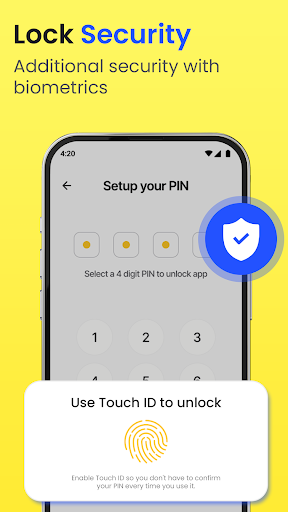
👉 Free Authenticator for All Accounts 😍😍 👉 Protect all your online accounts🔒🔐 Easily manage your verification codes and passwords in one place, 2FA Authenticator and a Password Manager in one secure app. 🔐 Two-Factor Authentication (2FA) - Generate and manage time-based one-time passwords (TOTP / OTP) for any service that supports 2FA, such as Google, Facebook, Microsoft, Instagram, Dropbox, or any other account. - You can add accounts by scanning a QR code or entering a secret key manually - All generated codes are stored locally and work even without an internet connection 🛡️ Password Manager - Keep all your passwords safe in one secure vault with strong encryption, your data stays private and protected from unauthorized access - Easily add, edit, and organize your passwords, notes, and login details - Access them anytime with a single master password or fingerprint authentication 🌟 Key Features of Authenticator - Supports Any Account: Works with Google, Facebook, Microsoft, Instagram, Dropbox, and all services that use 2FA or OTP codes - Offline 2FA Codes: Generate and use one-time passwords (TOTP) even without an internet connection. - Secure Password Vault : Store and organize all your passwords safely with encryption - Backup & Restore: Easily back up your authentication data and restore it on a new device - Easy Setup: Quickly add new accounts by scanning a QR code or entering a setup key manually. - Autofill Support: Automatically fill in usernames and passwords for each app or website with one tap 🔐 What is 2FA & TOTP? - Two-Factor Authentication (2FA) adds an extra layer of protection to your online accounts. Instead of relying only on a password, 2FA requires a verification code that changes every few seconds. - These codes are generated using the Time-Based One-Time Password (TOTP) standard – the same method used by Google Authenticator, Microsoft Authenticator and other secure apps 🔐 How to Enable 2FA on your online account 1. Open the website or app of the service you want to secure (e.g., Google, Facebook, Instagram, Microsoft, etc.). 2. Go to Security Settings or Account Settings. 3. Find and select the option Two-Factor Authentication (2FA) or Login Verification. 4. Choose the Authenticator App method when prompted. 5. A QR code or secret key will appear on your screen 🔐 Add the account to Authenticator 1. Open Authenticator for All Accounts on your device. 2. Tap Add Account (+). 3. Choose one of the following options: - Scan QR Code: Point your camera at the QR code displayed on the service’s website. - Enter Setup Key: Manually type or paste the secret key. 4. The app will automatically generate a 6-digit verification code (OTP/TOTP) for that account. 5. Go back to the website or app and enter the code to complete the 2FA setup. 6. Once confirmed, your account is now protected with two-factor authentication. Thank you for using our Authenticator. For any support or feedback, please contact us at [email protected]
Installs since 8 Nov 2026 Measured
Exact Google Play install counts, collected daily
Ratings
- 5 ★0.0%
- 4 ★0.0%
- 3 ★0.0%
- 2 ★0.0%
- 1 ★0.0%
Recent reviews
Latest public reviews from the store
No reviews in our sample for this app yet.
Top chart positions
Latest Google Play chart ranks by country, last 10 days
- Countries ranked
- 1
- Best rank
- #143
- Top 10 placements
- 0
- of 1 chart placements
- Average rank
- #143
Best countries on Google Play
- 🇫🇷 France · Top free, Tools#143
| Country | Chart | Category | Rank | Best (10 days) | Date |
|---|---|---|---|---|---|
| 🇫🇷 France | Top free | Tools | #143 | #128 | 21 Nov 2026 |
Authenticator for All Accounts history
Release, install milestones, listing and store changes
- Reached 10,000+ installs 31 Mar 2026
- Reached 5,000+ installs 7 Nov 2025
- Reached 1,000+ installs 10 Oct 2025
- Reached 500+ installs 26 Sep 2025
- First released on the store 3 Jul 2025
Update frequency
How often Authenticator for All Accounts ships a new version, month by month
2 updates in the last 12 months. More often than most similar apps: they shipped a median of 0 updates in the same year.
Recent versions
Current version Varies with device
- Version 4.19 Feb 2026
- Version 4.023 Jan 2026
- Version 3.216 Nov 2025
- Version 3.17 Nov 2025
Listing keywords
Words and phrases Authenticator for All Accounts repeats most in its store listing
Top phrases: qr code (5), factor authentication (4), factor authentication 2fa (3), authentication 2fa (3), google facebook (3).
Highlighted words also appear in the title. Counts cover the title, short description and description.
Business model and tech
From the store listing and declared permissions
- Business model
- Free to downloadIn-app purchasesShows ads
- Subscriptions and payments
- Google Play billing
- Sensitive access
- CameraAdvertising ID
20 permissions
0 special access, 2 sensitive, 18 standard
- Take photos and videosSensitive
- Show notificationsPOST_NOTIFICATIONSSensitive
- Ad attribution (Privacy Sandbox)ACCESS_ADSERVICES_ATTRIBUTIONStandard
- Ad topics (Privacy Sandbox)ACCESS_ADSERVICES_TOPICSStandard
- Read how it was installed (install referrer)BIND_GET_INSTALL_REFERRER_SERVICEStandard
- Read the advertising IDAD_IDStandard
- Read the advertising ID (Privacy Sandbox)ACCESS_ADSERVICES_AD_IDStandard
- Control vibrationStandard
- Foreground service (data sync)FOREGROUND_SERVICE_DATA_SYNCStandard
- Foreground service (media projection)FOREGROUND_SERVICE_MEDIA_PROJECTIONStandard
- Keep the phone awakeStandard
- Run a foreground serviceFOREGROUND_SERVICEStandard
Compliance
What the listing and the app package show
- Store status
- Live
- Upkeep
- Updated 31 Mar 2026
- Registered in
- Vietnam
- Privacy policy
- Linked on the listing
- Advertising
- Shows ads
- In-app purchases
- Offered
- Age rating
- Everyone
- Sensitive permissions
- 2 sensitive of 20
- Location access
- No
- Camera and microphone
- Camera
Apps like Authenticator for All Accounts
들어서 화면켜기Won3.5K installs★ 4.0
Height PredictionEcliptic App Ventures45.9K installs★ 2.4
Speicers`Pro VPNEldiablolucifer202021.2K installs★ 4.14
Lightning Tracker with AlertsYaksh Software4.3K installs★ 3.0
Mana Pathi (Unit Converter)Shirish Koirala2.2K installs★ 4.6
Multi-tab Calc - A simple app.Naoyuki Rikiji1.3K installs★ 5.0
Just Silence. Scheduled.Akid Soft1.6K installs★ 5.0
- WoWp AssistantВиталий Робиновский2K installs★ 4.2
LINKa: напишиLINKa7.9K installs★ 4.4
Authenticator for All Accounts: questions and answers
How many downloads does Authenticator for All Accounts have?
Authenticator for All Accounts has 55,858 installs on Google Play, measured from the store's own count on 22 Nov 2026.
Who makes Authenticator for All Accounts?
Authenticator for All Accounts is published by ALLSOFT, a developer based in VN.
When was Authenticator for All Accounts last updated?
The latest version (Varies with device) was released on 31 Mar 2026.
Is Authenticator for All Accounts free?
Yes. Authenticator for All Accounts is free to download and offers in-app purchases, and it shows ads.
Is Authenticator for All Accounts still available?
Yes. Authenticator for All Accounts is live on Google Play as of 22 Nov 2026.
Track Authenticator for All Accounts and its competitors
Watch any app for new versions, rating drops, chart moves and removals. Free plan, no card.