
Auto Clicker - Auto click
Auto clicker automate repetitive clicks, improve gameplay, reduce manual effort
- Installs
- 1.57M
- Measured
- Rating
- 4.15
- Ratings
- 7.3K
- 74 reviews
- Version
- 1.6.1
- Updated 7 Sep 2026
- Released
- 28 Jan 2024
- Tracked since 11 May 2026
- Size
- —
Screenshots


About Auto Clicker - Auto click
The description on the store listing
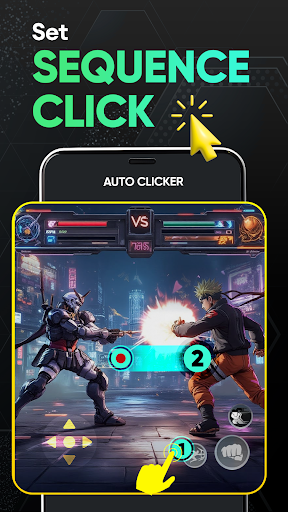
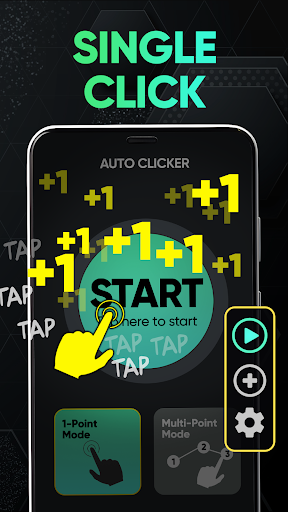
Auto clicker app lets you automatically click or tap repeatedly at any location, and using any time interval you choose.
If you need to press many times on a certain area of your screen, click through a series of buttons, or repeatedly swipe in a particular direction, this auto clicker download has you covered.
Simply record your desired actions, specify the amount of repeats, and let the quick touch auto clicker app handle the rest. It's perfect for any task that needs frequent screen interactions.
⭐Huge benefits of Auto click you must know:
- Easier and less time consuming than traditional clicking.
- Allow you to easily and quickly complete repetitive tasks with no stress or …
Read the full description
Auto clicker app lets you automatically click or tap repeatedly at any location, and using any time interval you choose. If you need to press many times on a certain area of your screen, click through a series of buttons, or repeatedly swipe in a particular direction, this auto clicker download has you covered. Simply record your desired actions, specify the amount of repeats, and let the quick touch auto clicker app handle the rest. It's perfect for any task that needs frequent screen interactions. ⭐Huge benefits of Auto click you must know: - Easier and less time consuming than traditional clicking. - Allow you to easily and quickly complete repetitive tasks with no stress or strain on your hands. - Helpful when you need to complete tedious tasks that require a lot of clicking. - Reduce carpal tunnel syndrome because of constantly clicking the screen for hours when you use a phone all the time. - Save your time from tedious tasks like hitting all the buttons or links you need as many times as you want by fast auto clicker. - Save a lot of time because it automatically performs repeated activities. - Ensures precise clicking at specified positions on the screen. - Ensuring that your tasks are uninterrupted and completed according to plan. - Spend less time on repetitive tasks. ⭐ What you can get: - Customizable click speeds - Easy select multi click points - Set auto click sequences - Combined click mode - Anti-detection mode helps to avoid detection, ensuring smooth and uninterrupted automation - Schedule your clicks for regular intervals - Automatic complex tasks using pre-set click sequences by this auto clicker app - Set target point and press start - Single and multi-target clicking points or swipes, allowing you to choose how clicks are executed - Stop, pause or resume the scripts at any time - Support for drag-and-drop automation on screen with this auto clicker download - Timed auto-stop to customize the duration of clicker - User-friendly interface to use with gs auto clicker - Have a global timer to run for a certain amount of time - Easy to choose time intervals to set target point and search image - Check scripts history anytime ⭐Getting free “fast auto clicker” helps you to 1️⃣Reducing physical strain - Instead of randomly clicking at the middle of the keyboard, you can target the exact point where you would like the mouse to stop. - Everything will be running smoothly and accurately and that you will not need to repeatedly configure the system tray located in the future. - Reduce the risk of accidentally pressing the wrong key on your keyboard. 2️⃣Save time - Spend a lot less time doing repetitive tasks by using the target point. - No waiting time because this fast auto clicker download eliminates the need for waiting, monitoring taps. 3️⃣Work Efficiency - Not interrupted, complete works much faster - Never miss important activities, for sure with gs auto clicker Note: - Only support Android 8.0 and above - Requires AccessibilityService API to work. We don't use this API to collect any user data - No ROOT permission required * Auto clicker uses the AccessibilityService API to implement the core functionality of the app. 1. Why use the AccessibilityService API service? The app uses the AccessibilityService API service to realize core functions such as automatic clicking, swipes, synchronous clicking, and long pressing. NOT doing anything else that violates API policy. 2. Do we collect personal data? We will not collect any private information through this interface of the AccessibilityService API.
Installs, last 30 days Measured
Exact Google Play install counts, collected daily
Ratings
7,329 ratings, 74 reviews
- 5 ★69%
- 4 ★11%
- 3 ★2.8%
- 2 ★0.9%
- 1 ★16%
Recent reviews
Latest public reviews from the store
No reviews in our sample for this app yet.
Top chart positions
Latest Google Play chart ranks by country, last 10 days
Auto Clicker - Auto click history
Release, install milestones, listing and store changes
- Reached 1,000,000+ installs 15 Dec 2025
- Reached 500,000+ installs 21 Oct 2024
- Reached 100,000+ installs 21 Jul 2024
- Reached 50,000+ installs 11 Jul 2024
- Reached 10,000+ installs 24 Apr 2024
- Reached 5,000+ installs 27 Mar 2024
- Reached 1,000+ installs 29 Feb 2024
- First released on the store 28 Jan 2024
Update frequency
How often Auto Clicker - Auto click ships a new version, month by month
4 updates in the last 12 months. More often than most similar apps: they shipped a median of 0 updates in the same year.
Recent versions
Current version 1.6.1
- Version 1.5.97 Sep 2026
Optimize
- Version 1.5.711 Aug 2026
- Version 1.5.618 Jun 2026
- Version 1.5.519 Jan 2026
Listing keywords
Words and phrases Auto Clicker - Auto click repeats most in its store listing
Top phrases: auto clicker (13), accessibilityservice api (5), auto clicker download (3), fast auto clicker (3), auto click (3).
Highlighted words also appear in the title. Counts cover the title, short description and description.
Business model and tech
From the store listing and declared permissions
- Business model
- Free to downloadIn-app purchasesShows ads
- Subscriptions and payments
- Google Play billing
- Sensitive access
- Photos, videos and filesAdvertising ID
19 permissions
2 special access, 3 sensitive, 14 standard
- See every installed appQUERY_ALL_PACKAGESSpecial access
- Set exact alarmsSCHEDULE_EXACT_ALARMSpecial access
- Change or delete shared storageSensitive
- Read shared storageSensitive
- Show notificationsPOST_NOTIFICATIONSSensitive
- Ad attribution (Privacy Sandbox)ACCESS_ADSERVICES_ATTRIBUTIONStandard
- Ad topics (Privacy Sandbox)ACCESS_ADSERVICES_TOPICSStandard
- Read how it was installed (install referrer)BIND_GET_INSTALL_REFERRER_SERVICEStandard
- Read the advertising IDAD_IDStandard
- Read the advertising ID (Privacy Sandbox)ACCESS_ADSERVICES_AD_IDStandard
- Control vibrationStandard
- Keep the phone awakeStandard
Compliance
What the listing and the app package show
- Store status
- Live
- Upkeep
- Updated 7 Sep 2026
- Registered in
- Vietnam
- Privacy policy
- Linked on the listing
- Advertising
- Shows ads
- In-app purchases
- Offered
- Age rating
- Everyone
- Sensitive permissions
- 3 sensitive, 2 special access of 19
- Location access
- No
- Camera and microphone
- Neither
Apps like Auto Clicker - Auto click
LED Strip Music Bulb RemoteCards3.4M installs★ 4.12
List, Copy And InviteManuelitaGG145K installs★ 4.4
Recover Deleted Messages AppAllied Clicks126K installs★ 4.3
Digital Dashboard GPSluozirui628K installs★ 3.44
Battery Health TemperatureSimpleEvo Apps1.1M installs★ 4.09
বাংলা ঘড়ি (Bangla Clock)Md. Sahedul Hasan1.4M installs★ 4.46
MyScript Calculator 2MyScript301K installs★ 4.61
WiFi Extract كشف الواى فاىKharphonk1.9M installs★ 3.79
StaytrackBossjob13.4K installs★ 4.96
Auto Clicker - Auto click: questions and answers
How many downloads does Auto Clicker - Auto click have?
Auto Clicker - Auto click has 1,568,347 installs on Google Play, measured from the store's own count on 19 Nov 2026.
Who makes Auto Clicker - Auto click?
Auto Clicker - Auto click is published by Outlookdaily, a developer based in VN.
When was Auto Clicker - Auto click last updated?
The latest version (1.6.1) was released on 7 Sep 2026.
Is Auto Clicker - Auto click free?
Yes. Auto Clicker - Auto click is free to download and offers in-app purchases, and it shows ads.
Is Auto Clicker - Auto click still available?
Yes. Auto Clicker - Auto click is live on Google Play as of 19 Nov 2026.
Track Auto Clicker - Auto click and its competitors
Watch any app for new versions, rating drops, chart moves and removals. Free plan, no card.