- Installs
- 164K
- Measured
- Rating
- 2.83
- Ratings
- 327
- 6 reviews
- Version
- 1.5.8
- Updated 16 Dec 2025
- Released
- 10 Aug 2015
- Tracked since 12 May 2026
- Size
- —
- Needs 4.4
Also on App Store: Auto+ (34 ratings)
Screenshots


About Auto+
The description on the store listing
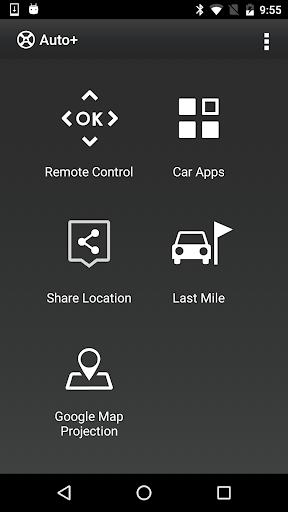
Auto+ is designed to be used with the particular model infotainment system, there are five modes to enhance the connectivity between the infotainment and your smartphone.
You can control the infotainment anywhere from your car once the Bluetooth is connected, watch online video streaming, sync your personal calendar, share current locations, last mile destination and project your google map for navigation.
Auto+ Remote control mode:
Control navigation and media playback with single tap. Switch the Car Launcher with flick of your finger or quickly tap out the POI name instead of clicking the letter on the infotainment system screen.
Auto+ Car App mode(*Require MHL cable):
Use MHL …
Read the full description
Auto+ is designed to be used with the particular model infotainment system, there are five modes to enhance the connectivity between the infotainment and your smartphone. You can control the infotainment anywhere from your car once the Bluetooth is connected, watch online video streaming, sync your personal calendar, share current locations, last mile destination and project your google map for navigation. Auto+ Remote control mode: Control navigation and media playback with single tap. Switch the Car Launcher with flick of your finger or quickly tap out the POI name instead of clicking the letter on the infotainment system screen. Auto+ Car App mode(*Require MHL cable): Use MHL cable connect infotainment to watch online video streaming, and also to sync your personal calendar via smartphone. Auto+ Share Location mode: Share locations from cell phone and start navigation by infotainment. Auto+ Last mile mode: Use last mile navigation guiding you from your car to destination and back. Auto+ Google map projection: Connect HDMI and then you can able to project your smartphone’s Google map screens on the Infotainment system. You can use Auto+ to: - Control the infotainment system - Control media playback - Control car launcher - Enter text with Keyboard - Watch online video streaming (*Require MHL cable) - Sync up your personal calendar (*Require MHL cable) - Share locations from cell phone - Use last mile navigation guiding you to the destination - Project Google map screens on the Infotainment system. (*Require MHL cable) Auto+ Requirement: - Requires a device with Android 4.2 or later to use Auto+. - Requires a Bluetooth LE connection to the infotainment to use Auto+. Auto+ Quick guide: 1. Install Auto+ 2. Click "Auto+ Connect" on the infotainment, and select Android mode. 3. Launch Auto+ and it will automatically connect. Enjoy our Auto+.
Installs since 29 Aug 2026 Measured
Exact Google Play install counts, collected daily
Ratings
327 ratings, 6 reviews
- 5 ★50%
- 4 ★0.0%
- 3 ★0.0%
- 2 ★8.1%
- 1 ★42%
Recent reviews
Latest public reviews from the store
- 13 Apr 2026
I really like the sensor and the potential for this thing. The app is lacking, as is some of the tracking, but there have been some improvements so I'm hopeful for the future. What I would love to see: 1. Direction data. We need to see how much time we spend in each gait, each way. Other trackers that are centered can do this. 2. Transition count. This is already tracked (you can see them in the chart) but you can't access it. 3. Data over time. I'm not sure what matters and when right now.
- 12 Mar 2026
I really like this app because it allows me to use my phone when I want to use my watch for something different. It is easy to navigate and to see data
- 12 Mar 2026
I've been using the Blaze sensor for about a month and it's been really helpful. Being able to see more of my horses biometric data has helped with training. Love the design too!
Top chart positions
Latest Google Play chart ranks by country, last 10 days
Not in any tracked top chart in the last 10 days.
Auto+ history
Release, install milestones, listing and store changes
- Reached 100,000+ installs 7 Aug 2021
- Reached 50,000+ installs 14 Feb 2019
- Reached 10,000+ installs 22 Dec 2016
- Reached 5,000+ installs 25 Jul 2016
- Reached 1,000+ installs 29 Jan 2016
- Reached 500+ installs 17 Dec 2015
- Reached 100+ installs 20 Oct 2015
- Reached 50+ installs 6 Sep 2015
Update frequency
How often Auto+ ships a new version, month by month
1 updates in the last 12 months. More often than most similar apps: they shipped a median of 0 updates in the same year.
Recent versions
Current version 1.5.8
- Version 1.5.83 Dec 2025
This version contains app improvements and enhancements to user experience.
- Version 1.5.716 Jul 2025
- Version 1.5.625 Jun 2023
- Version 1.5.512 May 2023
Listing keywords
Words and phrases Auto+ repeats most in its store listing
Top phrases: infotainment system (6), mhl cable (5), require mhl cable (4), google map (4), require mhl (4).
Highlighted words also appear in the title. Counts cover the title, short description and description.
Business model and tech
From the store listing and declared permissions
- Business model
- Free to download
- Sensitive access
- No sensitive permission declared
Compliance
What the listing and the app package show
- Store status
- Live
- Upkeep
- Updated 16 Dec 2025
- Registered in
- United States
- Privacy policy
- Linked on the listing
- Advertising
- No ads declared
- In-app purchases
- None declared
- Age rating
- Everyone
Apps like Auto+
Apk GeneratorAks Apps92.9K installs★ 3.54
Total Control 2.0Extraflame S.p.A.30K installs★ 2.67
EASI DriverHungrypanda Au Pty Ltd43.8K installs★ 3.67
Waste calendarZampogna Gianluca33.5K installs★ 3.0
Offline Password ManagerYogesh Dama21.4K installs★ 3.77
OBD Pluswanbaolu46.9K installs★ 2.67
Dreamy Light Jar ThemesTheme Design Apps for Android31.1K installs★ 4.75
- Apk Plus Sharing app - Application ManagerApp Sharing Management Lab226K installs★ 4.56
LaserPecker Design SpaceShenzhen Hingin Technology Co., Ltd.80.4K installs★ 2.05
Auto+: questions and answers
How many downloads does Auto+ have?
Auto+ has 164,496 installs on Google Play, measured from the store's own count on 14 Nov 2026.
Who makes Auto+?
Auto+ is published by Garmin, a developer based in US.
When was Auto+ last updated?
The latest version (1.5.8) was released on 16 Dec 2025.
Is Auto+ free?
Yes. Auto+ is free to download.
Is Auto+ still available?
Yes. Auto+ is live on Google Play as of 14 Nov 2026.
Track Auto+ and its competitors
Watch any app for new versions, rating drops, chart moves and removals. Free plan, no card.