
Auto Reply, Automation Tool
Auto Reply, Send Automatic reply to incoming messages in Multiple Messaging Apps
- Installs
- 103K
- Measured
- Rating
- 3.67
- Ratings
- 763
- 5 reviews
- Version
- 1.1.4
- Updated 7 Jan 2026
- Released
- 12 Jun 2025
- Tracked since 11 May 2026
- Size
- —
Screenshots


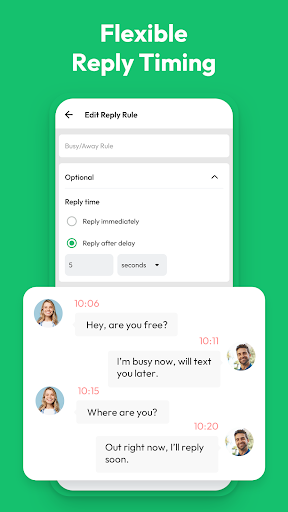

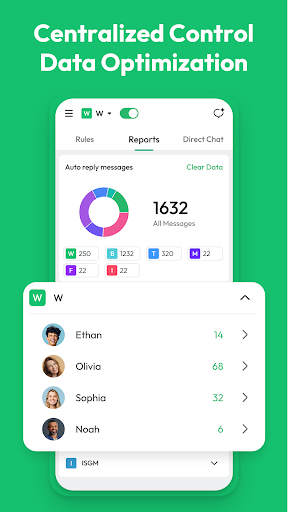
About Auto Reply, Automation Tool
The description on the store listing
Auto Reply is an automation tool, dedicated to automate your reply in numerous messaging apps, enhances social communication with 3 key features: Responder for instant replies based on rules, Repeater for scheduled or recurring messages, and Replicator for consistent, custom-styled responses.
Features:
• Supports automatic reply in multiple messaging applications
• Direct Chat
• Reports Management:
○ You can monitor and manage auto reply messages across multiple platforms for improved communication efficiency.
○ You can clear your data, which helps ensure your statistics are accurate and not corrupted by old data, especially before rolling out new autoresponder rules. …
Read the full description
Auto Reply is an automation tool, dedicated to automate your reply in numerous messaging apps, enhances social communication with 3 key features: Responder for instant replies based on rules, Repeater for scheduled or recurring messages, and Replicator for consistent, custom-styled responses. Features: • Supports automatic reply in multiple messaging applications • Direct Chat • Reports Management: ○ You can monitor and manage auto reply messages across multiple platforms for improved communication efficiency. ○ You can clear your data, which helps ensure your statistics are accurate and not corrupted by old data, especially before rolling out new autoresponder rules. Besides, accumulated data may slow down the app. Clearing redundant data improves speed and responsiveness. How to Set Your Auto Reply Rules: Step 1: Choose Your Message Type • You can set up auto reply for all messages, messages that contain specific keywords, or those that fully match certain criteria. Step 2: Choose Your Reply Type • You can customize your reply content or create a menu of quick reply. Step 3: Pick Who Gets Your Auto Reply • Choose to auto reply to everyone, specific contacts, or exclude certain contacts. You can pick contacts from your address book or import a custom list. Step 4: Set Your Response Timing • Decide whether to reply instantly, after a delay of a few seconds, or after a specified number of minutes. Step 5: Schedule Your Active Times • Select whether to auto reply daily, on weekdays (Monday to Friday), or on weekends. You can also define specific time periods for auto reply, such as 12:00 PM to 2:00 PM everyday. Lastly, you can send your auto reply to incoming messages. Tips: • Please turn on Notification Permission to enable the rules you configured. • You can stop any auto reply rule whenever you want and set an end date or message limit. • You can copy your rules and use them with different apps. • You can find the relevant rules you set by searching for keywords. • Before the automatic reply takes effect, you can first test whether the rules you set are enforceable. Disclaimer: • We Will Not Collect Any Personal Information and Do Not Obtain Your Password in Any Way. • Auto Reply is Not Affiliated With Any 3rd Party.
Installs since 29 Aug 2026 Measured
Exact Google Play install counts, collected daily
Ratings
763 ratings, 5 reviews
- 5 ★67%
- 4 ★0.0%
- 3 ★0.0%
- 2 ★0.0%
- 1 ★33%
Recent reviews
Latest public reviews from the store
- 5 Jan 2026
;Ive the work pk.
- 6 Jun 2025
scam naman ito na flatform
- 22 Nov 2024
Tell
- 27 Oct 2024
Not easy to do
What reviewers bring up
Topics mentioned in the latest 50 reviews, by how many reviews mention them
Liked in good reviews (28 reviews)
- wonderful 2
- job 2
Raised in bad reviews (19 reviews)
- transfer 2
- without 2
- clear 2
- waste 2
- card 2
- move 2
Top chart positions
Latest Google Play chart ranks by country, last 10 days
Not in any tracked top chart in the last 10 days.
Auto Reply, Automation Tool history
Release, install milestones, listing and store changes
- Reached 50,000+ installs 10 Dec 2025
- Reached 10,000+ installs 9 Aug 2025
- Reached 5,000+ installs 26 Jul 2025
- Reached 1,000+ installs 12 Jul 2025
- Reached 500+ installs 2 Jul 2025
- First released on the store 12 Jun 2025
Update frequency
How often Auto Reply, Automation Tool ships a new version, month by month
2 updates in the last 12 months. More often than most similar apps: they shipped a median of 1 updates in the same year.
Recent versions
Current version 1.1.4
- Version 1.1.45 Jan 2026
• Direct Chat • Auto Reply messages across multiple platforms • Supports automatic replies in multiple messaging apps
- Version 1.1.317 Dec 2025
- Version 1.1.110 Oct 2025
- Version 1.124 Sep 2025
Listing keywords
Words and phrases Auto Reply, Automation Tool repeats most in its store listing
Top phrases: auto reply (13), automatic reply (3), reply to incoming (2), rules you set (2), automation tool (2).
Highlighted words also appear in the title. Counts cover the title, short description and description.
Business model and tech
From the store listing and declared permissions
- Business model
- Free to downloadShows ads
- Sensitive access
- ContactsPhone and callsAdvertising ID
20 permissions
0 special access, 4 sensitive, 16 standard
- Change contactsSensitive
- Read contactsSensitive
- Show notificationsPOST_NOTIFICATIONSSensitive
- Read phone status and identitySensitive
- Ad attribution (Privacy Sandbox)ACCESS_ADSERVICES_ATTRIBUTIONStandard
- Ad topics (Privacy Sandbox)ACCESS_ADSERVICES_TOPICSStandard
- Read how it was installed (install referrer)BIND_GET_INSTALL_REFERRER_SERVICEStandard
- Read the advertising IDAD_IDStandard
- Read the advertising ID (Privacy Sandbox)ACCESS_ADSERVICES_AD_IDStandard
- Ask to skip battery optimisationREQUEST_IGNORE_BATTERY_OPTIMIZATIONSStandard
- Foreground service (special use)FOREGROUND_SERVICE_SPECIAL_USEStandard
- Keep the phone awakeStandard
Compliance
What the listing and the app package show
- Store status
- Live
- Upkeep
- Updated 7 Jan 2026
- Registered in
- Hong Kong SAR China
- Privacy policy
- Linked on the listing
- Advertising
- Shows ads
- In-app purchases
- None declared
- Age rating
- Everyone
- Sensitive permissions
- 4 sensitive of 20
- Location access
- No
- Camera and microphone
- Neither
Apps like Auto Reply, Automation Tool
Graffiti Battery Meter [WidgetTomoyuki Ono135K installs★ 4.46
Authenticator App - 2FAHoniry Xidoa799K installs★ 1.77
EasyBattery - Battery Managersteven he188K installs★ 4.44
Plant Identifier AI - CareAI Identifier Apps133K installs★ 4.32
How Long Widget - Time CounterRubén Mayayo195K installs★ 3.68
Aranet HomeSAF Tehnika A/S68.8K installs★ 4.79
RF Signal Tracker & DetectorMove More Solutions328K installs★ 2.68
LED Text ScrollerBlue Wave203K installs★ 3.5
Check VIN Number Lookup SearchCriminal Search Background4.6K installs★ 5.0
Auto Reply, Automation Tool: questions and answers
How many downloads does Auto Reply, Automation Tool have?
Auto Reply, Automation Tool has 103,459 installs on Google Play, measured from the store's own count on 14 Nov 2026.
Who makes Auto Reply, Automation Tool?
Auto Reply, Automation Tool is published by Droid-Developer, a developer based in HK.
When was Auto Reply, Automation Tool last updated?
The latest version (1.1.4) was released on 7 Jan 2026.
Is Auto Reply, Automation Tool free?
Yes. Auto Reply, Automation Tool is free to download, and it shows ads.
Is Auto Reply, Automation Tool still available?
Yes. Auto Reply, Automation Tool is live on Google Play as of 14 Nov 2026.
Track Auto Reply, Automation Tool and its competitors
Watch any app for new versions, rating drops, chart moves and removals. Free plan, no card.