
AutoCAD Learning & Tutorials
Learn basic to advanced tutorials of AutoCAD for all engineers.
- Installs
- 60.85K
- Measured
- Rating
- —
- Ratings
- —
- Version
- Varies with device
- Updated 27 Apr 2026
- Released
- 6 Oct 2024
- Tracked since 12 May 2026
- Size
- —
Screenshots

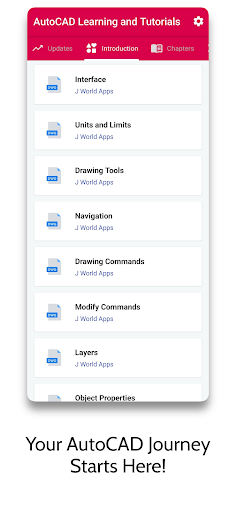


About AutoCAD Learning & Tutorials
The description on the store listing
# 📐🖥️ AutoCAD Learning & Tutorials – Master Design & Drafting Like a Pro! 🚀🏗️
## 🏗️ Introduction: Learn AutoCAD the Smart Way 🎯
Whether you’re an **architect**, **engineer**, **interior designer**, **student**, or simply a design enthusiast — AutoCAD is the **gold standard** for 2D & 3D drafting and design. But let’s be honest — learning AutoCAD can feel overwhelming without the right guidance.
That’s where **AutoCAD Learning & Tutorials** comes in — your **complete offline & online learning guide** 📚💡. This app takes you from **beginner basics** to **professional-level designs**, with step-by-step tutorials, images, examples, and practice projects.
No confusing jargon. …
Read the full description
# 📐🖥️ AutoCAD Learning & Tutorials – Master Design & Drafting Like a Pro! 🚀🏗️ ## 🏗️ Introduction: Learn AutoCAD the Smart Way 🎯 Whether you’re an **architect**, **engineer**, **interior designer**, **student**, or simply a design enthusiast — AutoCAD is the **gold standard** for 2D & 3D drafting and design. But let’s be honest — learning AutoCAD can feel overwhelming without the right guidance. That’s where **AutoCAD Learning & Tutorials** comes in — your **complete offline & online learning guide** 📚💡. This app takes you from **beginner basics** to **professional-level designs**, with step-by-step tutorials, images, examples, and practice projects. No confusing jargon. No scattered resources. Just **clear lessons + real-world tips** to make you a confident AutoCAD user! ✅ ## 📚 What You’ll Learn Inside This app covers **everything** from the basics to advanced tools — in **easy, beginner-friendly language** with **practical examples**. ### 🔹 1. AutoCAD Basics 🖱️ * Introduction to AutoCAD interface * Understanding workspace & navigation * Drawing basic shapes (Line, Circle, Rectangle, Arc) * Saving, opening & managing projects --- ### 🔹 2. Drawing & Editing Tools ✏️ * Move, Copy, Rotate, Scale, Mirror * Trim, Extend, Fillet, Chamfer * Offset, Array, Stretch * Advanced object selection techniques --- ### 🔹 3. Layers, Colors & Properties 🎨 * Creating & managing layers * Line types, colors, and thickness * Object properties and layer control --- ### 🔹 4. Precision Tools 📏 * Using Grid, Snap, and Ortho mode * Object Snap (OSNAP) mastery * Polar tracking & coordinate systems --- ### 🔹 5. Text, Dimensions & Annotations 📝 * Adding text and labels * Dimensioning tools (Linear, Aligned, Radius, Diameter) * Leaders, annotations & styles --- ### 🔹 6. Blocks & Groups 🔲 * Creating and inserting blocks * Using block attributes * Grouping and ungrouping objects --- ### 🔹 7. Advanced Features 🚀 * External references (Xrefs) * Layouts & Viewports * Plotting & Printing * Paper space vs Model space --- ### 🔹 8. 3D Modeling & Rendering 🏗️ * Introduction to 3D workspace * Creating 3D solids, surfaces & meshes * Orbit, view & rendering techniques --- ### 🔹 9. Shortcuts & Productivity Tips ⚡ * Essential AutoCAD keyboard shortcuts * Speed up drafting workflow * Best practices for file management --- ### 🔹 10. Practice Projects 🛠️ * Real-world design assignments * Step-by-step guided projects * From simple floor plans to 3D models --- ## ✏️ Practice + Quizzes = Mastery After each lesson: * 🎯 Practice tasks * 🧠 Quizzes to test understanding * 📄 Downloadable DWG practice files --- ## 📲 Features You’ll Love ✔️ **Beginner to Advanced Lessons** – Learn at your own pace ✔️ **Offline Support** – Access most content without internet ✔️ **Step-by-Step Tutorials** – Clear instructions with images ✔️ **DWG File Downloads** – Practice with real AutoCAD files ✔️ **Search & Bookmark** – Find and save topics easily ✔️ **Regular Updates** – New tutorials & tips added monthly --- ## 🎯 Who Can Use This App? * 👷 Civil engineers & architects * 🏢 Interior designers * 🧑🎓 Engineering students * 🖌️ Freelance CAD designers * 🏗️ Construction professionals * 📐 Anyone passionate about design! ## 🔐 Safe & Lightweight * No unnecessary permissions * No login required * Works on all Android devices * Small app size, fast performance --- ## 📥 Download Now – Start Designing Like a Pro! 🚀 📲 Get **AutoCAD Learning & Tutorials** and: * Learn the complete AutoCAD workflow * Practice with guided projects * Improve your design skills step-by-step **Your journey from beginner to professional AutoCAD designer starts today!** 🏗️🎨
Installs since 29 Aug 2026 Measured
Exact Google Play install counts, collected daily
Ratings
- 5 ★0.0%
- 4 ★0.0%
- 3 ★0.0%
- 2 ★0.0%
- 1 ★0.0%
Recent reviews
Latest public reviews from the store
- 20 Apr 2026
nice spp
- 14 Jan 2026
Nice
Top chart positions
Latest Google Play chart ranks by country, last 10 days
Not in any tracked top chart in the last 10 days.
AutoCAD Learning & Tutorials history
Release, install milestones, listing and store changes
- Reached 50,000+ installs 27 Apr 2026
- Reached 10,000+ installs 9 Mar 2025
- Reached 5,000+ installs 16 Feb 2025
- Reached 1,000+ installs 22 Dec 2024
- Reached 500+ installs 24 Nov 2024
- Reached 100+ installs 10 Nov 2024
- Reached 50+ installs 14 Oct 2024
- First released on the store 6 Oct 2024
Recent versions
Current version Varies with device
- Version 1.01 Dec 2024
Listing keywords
Words and phrases AutoCAD Learning & Tutorials repeats most in its store listing
Top phrases: autocad learning tutorials (4), step by step (4), autocad learning (4), learning tutorials (4), guided projects (2).
Highlighted words also appear in the title. Counts cover the title, short description and description.
Business model and tech
From the store listing and declared permissions
- Business model
- Free to downloadShows ads
- Sensitive access
- Advertising ID
13 permissions
0 special access, 1 sensitive, 12 standard
- Show notificationsPOST_NOTIFICATIONSSensitive
- Ad attribution (Privacy Sandbox)ACCESS_ADSERVICES_ATTRIBUTIONStandard
- Ad topics (Privacy Sandbox)ACCESS_ADSERVICES_TOPICSStandard
- Read how it was installed (install referrer)BIND_GET_INSTALL_REFERRER_SERVICEStandard
- Read the advertising IDAD_IDStandard
- Read the advertising ID (Privacy Sandbox)ACCESS_ADSERVICES_AD_IDStandard
- Keep the phone awakeStandard
- Run a foreground serviceFOREGROUND_SERVICEStandard
- Full internet accessStandard
- See network connectionsStandard
- Receive push messagesStandard
- Internal app permissionDYNAMIC_RECEIVER_NOT_EXPORTED_PERMISSIONStandard
Compliance
What the listing and the app package show
- Store status
- Live
- Upkeep
- Updated 27 Apr 2026
- Privacy policy
- Linked on the listing
- Advertising
- Shows ads
- In-app purchases
- None declared
- Age rating
- Everyone
- Sensitive permissions
- 1 sensitive of 13
- Location access
- No
- Camera and microphone
- Neither
Apps like AutoCAD Learning & Tutorials
영산강 안심 알림eICT융합소프트 & 스마트오더18.3K installs★ 4.0
JBLETRADOC Mobile10.3K installs★ 4.5
Two Point HeightOmega Centauri Software15.3K installs★ 2.22
Sheridan RecyclesCity of Sheridan634 installs★ 4.67
NAFNorges Automobil-Forbund200K installs★ 3.9
Ipsos Adria CAPIIpsos Serbia7.4K installs★ 3.9
Clock: Alarm Clock & TimerIntratech so36.1K installs★ 3.79
Süzme Sayaç HesaplamaNotsup30.3K installs★ 3.6
Cattle & Goat Record KeepingVetzKin10.3K installs★ 2.5
AutoCAD Learning & Tutorials: questions and answers
How many downloads does AutoCAD Learning & Tutorials have?
AutoCAD Learning & Tutorials has 60,851 installs on Google Play, measured from the store's own count on 7 Nov 2026.
Who makes AutoCAD Learning & Tutorials?
AutoCAD Learning & Tutorials is published by J world Apps.
When was AutoCAD Learning & Tutorials last updated?
The latest version (Varies with device) was released on 27 Apr 2026.
Is AutoCAD Learning & Tutorials free?
Yes. AutoCAD Learning & Tutorials is free to download, and it shows ads.
Is AutoCAD Learning & Tutorials still available?
Yes. AutoCAD Learning & Tutorials is live on Google Play as of 7 Nov 2026.
Track AutoCAD Learning & Tutorials and its competitors
Watch any app for new versions, rating drops, chart moves and removals. Free plan, no card.