
- Installs
- 180
- Measured
- Rating
- —
- Ratings
- —
- Version
- Varies with device
- Updated 2 Jun 2025
- Released
- —
- Tracked since 12 May 2026
- Size
- —
Screenshots




About AutomateBox
The description on the store listing
Key Features
1. User Authentication
The app ensures that only authorized personnel can access the attendance features:
Login System: Users log in with their credentials, which may include an email and password or biometric verification.
Role-Based Access: Admins, managers, and employees have tailored access to data and features based on their roles.
2. Punch-In and Punch-Out System
Employees can record their work hours with the following:
Punch-In: At the start of their workday, users can mark their attendance.
Punch-Out: At the end of their shift, users log their departure.
Offline Mode: In case of network issues, the app stores attendance data locally and syncs it with the …
Read the full description
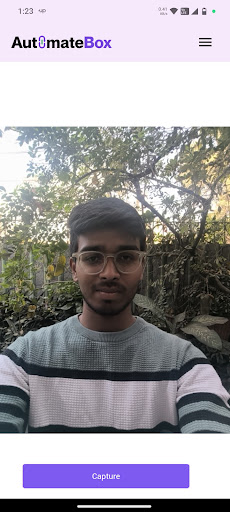
Key Features 1. User Authentication The app ensures that only authorized personnel can access the attendance features: Login System: Users log in with their credentials, which may include an email and password or biometric verification. Role-Based Access: Admins, managers, and employees have tailored access to data and features based on their roles. 2. Punch-In and Punch-Out System Employees can record their work hours with the following: Punch-In: At the start of their workday, users can mark their attendance. Punch-Out: At the end of their shift, users log their departure. Offline Mode: In case of network issues, the app stores attendance data locally and syncs it with the server once connectivity is restored. 3. Location Tracking The app fetches the user's real-time location during punch-in and punch-out to ensure the attendance is logged accurately: Location Accuracy: Uses GPS and APIs (e.g., Google Maps or Ola API) to fetch precise location coordinates. Geofencing: Alerts users if they are outside the permitted location when attempting to log attendance. 4. Image Capture To prevent proxy attendance: The app takes a selfie during punch-in and punch-out. Images are stored securely, linked to user records. 5. Date and Time Recording The app automatically records the date and time of punch events: Ensures compliance with work schedules. Provides a timestamp for each attendance entry. 6. Data Management All captured data is stored securely: Database Design: Includes tables for users, attendance records, and location data. Secure Storage: Implements encryption to protect sensitive information like user images and locations. 7. Dashboard for Admins The app features a dashboard for admins to: View attendance logs. Generate reports (daily, weekly, or monthly). Export data for payroll and compliance purposes. Workflow 1. User Login Users open the app and enter their login credentials. After successful authentication, they are directed to the home screen, which displays the punch-in and punch-out options. 2. Punch-In Process Step 1: User taps the "Punch-In" button. Step 2: The app fetches the current location using the device's GPS or APIs. Step 3: A selfie is captured to verify the user's presence. Step 4: The current date and time are automatically recorded. Step 5: All collected data (location, image, date, and time) is stored in the local database or sent to the server. 3. Punch-Out Process The punch-out process is identical to punch-in, except it logs the departure time. 4. Data Syncing When offline, attendance records are stored locally using technologies like SQLite or Hive. When internet connectivity is restored, the app syncs the data with the remote server. 5. Admin Dashboard Access Admins can log in to a separate portal to manage and analyze attendance data. Data filters allow them to view specific employee records or generate reports. Technical Architecture Frontend Framework: Flutter for cross-platform development. UI: Intuitive and simple interfaces for employees and admins. Offline Functionality: Integration with Hive or SharedPreferences for offline data storage. Backend Framework: FastAPI or Node.js for building APIs. Database: PostgreSQL or MongoDB to store user and attendance data. Storage: Cloud storage (e.g., AWS S3) for images and encrypted sensitive data. APIs Authentication API: Handles login and user validation. Punch-In/Out API: Records attendance data and saves it to the database. Sync API: Ensures offline data is uploaded to the server when online. Security Measures Data Encryption: Encrypt sensitive information like images and GPS coordinates. Token-Based Authentication: Uses JWT for secure access to APIs. Role Management: Ensures users can only access data and features relevant to their role.
Installs since 13 Nov 2026 Measured
Exact Google Play install counts, collected daily
Daily history starts once this app is in our daily install sample.
Ratings
- 5 ★0.0%
- 4 ★0.0%
- 3 ★0.0%
- 2 ★0.0%
- 1 ★0.0%
Recent reviews
Latest public reviews from the store
No reviews in our sample for this app yet.
Top chart positions
Latest Google Play chart ranks by country, last 10 days
Not in any tracked top chart in the last 10 days.
AutomateBox history
Release, install milestones, listing and store changes
- Reached 100+ installs 25 Feb 2025
- Reached 10+ installs 14 Jan 2025
Recent versions
Current version Varies with device
- Version 1.0.164 Mar 2025
- Version 1.0.1516 Feb 2025
- Version 1.0.1127 Jan 2025
- Version 1.0.107 Jan 2025
Listing keywords
Words and phrases AutomateBox repeats most in its store listing
Top phrases: attendance data (4), connectivity is restored (2), dashboard for admins (2), data and features (2), punch out process (2).
Highlighted words also appear in the title. Counts cover the title, short description and description.
Business model and tech
From the store listing and declared permissions
- Business model
- Free to download
- Sensitive access
- LocationCameraMicrophonePhone and callsPhotos, videos and files
13 permissions
0 special access, 7 sensitive, 6 standard
- Record audioSensitive
- Take photos and videosSensitive
- Change or delete shared storageSensitive
- Read shared storageSensitive
- Approximate locationSensitive
- Precise locationSensitive
- Call phone numbersSensitive
- Keep the phone awakeStandard
- Start when the phone turns onStandard
- Full internet accessStandard
- See network connectionsStandard
- Internal app permissionDYNAMIC_RECEIVER_NOT_EXPORTED_PERMISSIONStandard
Compliance
What the listing and the app package show
- Store status
- Live
- Upkeep
- Updated 2 Jun 2025
- Privacy policy
- Linked on the listing
- Advertising
- No ads declared
- In-app purchases
- None declared
- Age rating
- Everyone
- Sensitive permissions
- 7 sensitive of 13
- Location access
- Yes, while in use
- Camera and microphone
- Both
Apps like AutomateBox
영산강 안심 알림eICT융합소프트 & 스마트오더18.3K installs★ 4.0
JBLETRADOC Mobile10.3K installs★ 4.5
Two Point HeightOmega Centauri Software15.3K installs★ 2.22
Sheridan RecyclesCity of Sheridan636 installs★ 4.67
NAFNorges Automobil-Forbund200K installs★ 3.9
Ipsos Adria CAPIIpsos Serbia7.4K installs★ 3.9
Clock: Alarm Clock & TimerIntratech so36.1K installs★ 3.79
Süzme Sayaç HesaplamaNotsup30.4K installs★ 3.6
Cattle & Goat Record KeepingVetzKin10.3K installs★ 2.5
AutomateBox: questions and answers
How many downloads does AutomateBox have?
AutomateBox has 180 installs on Google Play, measured from the store's own count on 13 Nov 2026.
Who makes AutomateBox?
AutomateBox is published by DeveloperBox.
When was AutomateBox last updated?
The latest version (Varies with device) was released on 2 Jun 2025.
Is AutomateBox free?
Yes. AutomateBox is free to download.
Is AutomateBox still available?
Yes. AutomateBox is live on Google Play as of 13 Nov 2026.
Track AutomateBox and its competitors
Watch any app for new versions, rating drops, chart moves and removals. Free plan, no card.