Autostamper custom camera
Add GPS Stamp, datetime stamp, logo stamp, signature stamp on Auto Stamped photo
- Installs
- 50.27K
- Measured
- Rating
- 4.29
- Ratings
- 202
- 4 reviews
- Version
- Varies with device
- Updated 7 Apr 2026
- Released
- 12 Oct 2020
- Tracked since 11 May 2026
- Size
- 11 MB
- Needs 5.0
Screenshots


About Autostamper custom camera
The description on the store listing
Get 5 in 1 stamps on photo options in one single App! Add stamp from auto
stamper in-app custom camera specially designed for stamping Activities. You can make your photo informative as well as communicating with the help of an auto Stamping application.
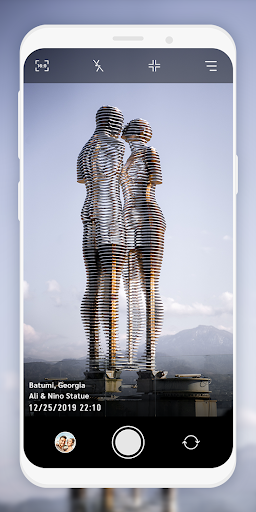
5 different stamps - Date time stamp, Signature stamp, Location stamp, Logo stamp, Sequence stamp available to add on photos clicked with Auto stamper time stamp camera application.
How Autostamper custom camera: Add Geotag & Timestamp Application works?
➽ When you open Application, You will get Custom camera of Auto stamper to click photos.
➽ You can change Camera settings
➽ From Menu, you can ON/OFF Stamps that you require …
Read the full description
Get 5 in 1 stamps on photo options in one single App! Add stamp from auto stamper in-app custom camera specially designed for stamping Activities. You can make your photo informative as well as communicating with the help of an auto Stamping application. 5 different stamps - Date time stamp, Signature stamp, Location stamp, Logo stamp, Sequence stamp available to add on photos clicked with Auto stamper time stamp camera application. How Autostamper custom camera: Add Geotag & Timestamp Application works? ➽ When you open Application, You will get Custom camera of Auto stamper to click photos. ➽ You can change Camera settings ➽ From Menu, you can ON/OFF Stamps that you require on your photos from Date stamper, Signature stamp, Logo Stamp, GPS location Stamp & Sequence Stamp. ➽ For each stamps, you can set and edit style, format, size, position of stamps ➽ You will get all selected stamps on your photo when you click from date and time stamper camera. Interesting Features: You can set or change camera Settings for: ⧪ Ratio ⧪ Grid ⧪ Flash ⧪ Rotate You can directly turn on/off Date and Time stamp, Location stamp, Logo stamp, Signature stamp on camera screen for stamper photo by clicking on stamp setting option. In Date and time stamp camera settings following features available: ➤ On/Off Toggle ➤ Change Date & Time Format ➤ Adjustable Stamp Size ➤ Variant Stamp Style ➤ Set Stamp position ➤ Change Stamp color ➤ Check preview by clicking on 👁️. From signature Stamp settings, following changes are possible: ➤ On/Off Toggle ➤ Add custom signature text ➤ Adjustable Stamp Size ➤ Variant Stamp Style ➤ Set Stamp position ➤ Change Stamp color ➤ Check preview by clicking on 👁️. For Logo stamp settings, following options are available: ➤ On/Off Toggle ➤ Upload/change logo image ➤ Set transparency level ➤ Adjustable Stamp Size ➤ Variant Stamp Style ➤ Set Stamp position ➤ Check preview by clicking on 👁️ In GPS Location Stamp settings, you can add following changes: ➤ On/Off Toggle ➤ Add custom / current Location ➤ Adjustable Stamp Size ➤ Variant Stamp Style ➤ Set Stamp position ➤ Change Stamp color ➤ Check preview by clicking on 👁️. In Sequence Stamp settings, you can add following changes: ➤ On/Off Toggle ➤Change Sequence Format ⊿Add Sequence Number ⊿Select Sequence type as increasing / Decreasing ⊿Set suffix/ prefix number ⊿Add sequence Repeat number ⊿Select Sequence number Unit ➤ Adjustable Stamp Size ➤ Variant Stamp Style ➤ Set Stamp position ➤ Change Stamp color ➤ Check preview by clicking on 👁️. Why do you need to have *Auto stamper custom camera : Add Geotag & Timestamp* application in your smartphone? ➽ To Add Date time stamp on Photo ➽ Auto time stamp options with stamper camera ➽ To have GPS stamp & geo tags on clicked pictures ➽ get date stamp, text stamp, image stamp, location stamp easily. ➽ date time stamper for easy photo stamping ➽ Easy picture stamp with Custom camera ➽ Auto stamper for photos - edit your photo having stamps ➽ Timestamp camera with advanced features at one place Click pictures by using this Application, and share with your family and friends. Use this application for multiple purposes and explore the world with this handy tool easily available in your smartphone.
Installs since 29 Aug 2026 Measured
Exact Google Play install counts, collected daily
Ratings
202 ratings, 4 reviews
- 5 ★72%
- 4 ★0.0%
- 3 ★14%
- 2 ★14%
- 1 ★0.0%
Recent reviews
Latest public reviews from the store
- 6 Dec 2025
very helpful
- 11 Jul 2025
very good app!🤗
- 17 Mar 2025
Very good
- 18 Sep 2024
good one
What reviewers bring up
Topics mentioned in the latest 40 reviews, by how many reviews mention them
Liked in good reviews (33 reviews)
- application 7
- timestamp 5
- camera 5
- date 4
- download 3
- auto stamper 2
- performance 2
- recommend 2
Raised in bad reviews (5 reviews)
- photo 2
- found 2
Top chart positions
Latest Google Play chart ranks by country, last 10 days
Not in any tracked top chart in the last 10 days.
Autostamper custom camera history
Release, install milestones, listing and store changes
- Reached 10,000+ installs 2 Jun 2021
- Reached 5,000+ installs 20 Apr 2021
- Reached 1,000+ installs 26 Jan 2021
- Reached 500+ installs 1 Dec 2020
- Reached 100+ installs 22 Oct 2020
- First released on the store 12 Oct 2020
Update frequency
How often Autostamper custom camera ships a new version, month by month
1 updates in the last 12 months. About as often as similar apps, which shipped a median of 1 updates in the same year.
Recent versions
Current version Varies with device
- Version 1.0.147 Apr 2026
- Version 1.0.1326 Oct 2025
- Version 1.0.1228 Aug 2025
- Version 1.0.118 Aug 2024
Listing keywords
Words and phrases Autostamper custom camera repeats most in its store listing
Top phrases: custom camera (6), adjustable stamp size (5), preview by clicking (5), set stamp position (5), size variant stamp (5).
Highlighted words also appear in the title. Counts cover the title, short description and description.
Business model and tech
From the store listing, the SDKs in the app package and its declared permissions
- Business model
- Free to downloadIn-app purchasesShows ads
- Built with
- No cross-platform framework or game engine detected
- Ad networks (1)
- AdMob
- Subscriptions and payments
- Google Play billing
- Analytics and crash reports
- Firebase
- Sign-in and social
- Sensitive access
- LocationCameraPhotos, videos and filesNearby devicesAdvertising ID
2 ad, attribution and analytics SDKs detected. SDKs are read from the app package and permissions from the store listing, so code that loads later is not seen.
Technology
19 SDKs found in the app package
Ad networks
Advertising and install-attribution SDKs found in the app package
- AdMob
26 permissions
0 special access, 8 sensitive, 18 standard
- Take photos and videosSensitive
- Change or delete shared storageSensitive
- Read photosREAD_MEDIA_IMAGESSensitive
- Read photos and videos the user picksREAD_MEDIA_VISUAL_USER_SELECTEDSensitive
- Read shared storageSensitive
- Approximate locationSensitive
- Precise locationSensitive
- Show notificationsPOST_NOTIFICATIONSSensitive
- Ad attribution (Privacy Sandbox)ACCESS_ADSERVICES_ATTRIBUTIONStandard
- Ad topics (Privacy Sandbox)ACCESS_ADSERVICES_TOPICSStandard
- Read how it was installed (install referrer)BIND_GET_INSTALL_REFERRER_SERVICEStandard
- Read the advertising IDAD_IDStandard
Compliance
What the listing and the app package show
- Store status
- Live
- Upkeep
- Updated 7 Apr 2026
- Registered in
- India
- Privacy policy
- Linked on the listing
- Advertising
- Shows ads
- In-app purchases
- Offered
- Age rating
- Everyone
- Sensitive permissions
- 8 sensitive of 26
- Location access
- Yes, while in use
- Camera and microphone
- Camera
Apps like Autostamper custom camera
AlbumAlbum80.4K installs★ 3.67
EnhanceMe - AI Photo EnhancerUnited Videos42.5K installs★ 4.2
Famous Picture FramesGajrup apps61.9K installs★ 4.67
HD Camera - DSLR & Pro CameraInnovate Apps Studio43.2K installs★ 4.22
Merry Christmas StickersWidgets For You117K installs★ 4.43
- Face Meme Makerappsrox.com38.7K installs★ 3.49
PixBaby: AI Baby Photo EditorGODHITECH JSC112K installs★ 4.0
RSPhotoEditorEduard Seredin33.4K installs★ 3.5
Photo Editor & Image FiltersRamsonTech109K installs★ 3.0
Autostamper custom camera: questions and answers
How many downloads does Autostamper custom camera have?
Autostamper custom camera has 50,273 installs on Google Play, measured from the store's own count on 14 Nov 2026.
Who makes Autostamper custom camera?
Autostamper custom camera is published by GPS Map Camera, a developer based in IN.
When was Autostamper custom camera last updated?
The latest version (Varies with device) was released on 7 Apr 2026.
Is Autostamper custom camera free?
Yes. Autostamper custom camera is free to download and offers in-app purchases, and it shows ads.
Is Autostamper custom camera still available?
Yes. Autostamper custom camera is live on Google Play as of 14 Nov 2026.
Track Autostamper custom camera and its competitors
Watch any app for new versions, rating drops, chart moves and removals. Free plan, no card.