Bead Pattern Creator
Bead Pattern Creator for your mobile device
- Installs
- 145K
- Measured
- Rating
- 2.05
- Ratings
- 444
- 78 reviews
- Version
- 18.6.9
- Updated 28 Aug 2026
- Released
- 3 Sep 2017
- Tracked since 11 May 2026
- Size
- 17 MB
- Needs 5.1
Screenshots




About Bead Pattern Creator
The description on the store listing
Bead Pattern Creator for your mobile device.
Comes with 5 free bead patterns. Download is free. To activate creation is $2.99.
Create bead patterns for Square Stitch, Brick Stitch, Peyote Stitch, 2 drop Peyote Stitch and Right Angle Weave.
To create bead patterns, select Create a Beading Pattern button.
The Bead Pattern Editor will appear. Fill in the squares with beads of any color.
To get started - Use the pencil to add beads to your bead pattern. Use the Eraser to remove beads from your bead pattern.
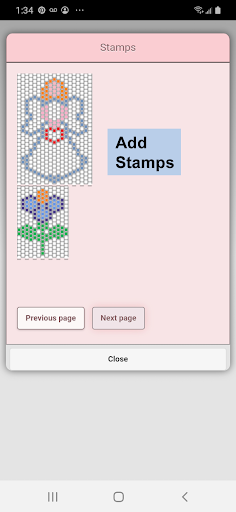
You also can select from over 400 stamps, inserts and borders to apply to your bead pattern.
Icons from left to right in the icon bar are:
Color icon - use to add new …
Read the full description
Bead Pattern Creator for your mobile device. Comes with 5 free bead patterns. Download is free. To activate creation is $2.99. Create bead patterns for Square Stitch, Brick Stitch, Peyote Stitch, 2 drop Peyote Stitch and Right Angle Weave. To create bead patterns, select Create a Beading Pattern button. The Bead Pattern Editor will appear. Fill in the squares with beads of any color. To get started - Use the pencil to add beads to your bead pattern. Use the Eraser to remove beads from your bead pattern. You also can select from over 400 stamps, inserts and borders to apply to your bead pattern. Icons from left to right in the icon bar are: Color icon - use to add new beads with different colors to your bead list. Save icon - use to save your bead pattern Pencil icon - use to add beads to your bead pattern Eraser icon - use to remove beads from your bead pattern Inserts icon - selectable list of bead patterns to add to your pattern (like roses) Stamps icon - selectable little stamps (little bead designs) to add to your bead pattern Borders icon - selectable borders to add to your pattern. Borders automatically wrap around your bead pattern. Dropper icon - lets you extract a bead color from your pattern and add more of that bead to your bead pattern Bucket icon - use to fill selected area with beads of the current color Trim icon - remove squares from your bead pattern. Undo icon - undo each last change you made to the bead pattern. Redo icon - redo each changes you undid. Cut icon - remove some beads from the pattern Copy icon - copy some beads from the pattern Paste icon - paste copied beads to the pattern Rotate - rotated selection of the bead pattern Flip right/left - flip selection of the bead pattern Flip top/bottom - flip selection of the bead pattern Zoom in icon - magnify the bead pattern Zoom out icon - minify the bead pattern Symbols icon - display a unique symbol on the bead to indicate it's color value Camera icon - take a picture using your mobile device camera and convert to a beading pattern Picture icon - select a picture from your device and convert to a pattern Social media icon - use social media to share your pattern (email, text etc.) Resize bars - resize bars are display at the bottom right corner of your pattern. Drag them to resize your bead pattern
Installs since 28 Aug 2026 Measured
Exact Google Play install counts, collected daily
Ratings
444 ratings, 78 reviews
- 5 ★19%
- 4 ★3.8%
- 3 ★4.8%
- 2 ★7.6%
- 1 ★65%
Recent reviews
Latest public reviews from the store
- 25 Aug 2022
Easy to use and easy to follow
Top chart positions
Latest Google Play chart ranks by country, last 10 days
Not in any tracked top chart in the last 10 days.
Bead Pattern Creator history
Release, install milestones, listing and store changes
- Reached 100,000+ installs 8 May 2025
- Reached 50,000+ installs 11 Mar 2023
- Reached 10,000+ installs 12 Mar 2019
- Reached 5,000+ installs 28 Jul 2018
- Reached 1,000+ installs 13 Nov 2017
- Reached 500+ installs 12 Oct 2017
- Reached 100+ installs 19 Sep 2017
- Reached 10+ installs 12 Sep 2017
Update frequency
How often Bead Pattern Creator ships a new version, month by month
5 updates in the last 12 months. More often than most similar apps: they shipped a median of 1 updates in the same year.
Recent versions
Current version 18.6.9
- Version 18.6.928 Aug 2026
Bead Pattern Creator - Be able to create your own bead patterns (Square, Brick, Peyote, 2 Drop Peyote and Right Angle Weave). Over 100 stamps and borders you can add to your patterns. Print your pattern and bead color usages. No Ads ever. A One Time Only Activation is $2.99
- Version 18.6.818 Apr 2026
Bead Pattern Creator - Be able to create your own bead patterns (Square, Brick, Peyote, 2 Drop Peyote and Right Angle Weave). Over 100 stamps and borders you can add to your patterns. Print your pattern and bead color usages. No Ads ever. A One Time Only Activation is $2.99
- Version 18.6.79 Apr 2026
- Version 18.6.522 Mar 2026
Listing keywords
Words and phrases Bead Pattern Creator repeats most in its store listing
Top phrases: bead pattern (21), bead patterns (4), bead pattern creator (3), icon selectable (3), mobile device (3).
Highlighted words also appear in the title. Counts cover the title, short description and description.
Business model and tech
From the store listing and declared permissions
- Business model
- Free to downloadIn-app purchases
- Sensitive access
- No sensitive permission declared
Compliance
What the listing and the app package show
- Store status
- Live
- Upkeep
- Updated 28 Aug 2026
- Registered in
- United States
- Privacy policy
- Linked on the listing
- Advertising
- No ads declared
- In-app purchases
- Offered
- Age rating
- Everyone
Apps like Bead Pattern Creator
Muslim Wedding Card MakerAshar Infotech242K installs★ 3.25
Billie Eilish StickersSamyak Singh45.1K installs★ 3.64
SacredSound VisualizerGamesGreh312K installs★ 4.44
Profile Pic Maker - DP MakerTri Core239K installs★ 3.76
Write Name on Birthday CakesKindLogic Works66.9K installs★ 4.44
Superhero Coloring PagesIrma Studio452K installs★ 2.73
Bodybuilder AISafiApps221K installs★ 3.0
Embroidery Viewer ProEmbroidermodder Team132K installs★ 3.63
MediBang Paletta:Drawing AppMediBang Inc.43.9K installs★ 4.7
Bead Pattern Creator: questions and answers
How many downloads does Bead Pattern Creator have?
Bead Pattern Creator has 145,345 installs on Google Play, measured from the store's own count on 14 Nov 2026.
Who makes Bead Pattern Creator?
Bead Pattern Creator is published by Crochet Designs, a developer based in US.
When was Bead Pattern Creator last updated?
The latest version (18.6.9) was released on 28 Aug 2026.
Is Bead Pattern Creator free?
Yes. Bead Pattern Creator is free to download and offers in-app purchases.
Is Bead Pattern Creator still available?
Yes. Bead Pattern Creator is live on Google Play as of 14 Nov 2026.
Track Bead Pattern Creator and its competitors
Watch any app for new versions, rating drops, chart moves and removals. Free plan, no card.