BIG Dash Pro | Odo
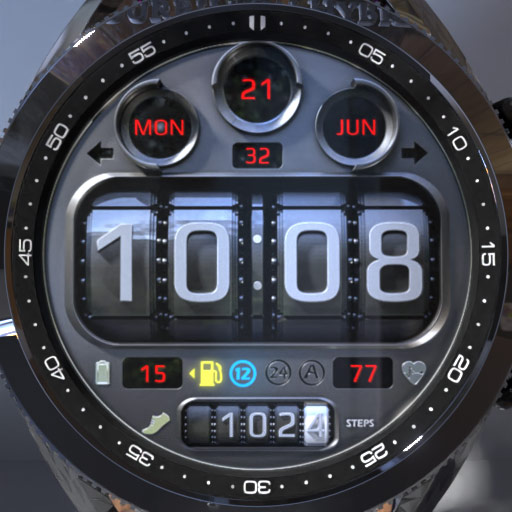
Inspired by car odometer, realistic watch face with BIG and clear to read time!
- Installs
- 4.74K
- Measured
- Rating
- 3.17
- Ratings
- 56
- 3 reviews
- Version
- Varies with device
- Updated 4 Mar 2023
- Released
- 12 Jul 2022
- Tracked since 14 May 2026
- Size
- —
Screenshots


About BIG Dash Pro | Odo
The description on the store listing
Features:
- Race/sport dashboard.
- Realistic design.
- Auto 12/24h format.
- Steps.
- Heart rate.
- Date.
- 3 color themes.
- Battery indicator.
- Easy to read AOD (Always On Display)
How to:
- To switch between different color themes, tap once on the screen.
Indicators:
- Left turn light (Blinks when Seconds hands is in the left side of the watch).
- Right turn light (Blinks when Seconds hands is in the right side of the watch).
- 12h Mode, lights if your watch is in 12h mode.
- 24h Mode, lights if your watch is in 24h mode.
- Low fuel light (Lights up if battery percentage is equal or below 15%).
- AOD light (Lights up in Always On Display)
* Heart rate …
Read the full description
Features: - Race/sport dashboard. - Realistic design. - Auto 12/24h format. - Steps. - Heart rate. - Date. - 3 color themes. - Battery indicator. - Easy to read AOD (Always On Display) How to: - To switch between different color themes, tap once on the screen. Indicators: - Left turn light (Blinks when Seconds hands is in the left side of the watch). - Right turn light (Blinks when Seconds hands is in the right side of the watch). - 12h Mode, lights if your watch is in 12h mode. - 24h Mode, lights if your watch is in 24h mode. - Low fuel light (Lights up if battery percentage is equal or below 15%). - AOD light (Lights up in Always On Display) * Heart rate info In order for the HR to work, you must first allow health sensors. When you apply the watch face if you see "-" or "0" or "ERR" heart rate was not measured, just tap on it to measure it. ** Heart rate is not always automatically availbe. If not, then read the above. JOIN WatchBase. Facebook group (General watch faces group): https://www.facebook.com/groups/1170256566402887/ Facebook page: https://www.facebook.com/WatchBase Intagram: https://www.instagram.com/watch.base/ SUBSCRIBE to our YouTube channel: https://www.youtube.com/c/WATCHBASE?sub_confirmation=1 https://www.youtube.com/c/WATCHBASE
Installs since 29 Aug 2026 Measured
Exact Google Play install counts, collected daily
Ratings
56 ratings, 3 reviews
- 5 ★51%
- 4 ★0.0%
- 3 ★0.0%
- 2 ★16%
- 1 ★33%
Recent reviews
Latest public reviews from the store
- 4 Oct 2025
Super app for car guy
- 16 Oct 2024
Great watchface, just wish the Galaxy watch ultra was supported
- 8 Sep 2024
Incompatible with Galaxy Watch Ultra. Otherwise looks amazing.
- 7 Jul 2024
I love the look of it, the lights is a really interesting idea. I just wish it had a few things. Let me change the complications up. I'd love to be able to click the indicator lights (turn signals) to open a couple of apps. The one thing is love more than anything though is one animation, the second hand is a rev counter, I'd love it to come down the rev range to a few seconds instead of magically popping to zero. Like a rev counter would.
What reviewers bring up
Topics mentioned in the latest 14 reviews, by how many reviews mention them
Liked in good reviews (8 reviews)
- design 2
Raised in bad reviews (4 reviews)
No topic comes up twice.
Top chart positions
Latest Google Play chart ranks by country, last 10 days
Not in any tracked top chart in the last 10 days.
BIG Dash Pro | Odo history
Release, install milestones, listing and store changes
- Reached 1,000+ installs 4 Mar 2023
- Reached 500+ installs 2 Feb 2023
- Reached 100+ installs 5 Sep 2022
- First released on the store 12 Jul 2022
Listing keywords
Words and phrases BIG Dash Pro | Odo repeats most in its store listing
Top phrases: heart rate (4), always on display (2), blinks when seconds (2), turn light blinks (2), 12h mode (2).
Highlighted words also appear in the title. Counts cover the title, short description and description.
Business model and tech
From the store listing and declared permissions
- Business model
- Free to download
- Sensitive access
- No sensitive permission declared
Compliance
What the listing and the app package show
- Store status
- Live
- Upkeep
- No update since 4 Mar 2023
- Registered in
- Bulgaria
- Privacy policy
- Linked on the listing
- Advertising
- No ads declared
- In-app purchases
- None declared
- Age rating
- Everyone
Apps like BIG Dash Pro | Odo
5K Stunning Wallpapers (pro)Team - Falcon1.5K installs★ 4.25
- Earn Cash Reward: Watch & EarnCash Reward Apps3.3K installs★ 3.33
カップケーキ 壁紙きせかえ+HOME by Ateam Entertainment8.3K installs★ 4.2
Dream Catchers Live Wallpaperapofiss1.7K installs★ 4.71
Wallpapers LakeWasabi13K installs★ 5.0
Horizon 9: Watch faceamoledwatchfaces™7.3K installs★ 4.11
Invisible Watchface AKM WearOSAkchim Watchfaces8.7K installs★ 3.6
Paris wallpaperWallpapers kingdom9.9K installs★ 5.0
Cute Dogs Lock ScreenIntellect Pi App37.1K installs★ 4.2
BIG Dash Pro | Odo: questions and answers
How many downloads does BIG Dash Pro | Odo have?
BIG Dash Pro | Odo has 4,739 installs on Google Play, measured from the store's own count on 17 Nov 2026.
Who makes BIG Dash Pro | Odo?
BIG Dash Pro | Odo is published by WatchBase, a developer based in BG.
When was BIG Dash Pro | Odo last updated?
The latest version (Varies with device) was released on 4 Mar 2023.
Is BIG Dash Pro | Odo free?
Yes. BIG Dash Pro | Odo is free to download.
Is BIG Dash Pro | Odo still available?
Yes. BIG Dash Pro | Odo is live on Google Play as of 17 Nov 2026.
Track BIG Dash Pro | Odo and its competitors
Watch any app for new versions, rating drops, chart moves and removals. Free plan, no card.