bimmer-tool
OBD diagnostics, Live Data, DPF regeneration for BMW
- Installs
- 50.26K
- Measured
- Rating
- 3.92
- Ratings
- 1.9K
- 40 reviews
- Version
- 3.9.4
- Updated 13 Oct 2026
- Released
- 1 Aug 2017
- Tracked since 14 May 2026
- Size
- 4 MB
- Needs 4.2
Screenshots

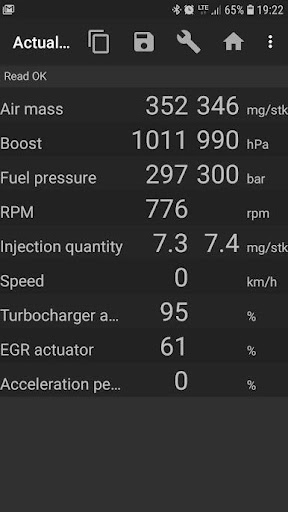
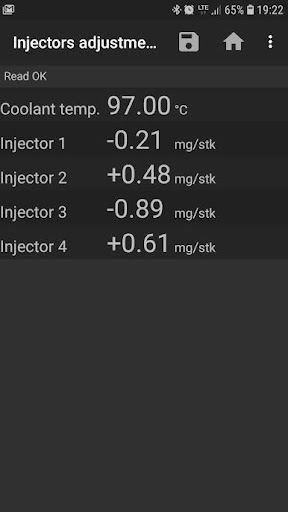
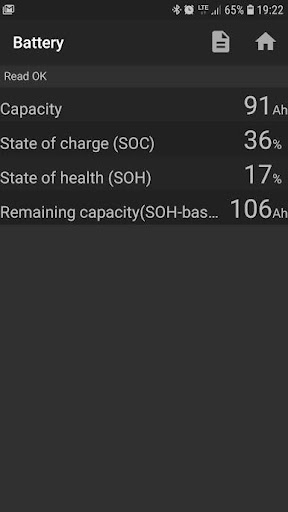
About bimmer-tool
The description on the store listing
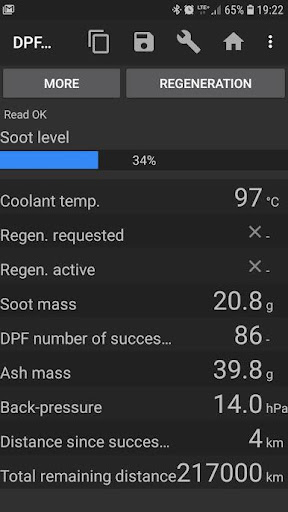
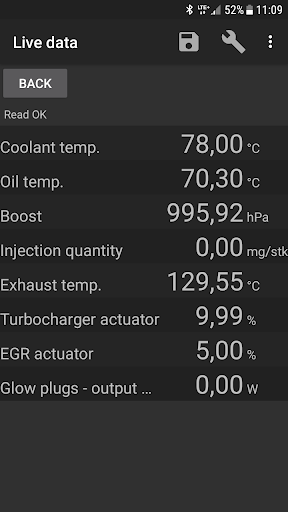
bimmer-tool allows to read & clear fault codes, request DPF regeneration, read engine live data and much more in BMW cars.
Try bimmer-tool lite to see whether the app is compatible with your BMW and your OBD adapter.
For cars below model year 2008 application functionality is limited and K+DCan USB cable connection is recommended. Wireless ELM adapter connection with cars below 2008 may not be possible or not all functions may be available.
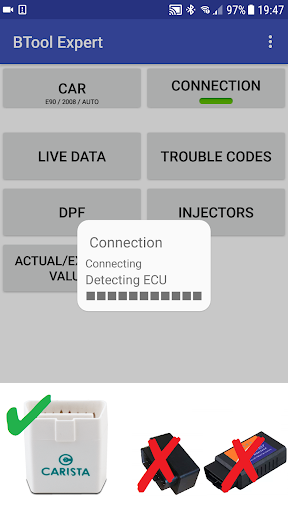
Important: This application requires a reliable OBD adapter. K+D-Can cable, ENET adapter (for F/G series) or below Bluetooth adapters are recommended:
- Vgate vLinker MC/FS/BM/FD https://www.vgatemall.com/products/
- UniCarScan …
Read the full description
bimmer-tool allows to read & clear fault codes, request DPF regeneration, read engine live data and much more in BMW cars. Try bimmer-tool lite to see whether the app is compatible with your BMW and your OBD adapter. For cars below model year 2008 application functionality is limited and K+DCan USB cable connection is recommended. Wireless ELM adapter connection with cars below 2008 may not be possible or not all functions may be available. Important: This application requires a reliable OBD adapter. K+D-Can cable, ENET adapter (for F/G series) or below Bluetooth adapters are recommended: - Vgate vLinker MC/FS/BM/FD https://www.vgatemall.com/products/ - UniCarScan UCSI-2000/USCI-2100: Choose setting: D-Can mode: MODE2 https://www.wgsoft.de/shop/obd-2-komplettsysteme/unicarscan/114/unicarscan-ucsi-2000-diagnoseadapter https://www.bmdiag.co.uk/unicarscan-ucsi-2000-bluetooth-obd2-adapter - Carista https://caristaapp.com/adapter - Veepeak OBDCheck BLE https://www.veepeak.com/product/obdcheck-ble Application allows to: - read DPF regeneration status and detailed information - request DPF regeneration - reset DPF adaptation values (required after filter replacement) - read exhaust fumes pressure - read injectors adjustments - read actual and expected values for air mass, intake manifold pressure, fuel pressure - log data to CSV file for further analysis - register battery replacement (without changing battery properties) - reset lamps circuits blocked due to short-circuit error in E-series - reset oil/brakes service and change interval** Supported OBD adapters - K+D-Can USB: This is recommended and most reliable adapter. You will also need USB-OTG cable. - ENET cable/Wifi Adapter: recommended for F & G series. ENET cable connections you need additionally USB-C to Ethernet adapter. - ELM327 Bluetooth: Bluetooth connection may be slower than USB. Only genuine ELM327 or PIC18-based adapters will work. It may not work with older engines. More info below. - ELM327 WiFi: Like ELM Bluetooth connection may be less stable. On some devices mobile data transmission needs to be disabled to use WiFi adapter. If you have questions or need any help send me an email. You can find our address at the bottom of the page. Quick start 1) Connect adapter to OBD II socket 2) Turn ignition on 3) Connect adapter to your phone: * USB: Connect adapter to the phone using USB-OTG cable. Phone will ask which app to start - choose bimmer-tool app. * Bluetooth: Go to phone Bluetooth setting. Search for Bluetooth devices and pair the adapter with the phone (PIN is usually 0000 or 1234). * Wifi: Turn mobile data transmission off. Turn WiFi on and search for available WiFi networks. Connect the phone to the adapter's WiFi. 4) Start the app, go to 'Car' and choose model and year. 5) Go to 'Connection' and choose connection type, adapter type and communication protocol. 6) Tap 'Connect' button. **Limitations: For mlodels below 2008 and e46/e39/e83/e53 the app requires K+DCan cable connection and only engine ECU is supported. Connection using a wireless ELM adapter may not be possible. Common problems - Engine 'No response' error in cars up to 2007 and BT/Wifi adapter. If this error occurs from time to time, try selecting ATWM option under advanced connection settings. - No connection: If adapter & protocol settings are correct and app still cannot connect to the car try force stop all diagnostic applications in application manager (including bimmer-tool) or restart the phone and try to connect again. Why this app requires permissions? - Storage: required for USB adapters support - Photos / Media / Files: allows to create CSV files - Pair with Bluetooth devices/access Bluetooth settings: required for Bluetooth adapters support - Full network access: required for WiFi adapters support - Approximate location: Theoretically it is possible to find approximate location using Bluetooth, however this app does not read/use location.
Installs, last 30 days Measured
Exact Google Play install counts, collected daily
Ratings
1,935 ratings, 40 reviews
- 5 ★67%
- 4 ★4.1%
- 3 ★4.1%
- 2 ★8.2%
- 1 ★16%
Recent reviews
Latest public reviews from the store
No reviews in our sample for this app yet.
Top chart positions
Latest Google Play chart ranks by country, last 10 days
- Countries ranked
- 35
- Best rank
- #2
- Top 10 placements
- 3
- of 41 chart placements
- Average rank
- #130
Best countries on Google Play
- 🇲🇽 Mexico · Top paid, Auto & Vehicles#2
- 🇮🇩 Indonesia · Top paid, Auto & Vehicles#2
- 🇮🇳 India · Top paid, Auto & Vehicles#3
- 🇭🇰 Hong Kong SAR China · Top paid#148
- 🇦🇪 United Arab Emirates · Top paid#149
- 🇳🇬 Nigeria · Top paid#149
| Country | Chart | Category | Rank | Best (10 days) | Date |
|---|---|---|---|---|---|
| 🇲🇽 Mexico | Top paid | Auto & Vehicles | #2 | #2 | 19 Nov 2026 |
| 🇮🇩 Indonesia | Top paid | Auto & Vehicles | #2 | #2 | 19 Nov 2026 |
| 🇮🇳 India | Top paid | Auto & Vehicles | #3 | #2 | 19 Nov 2026 |
| 🇮🇳 India | Top grossing | Auto & Vehicles | #30 | #29 | 19 Nov 2026 |
| 🇮🇩 Indonesia | Top grossing | Auto & Vehicles | #31 | #31 | 19 Nov 2026 |
| 🇲🇽 Mexico | Top grossing | Auto & Vehicles | #32 | #32 | 19 Nov 2026 |
| 🇮🇩 Indonesia | Top paid | All apps | #148 | #108 | 19 Nov 2026 |
| 🇭🇰 Hong Kong SAR China | Top paid | All apps | #148 | #107 | 19 Nov 2026 |
| 🇦🇪 United Arab Emirates | Top paid | All apps | #149 | #108 | 19 Nov 2026 |
| 🇳🇬 Nigeria | Top paid | All apps | #149 | #108 | 19 Nov 2026 |
bimmer-tool history
Release, install milestones, listing and store changes
- First released on the store 1 Aug 2017
Update frequency
How often bimmer-tool ships a new version, month by month
16 updates in the last 12 months. More often than most similar apps: they shipped a median of 0 updates in the same year.
Recent versions
Current version 3.9.4
- Version 3.9.413 Oct 2026
Android 16 support IHKA live data F11 - manual control of the rear axle suspension bellows
- Version 3.9.122 Aug 2026
Android 16 support IHKA live data F11 - manual control of the rear axle suspension bellows
- Version 3.8.3123 Jul 2026
IHKA live data F11 - manual control of the rear axle suspension bellows
- Version 3.8.305 Jul 2026
IHKA live data F11 - manual control of the rear axle suspension bellows
Listing keywords
Words and phrases bimmer-tool repeats most in its store listing
Top phrases: bimmer tool (5), dpf regeneration (4), adapters support (3), connect adapter (3), wifi adapter (3).
Highlighted words also appear in the title. Counts cover the title, short description and description.
Business model and tech
From the store listing and declared permissions
- Business model
- Paid, $19.99
- Sensitive access
- No sensitive permission declared
Compliance
What the listing and the app package show
- Store status
- Live
- Upkeep
- Updated 13 Oct 2026
- Registered in
- Poland
- Privacy policy
- Linked on the listing
- Advertising
- No ads declared
- In-app purchases
- None declared
- Age rating
- Everyone
Apps like bimmer-tool
Roav VIVAAnker99.9K installs★ 2.74
Diagramas AutomotricesWorks Apps147K installs★ 4.7
Sooq Cars - سوق كارزRoyal World Technology SPC892K installs★ 3.8
MobikeyHYUNDAI MOTOR CIS129K installs★ 2.7
Pósitron AlarmePST Eletronica SA379K installs★ 3.5
Holman InsightsHolman96K installs★ 4.31
AzParking.azAzparking724K installs★ 2.1
THINKWARE DASH CAM LINKTHINKWARE589K installs★ 3.37
Falcon-iFalcon-i Tracking Limited234K installs★ 3.58
bimmer-tool: questions and answers
How many downloads does bimmer-tool have?
bimmer-tool has 50,261 installs on Google Play, measured from the store's own count on 19 Nov 2026.
Who makes bimmer-tool?
bimmer-tool is published by bimmer-tool, a developer based in PL.
When was bimmer-tool last updated?
The latest version (3.9.4) was released on 13 Oct 2026.
Is bimmer-tool free?
No. bimmer-tool is a paid app priced at $19.99.
Is bimmer-tool still available?
Yes. bimmer-tool is live on Google Play as of 19 Nov 2026.
Track bimmer-tool and its competitors
Watch any app for new versions, rating drops, chart moves and removals. Free plan, no card.