
Button - Assistive Touch Tool
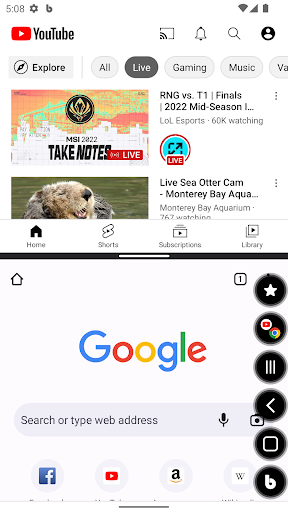
You can simply & quickly launch features, apps while keeping app screen in use.
- Installs
- 24.07K
- Measured
- Rating
- 4.63
- Ratings
- 127
- 6 reviews
- Version
- 1.1.5
- Updated 25 Jul 2024
- Released
- 7 Jun 2022
- Tracked since 13 May 2026
- Size
- —
Screenshots
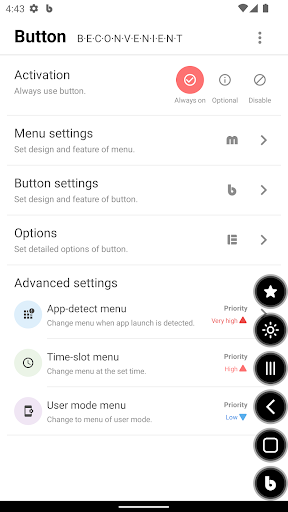
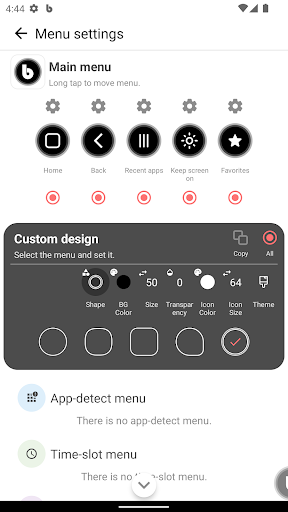
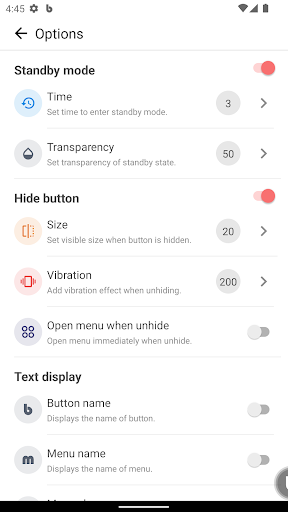
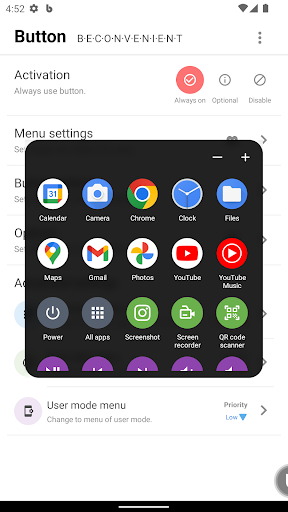


About Button - Assistive Touch Tool
The description on the store listing
You can launch frequently used system features, settings, and apps more easily with floating button.
<b>*Why do I need this app?</b>
- When it is inconvenient to use the mobile phone with both hands or when you want to use it simply with one hand.(Driving, disability, etc)
- When you want to launch features, settings, and apps while keeping app screen you are using.
- Hardware button on the phone is broken, or to prevent it.
- To make the phone screen(Home) more neat.
<b>*How do I use it?</b>
(1) Please allow 'Display over other apps' permission to use the button.
: This permission allows 'Button' to be used anywhere by placing it over other apps.
(2) 'Button' can be used all …
Read the full description
You can launch frequently used system features, settings, and apps more easily with floating button. <b>*Why do I need this app?</b> - When it is inconvenient to use the mobile phone with both hands or when you want to use it simply with one hand.(Driving, disability, etc) - When you want to launch features, settings, and apps while keeping app screen you are using. - Hardware button on the phone is broken, or to prevent it. - To make the phone screen(Home) more neat. <b>*How do I use it?</b> (1) Please allow 'Display over other apps' permission to use the button. : This permission allows 'Button' to be used anywhere by placing it over other apps. (2) 'Button' can be used all the time or can be selectively used only when the app launch is detected or at a set time. (3) If you tap 'Button' once, the available menu appears, and if you tap it again, you can close the menu. (4) Use it by setting menu and button with the features and designs you need. <b>*System</b> - Keep screen on, screen touch lock, screen rotation and more than 20 features. <b>*App</b> - Launch your apps and split screen is available. <b>*Life & Convenience</b> - Screenshot, screen recorder, flashlight, vibrator, magnifier, QR-code scanner, favorites <b>*Media</b> - Features for media playback and volume control <b>*Others</b> - 'Button' features and icons <b>*Permissions</b> - Display over other apps(*Mandatory) : Enable button. - Accessibility(AccessibilityService API) Accessibility services must be enabled to use the following features. : Power, Back, Previous app, Next app, Recent apps, All apps, Notifications, Quick settings, Screen off, Split screen, Automatically change menu when app launch is detected - Exclude from battery optimization : Prevent abnormal termination by registering as a whitelist - Device admin : Enable screen Off <b>'Button' never collects personal information, and does not use the allowed permissions for any other purpose other than the specified feature.</b> Thank you!
Installs since 29 Aug 2026 Measured
Exact Google Play install counts, collected daily
Ratings
127 ratings, 6 reviews
- 5 ★62%
- 4 ★38%
- 3 ★0.0%
- 2 ★0.0%
- 1 ★0.0%
Recent reviews
Latest public reviews from the store
- 16 Nov 2025
good
- 24 Aug 2025
Jay Siyaram 🙏 very nice dhanyvad 🙏
- 16 Aug 2025
ITS A GREAT OPPERTUNITY To share the temple location here 💐
- 26 Mar 2024
Good
What reviewers bring up
Topics mentioned in the latest 50 reviews, by how many reviews mention them
Liked in good reviews (45 reviews)
- temples 10
- india 8
- information 3
- beautiful 2
- location 2
- people 2
- easily 2
- useful 2
Raised in bad reviews (5 reviews)
- open 2
Top chart positions
Latest Google Play chart ranks by country, last 10 days
Not in any tracked top chart in the last 10 days.
Button - Assistive Touch Tool history
Release, install milestones, listing and store changes
- Reached 10,000+ installs 25 Jul 2024
- Reached 5,000+ installs 21 Mar 2024
- First released on the store 7 Jun 2022
Update frequency
How often Button - Assistive Touch Tool ships a new version, month by month
0 updates in the last 12 months. Less often than most similar apps: they shipped a median of 2 updates in the same year.
Recent versions
Current version 1.1.5
- Version 1.1.522 Mar 2024
*2024-03-21 - Bug fixes *2023-10-06 - Bug fixes *2023-08-21 - Android 13 compatible patch : Android 13 or later cannot turn on/off Bluetooth.(Google policy) - Bug fixes
Listing keywords
Words and phrases Button - Assistive Touch Tool repeats most in its store listing
Top phrases: keeping app screen (2), launch is detected (2), features settings (2), launch features (2), screen off (2).
Highlighted words also appear in the title. Counts cover the title, short description and description.
Business model and tech
From the store listing and declared permissions
- Business model
- Free to downloadIn-app purchasesShows ads
- Subscriptions and payments
- Google Play billing
- Sensitive access
- CameraMicrophonePhotos, videos and filesNearby devicesDraws over other appsAdvertising ID
29 permissions
3 special access, 6 sensitive, 20 standard
- Ask to uninstall appsREQUEST_DELETE_PACKAGESSpecial access
- Change Do Not DisturbACCESS_NOTIFICATION_POLICYSpecial access
- Draw over other appsSpecial access
- Record audioSensitive
- Take photos and videosSensitive
- Change or delete shared storageSensitive
- Read shared storageSensitive
- Connect to paired Bluetooth devicesBLUETOOTH_CONNECTSensitive
- Show notificationsPOST_NOTIFICATIONSSensitive
- Ad attribution (Privacy Sandbox)ACCESS_ADSERVICES_ATTRIBUTIONStandard
- Ad topics (Privacy Sandbox)ACCESS_ADSERVICES_TOPICSStandard
- Read the advertising IDAD_IDStandard
Compliance
What the listing and the app package show
- Store status
- Live
- Upkeep
- No update since 25 Jul 2024
- Registered in
- South Korea
- Privacy policy
- Linked on the listing
- Advertising
- Shows ads
- In-app purchases
- Offered
- Age rating
- Everyone
- Sensitive permissions
- 6 sensitive, 3 special access of 29
- Location access
- No
- Camera and microphone
- Both
Apps like Button - Assistive Touch Tool
aDataConMonamazing-create13.6K installs★ 4.3
Universal TV Remote for All TVAlphard Solutions56K installs★ 3.17
Auto Scroll TTAbyssiniatech64.2K installs★ 2.67
Whistle SoundsInfinite_Apps64.4K installs★ 3.5
QR Barcode : Scanner & CreateScan Team320K installs★ 3.38
Calendario de Puerto Rico 2025FamilyAppsPro15.2K installs★ 4.57
Motion Detector: Security CamFabioDeveloper8.1K installs★ 4.1
Watt VA Amp Volt CalculationsElectroMission Co.53.2K installs★ 1.0
Zip Extractor–Unzip UnRARMS Apps Lab30.1K installs★ 3.5
Button - Assistive Touch Tool: questions and answers
How many downloads does Button - Assistive Touch Tool have?
Button - Assistive Touch Tool has 24,065 installs on Google Play, measured from the store's own count on 17 Nov 2026.
Who makes Button - Assistive Touch Tool?
Button - Assistive Touch Tool is published by FLUX, a developer based in KR.
When was Button - Assistive Touch Tool last updated?
The latest version (1.1.5) was released on 25 Jul 2024.
Is Button - Assistive Touch Tool free?
Yes. Button - Assistive Touch Tool is free to download and offers in-app purchases, and it shows ads.
Is Button - Assistive Touch Tool still available?
Yes. Button - Assistive Touch Tool is live on Google Play as of 17 Nov 2026.
Track Button - Assistive Touch Tool and its competitors
Watch any app for new versions, rating drops, chart moves and removals. Free plan, no card.