
CameraFTP TimeLapse
Take time-lapse pictures & store in Cloud; share video & embed camera in webpage
- Installs
- 5.87K
- Measured
- Rating
- 3.2
- Ratings
- 24
- 2 reviews
- Version
- Varies with device
- Updated 22 Dec 2025
- Released
- 19 Aug 2019
- Tracked since 10 May 2026
- Size
- 18 MB
- Needs 4.2
Screenshots




About CameraFTP TimeLapse
The description on the store listing
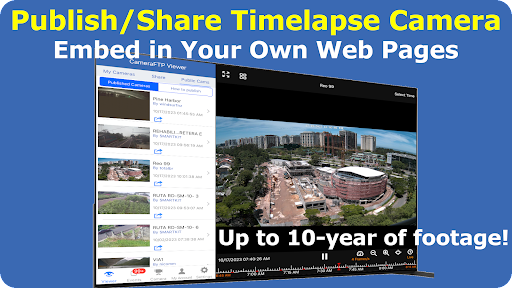
CameraFTP TimeLapse App can automatically take pictures and upload them to CameraFTP cloud storage. You can generate time-lapse video online, or download images and create high-quality time-lapse video offline. You can publish or share the time-lapse camera, or embed it in your own web page.
CameraFTP TimeLapse advantages:
- Easy and Automatic. You don't need to manually record footage.
- Supports IP cameras, smartphones, tablets and webcams.
- Multi-year retention time; supports long timelapse video.
- Timelapse camera viewer and video creator.
- Download all recorded images for offline viewing and processing.
- Low cost.
TimeLapse Recording Usage Cases:
- Construction …
Read the full description
CameraFTP TimeLapse App can automatically take pictures and upload them to CameraFTP cloud storage. You can generate time-lapse video online, or download images and create high-quality time-lapse video offline. You can publish or share the time-lapse camera, or embed it in your own web page. CameraFTP TimeLapse advantages: - Easy and Automatic. You don't need to manually record footage. - Supports IP cameras, smartphones, tablets and webcams. - Multi-year retention time; supports long timelapse video. - Timelapse camera viewer and video creator. - Download all recorded images for offline viewing and processing. - Low cost. TimeLapse Recording Usage Cases: - Construction projects, e.g. record a timelapse video of construction of a building, bridge, dam, ship, etc. A construction project may take 3 months to several years. - Growing plants. It may take a few weeks to a few years. The time-lapse video can quickly tell how plants grow from a seed to big plants. - Blossoming flowers. - Changing seasons (of a city or mountain, etc.) - Stars in the sky. CameraFTP TimeLapse App for Android and iOS: You can download CameraFTP TimeLapse App if you want to use a smartphone/tablet to create time-lapse video. Use IP Camera (or CCTV DVR) for Time Lapse Recording: Configure your IP camera or DVR to record images to CameraFTP cloud storage; Configure your camera/DVR for: (1) Image Recording; (2) Continuous recording; (3) Low upload frequency; (4) Usually high image resolution. Order a Timelapse Recording plan that matches the above parameters and set a long retention time. Use a PC/Webcam for TimeLapse Recording: Install CameraFTP Virtual Security System software. Add a webcam in your VSS, and set it to: (1) Image Recording; (2) Continuous recording; (3) Low upload frequency; (4) Usually high image resolution. Order a Timelapse Recording plan that matches the above parameters and set a long retention time. View TimeLapse Camera/Video: You can use CameraFTP Viewer app to view your timelapse camera/video online. CameraFTP has web browser based viewer and mobile viewer app for iOS and Android. Please go to App Store or Google Play to download CameraFTP Viewer apps. You can also visit www.cameraftp.com and click Software to download the viewer apps. Timelapse video generation: Log in to www.cameraftp.com website, go to My Cameras page, click the timelapse icon below your camera thumbnail, it will go to the Timelapse generation page. You can preview a timelapse video or download it. For large resellers and enterprise customers, you can even customize the logo on the timelapse video. CameraFTP is a division of DriveHQ.com, which was founded in 2003. It is a leading cloud IT service provider. CameraFTP is a leading cloud recording (home/business monitoring) service provider. DriveHQ has over 20 years of great track record. Our service uptime is over 99.99%.
Installs since 15 Nov 2026 Measured
Exact Google Play install counts, collected daily
Daily history starts once this app is in our daily install sample.
Ratings
24 ratings, 2 reviews
- 5 ★40%
- 4 ★20%
- 3 ★0.0%
- 2 ★0.0%
- 1 ★40%
Recent reviews
Latest public reviews from the store
- 13 May 2026
👍🏻
- 1 May 2026
does what it's supposed to do
- 16 Apr 2026
good going I paid for the lifetime membership, it is worth it but I have to click the photo. it could have translated without a click
- 9 Apr 2026
supar hai
What reviewers bring up
Topics mentioned in the latest 50 reviews, by how many reviews mention them
Liked in good reviews (21 reviews)
- translated 2
Raised in bad reviews (27 reviews)
- waste 4
- unsubscribe 3
- trial 3
- money 3
- ads 3
- subscription 2
- translation 2
- translator 2
Top chart positions
Latest Google Play chart ranks by country, last 10 days
Not in any tracked top chart in the last 10 days.
CameraFTP TimeLapse history
Release, install milestones, listing and store changes
- Reached 5,000+ installs 22 Dec 2025
- Reached 1,000+ installs 2 Aug 2022
- Reached 500+ installs 7 Aug 2021
- Reached 100+ installs 31 Dec 2019
- First released on the store 19 Aug 2019
Recent versions
Current version Varies with device
- Version 1.226 Dec 2019
Listing keywords
Words and phrases CameraFTP TimeLapse repeats most in its store listing
Top phrases: cameraftp timelapse (5), timelapse video (5), lapse video (4), timelapse recording (4), timelapse camera (3).
Highlighted words also appear in the title. Counts cover the title, short description and description.
Business model and tech
From the store listing and declared permissions
- Business model
- Free to download
- Sensitive access
- CameraPhotos, videos and files
11 permissions
0 special access, 2 sensitive, 9 standard
- Take photos and videosSensitive
- Read shared storageSensitive
- Control the flashlightStandard
- Keep the phone awakeStandard
- Change network connectivityStandard
- Connect to and disconnect from Wi-FiStandard
- Full internet accessStandard
- See network connectionsStandard
- See Wi-Fi connectionsStandard
- Capture secure video outputCAPTURE_SECURE_VIDEO_OUTPUTStandard
- Capture video outputCAPTURE_VIDEO_OUTPUTStandard
Compliance
What the listing and the app package show
- Store status
- Live
- Upkeep
- Updated 22 Dec 2025
- Registered in
- United States
- Privacy policy
- Linked on the listing
- Advertising
- No ads declared
- In-app purchases
- None declared
- Age rating
- Everyone
- Sensitive permissions
- 2 sensitive of 11
- Location access
- No
- Camera and microphone
- Camera
Apps like CameraFTP TimeLapse
GB CamOscar R.C.7K installs★ 3.42
Stop Motion: Dreamlapse CameraShush Creative28.8K installs★ 3.0
RGM ThermalCAM 1-external camRGM Vision10.1K installs★ 3.36
Kuvat.fi uploaderMediadrive Ltd3.1K installs★ 2.7
Beautiful Rose Flower FramesMy Photo Apps15.2K installs★ 2.5
Vintage Retro Camera - Retro FArt Photo Studio21K installs★ 3.67
Red Eye Corrector: RedFixerpaciosdev apps7.8K installs★ 1.67
Night Dual Photo FramesWallpaper Collection14.1K installs★ 4.0
DOF Calculatorio:io21K installs★ 3.67
CameraFTP TimeLapse: questions and answers
How many downloads does CameraFTP TimeLapse have?
CameraFTP TimeLapse has 5,869 installs on Google Play, measured from the store's own count on 15 Nov 2026.
Who makes CameraFTP TimeLapse?
CameraFTP TimeLapse is published by DriveHQ.com & CameraFTP.com Cloud Services, a developer based in US.
When was CameraFTP TimeLapse last updated?
The latest version (Varies with device) was released on 22 Dec 2025.
Is CameraFTP TimeLapse free?
Yes. CameraFTP TimeLapse is free to download.
Is CameraFTP TimeLapse still available?
Yes. CameraFTP TimeLapse is live on Google Play as of 15 Nov 2026.
Track CameraFTP TimeLapse and its competitors
Watch any app for new versions, rating drops, chart moves and removals. Free plan, no card.