
- Installs
- 1.56K
- Measured
- Rating
- 4.2
- Ratings
- 9
- 1 reviews
- Version
- 3.2.6
- Updated 13 Aug 2026
- Released
- 1 Jun 2019
- Tracked since 13 May 2026
- Size
- 92 MB
- Needs 8.0
Also on App Store: CAPTOR (1 ratings)
Screenshots




About CAPTOR
The description on the store listing
IMPORTANT: CAPTOR™ is an Android Enterprise AppConfig app, intended to be used as a managed app deployed by an enterprise mobility management (EMM) platform such as VMware Workspace ONE (AirWatch), AppTec360, Citrix Endpoint Manager. CAPTOR requires a license key from Inkscreen. Please go to www.inkscreen.com/trial to request a license key.
CAPTOR™ enables the secure capture and control of sensitive business-related content. CAPTOR is the most secure managed business camera app, document scanning app, and audio recording app available for enterprise and government customers.
Key Features:
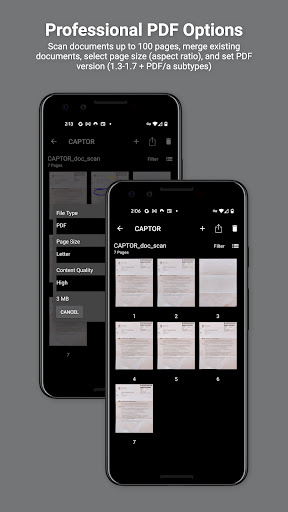
-Scan multi-page documents with smart edge detection, edit, annotate, and save as PDF. …
Read the full description
IMPORTANT: CAPTOR™ is an Android Enterprise AppConfig app, intended to be used as a managed app deployed by an enterprise mobility management (EMM) platform such as VMware Workspace ONE (AirWatch), AppTec360, Citrix Endpoint Manager. CAPTOR requires a license key from Inkscreen. Please go to www.inkscreen.com/trial to request a license key. CAPTOR™ enables the secure capture and control of sensitive business-related content. CAPTOR is the most secure managed business camera app, document scanning app, and audio recording app available for enterprise and government customers. Key Features: -Scan multi-page documents with smart edge detection, edit, annotate, and save as PDF. -Capture high resolution photos. -Record ambient audio. -Read QR codes and launch secure browser. -Annotate photos and documents with arrows, drawings, highlighters, and text labels. -Informative captions can be automatically applied to photos. -IT policies to enforce authentication, sharing, file naming, etc. -Capture content even in situations with no connectivity. -Encrypted data container protects content and enables IT administrator to wipe data if device is lost or stolen. -Completely separate work content from personal to support BYOD/COPE, and enabling personal privacy (GDPR compliance). -Secure Content Copy: Backup content to a network drive using OneDrive, SMB, SFTP, or WebDAV. CAPTOR is used to solve complex use cases in industries such as healthcare, legal, government, law enforcement, insurance, construction, and financial services.
Installs since 28 Aug 2026 Measured
Exact Google Play install counts, collected daily
Ratings
9 ratings, 1 reviews
- 5 ★88%
- 4 ★0.0%
- 3 ★0.0%
- 2 ★0.0%
- 1 ★13%
Recent reviews
Latest public reviews from the store
- 8 Aug 2024
This app would be greatly improved if there was a search within a specific deck option. For when you find a kanji out in the wild and want to add it to your study routine. Manually searching through the N1, N2, or Core 6k / 10k decks is very impractical. That being said, you should still get this app. An excellent study resource. Cross platform as well! Edit: Another find. It seems there are no timezone settings for those of us that are currently in Japan using this app!
- 31 Jan 2024
I LOVE this app! I've literally been looking for something like this for years. It lets you actually practice writing kanji but in a flash card electronic format that uses spaced repetition. It's perfect. I couldn't keep up with having an actual physical practice book because I'm on the go too much. This I can do whenever I have a spare few minutes and I don't have to lug books around. Totally worth the money if you are serious about learning to write and not just read.
- 17 Aug 2023
This is such a great app for learning kanji! There is writing practice, and you can erase and write out the kanji as many times as you want - a feature that many other kanji learning apps lack as they just let you write it out once on your own before moving on. I also love that the app introduces you to some compound words and lets you practice different kanji together. The writing animation is also super satisfying. Thank you to the development team!
- 2 Jun 2022
Even in the free version, excellent app. Teaches hiragana and katakana as well as a decent amount of kanji, and it allows you to see how you truly write (rather than force your line into the font, as many other apps do). One star less because it seems quitw resource intensive - my phone frequently heats up quite significantly while using it. No other major issues! /Edit: Picking it up again a couple of years later, new phone, no heating, very enjoyable. Went pro license 2 weeks ago, and happy!
What reviewers bring up
Topics mentioned in the latest 10 reviews, by how many reviews mention them
Liked in good reviews (8 reviews)
- kanji 5
- writing 4
- write 4
- practice 3
- learning 3
- hiragana 3
- however 3
- edit 3
Raised in bad reviews (2 reviews)
- without 2
Top chart positions
Latest Google Play chart ranks by country, last 10 days
Not in any tracked top chart in the last 10 days.
CAPTOR history
Release, install milestones, listing and store changes
- Reached 1,000+ installs 18 Aug 2024
- Reached 500+ installs 29 Oct 2021
- Reached 100+ installs 5 Jul 2020
- Reached 50+ installs 6 Feb 2020
- Reached 10+ installs 10 Aug 2019
- Reached 5+ installs 27 Jun 2019
- First released on the store 1 Jun 2019
Update frequency
How often CAPTOR ships a new version, month by month
2 updates in the last 12 months. More often than most similar apps: they shipped a median of 1 updates in the same year.
Recent versions
Current version 3.2.6
- Version 3.2.613 Aug 2026
Kerberos authentication option for SMB backups (beta) bug fixes
- Version 3.2.028 Apr 2026
bug fixes
- Version 2.1.220 Jan 2023
- Version 2.1.119 Dec 2022
Listing keywords
Words and phrases CAPTOR repeats most in its store listing
Top phrases: license key (2), secure content (2).
Highlighted words also appear in the title. Counts cover the title, short description and description.
Business model and tech
From the store listing and declared permissions
- Business model
- Free to download
- Sensitive access
- No sensitive permission declared
Compliance
What the listing and the app package show
- Store status
- Live
- Upkeep
- Updated 13 Aug 2026
- Registered in
- United States
- Privacy policy
- Linked on the listing
- Advertising
- No ads declared
- In-app purchases
- None declared
- Age rating
- Everyone
Apps like CAPTOR
Great Clips ConnectGreat Clips19.3K installs★ 4.0
My NotebookArabic alphabet studio14.4K installs★ 5.0
ELECTRICAL CONTRACTOR MagazineELECTRICAL CONTRACTOR Magazine17.2K installs★ 4.5
TicketManagerTicketManager12.2K installs★ 3.5
CrewConneXTA Connections15.1K installs★ 1.32
Unique Business WayPARAM COMPUTER3.3K installs★ 5.0
VeriTread CarrierVeriTread LLC12.5K installs★ 4.31
WealthParkWealthPark株式会社46.8K installs★ 3.6
CloudstreamWorkstream Automation Ltd72.5K installs★ 2.0
CAPTOR: questions and answers
How many downloads does CAPTOR have?
CAPTOR has 1,561 installs on Google Play, measured from the store's own count on 20 Nov 2026.
Who makes CAPTOR?
CAPTOR is published by Inkscreen LLC, a developer based in US.
When was CAPTOR last updated?
The latest version (3.2.6) was released on 13 Aug 2026.
Is CAPTOR free?
Yes. CAPTOR is free to download.
Is CAPTOR still available?
Yes. CAPTOR is live on Google Play as of 20 Nov 2026.
Track CAPTOR and its competitors
Watch any app for new versions, rating drops, chart moves and removals. Free plan, no card.