
Capture Clipper
Clip your favorite web! You can save coupons, recipes, etc. in PNG format.
- Installs
- 262K
- Measured
- Rating
- 3.17
- Ratings
- 1.2K
- 29 reviews
- Version
- 6.7.2
- Updated 21 Jun 2026
- Released
- 10 Apr 2012
- Tracked since 12 May 2026
- Size
- 4 MB
- Needs 4.1
Screenshots

About Capture Clipper
The description on the store listing
A screen capture tool for Web sites. You can easily call it from your browser's share menu.
<b>Features:</b>
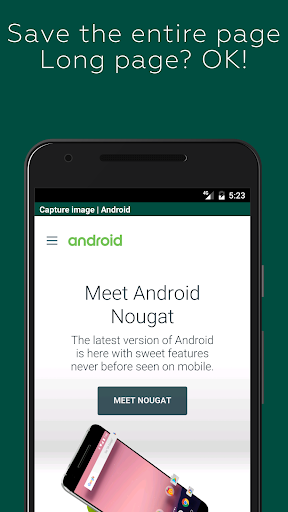
- You can save the entire page. It's also for long vertical pages!
- It blocks ads by default, so you can take ad-free captures (you can also turn off the blocking)
- You can also save only the area you are viewing.
- The image is saved as a PNG file, so there is no blurring.
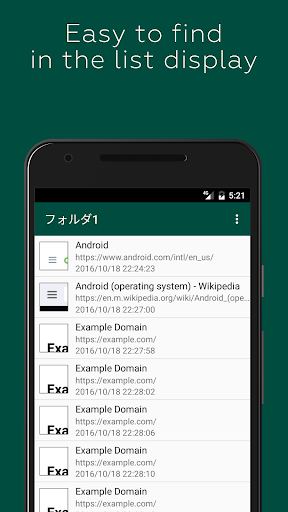
- The captures can be categorized into 16 folders. You can change the name of the folder as you like.
- Captures can also be viewed offline, saving you packet.
<b>How to use it:</b>
- Take note of coupons, transfer information, recipes, etc. and check offline!
- Save your favorite blogs and …
Read the full description
A screen capture tool for Web sites. You can easily call it from your browser's share menu. <b>Features:</b> - You can save the entire page. It's also for long vertical pages! - It blocks ads by default, so you can take ad-free captures (you can also turn off the blocking) - You can also save only the area you are viewing. - The image is saved as a PNG file, so there is no blurring. - The captures can be categorized into 16 folders. You can change the name of the folder as you like. - Captures can also be viewed offline, saving you packet. <b>How to use it:</b> - Take note of coupons, transfer information, recipes, etc. and check offline! - Save your favorite blogs and images that you want to see over and over again <b>Capture steps (for standard browser/Chrome):</b> 1. display the Web site you want to capture in a standard browser/Chrome 2. display the Menu 3. select [Other]. 4. select [Share Page]. Select [Capture Clipper]. You can use the same steps with other browsers. <b>Capture of the Login Required Page:</b> Due to technical limitations of Android, pages that require login, etc. cannot be captured directly. The preview screen can be used like a normal browser, so you can capture it with a login operation. Also, if you select "Reload First Page" in the preview menu, the first URL that calls Capture Clipper will be reloaded. The recapture after the login process might come in handy just a little bit. (Reloading may not work in some cases.) <b>Restrictions: app capture:</b> Capture Clipper is for web pages only and cannot capture applications such as Facebook, email, games, etc. You can capture them with Android 4.0 or later devices with the standard OS features. Try pressing the "Power" button and the "Volume Down" button at the same time.
Installs, last 30 days Measured
Exact Google Play install counts, collected daily
Ratings
1,170 ratings, 29 reviews
- 5 ★34%
- 4 ★16%
- 3 ★16%
- 2 ★0.0%
- 1 ★34%
Recent reviews
Latest public reviews from the store
- 31 Mar 2025
jaisa picture mai hai vaisa to nahi nahi hai lekin ye bohot achha game hai
- 24 Jan 2025
Very interesting game and Graphics are pretty cool. One of my favourite game.
- 24 Jan 2025
Very good graphics appreciated
- 24 Jan 2025
Best shooting game
What reviewers bring up
Topics mentioned in the latest 15 reviews, by how many reviews mention them
Liked in good reviews (14 reviews)
- graphics 3
- fps 3
- gun shooter 2
Raised in bad reviews (1 reviews)
No topic comes up twice.
Top chart positions
Latest Google Play chart ranks by country, last 10 days
Not in any tracked top chart in the last 10 days.
Capture Clipper history
Release, install milestones, listing and store changes
- Reached 100,000+ installs 27 Mar 2013
- First released on the store 10 Apr 2012
Update frequency
How often Capture Clipper ships a new version, month by month
2 updates in the last 12 months. More often than most similar apps: they shipped a median of 0 updates in the same year.
Recent versions
Current version 6.7.2
- Version 6.7.221 Jun 2026
Improved the migration data import process.
- Version 6.7.17 Jun 2026
Improved the migration data import process.
- Version 6.7.017 Aug 2025
Improved app reliability.
- Version 6.6.017 Aug 2024
Listing keywords
Words and phrases Capture Clipper repeats most in its store listing
Top phrases: capture clipper (4), browser chrome display (2), standard browser chrome (2), browser chrome (2), chrome display (2).
Highlighted words also appear in the title. Counts cover the title, short description and description.
Business model and tech
From the store listing and declared permissions
- Business model
- Free to downloadShows ads
- Sensitive access
- No sensitive permission declared
Compliance
What the listing and the app package show
- Store status
- Live
- Upkeep
- Updated 21 Jun 2026
- Registered in
- Japan
- Privacy policy
- Linked on the listing
- Advertising
- Shows ads
- In-app purchases
- None declared
- Age rating
- Everyone
Apps like Capture Clipper
Photo Watch Face ProTiny Watch21.4K installs★ 4.42
GPS Location Sharing & LocatorNeo Utilities796K installs★ 4.2
Views Fans: CommunityaAa Designer36.5K installs★ 3.67
Space Clean ToolkitStarlume Tech597K installs★ 3.85
Calculator+ Photo&Video vaultGreen Water420K installs★ 4.37
Red Panic ButtonUltimate Communication Software LTD257K installs★ 3.31
Cutting Paper CalculatorTasikWeb.com84.5K installs★ 3.92
FORMSThe App Master848K installs★ 2.78
My Router IP (Setup Page)Samri Nasser449K installs★ 4.17
Capture Clipper: questions and answers
How many downloads does Capture Clipper have?
Capture Clipper has 262,008 installs on Google Play, measured from the store's own count on 20 Nov 2026.
Who makes Capture Clipper?
Capture Clipper is published by lonesomebit, a developer based in JP.
When was Capture Clipper last updated?
The latest version (6.7.2) was released on 21 Jun 2026.
Is Capture Clipper free?
Yes. Capture Clipper is free to download, and it shows ads.
Is Capture Clipper still available?
Yes. Capture Clipper is live on Google Play as of 20 Nov 2026.
Track Capture Clipper and its competitors
Watch any app for new versions, rating drops, chart moves and removals. Free plan, no card.