
CDR Editor: CorelDRAW
View, edit, print, convert CorelDRAW CDR file to PDF, Image, Microsoft Office.
- Installs
- 119K
- Measured
- Rating
- 2.33
- Ratings
- 180
- 5 reviews
- Version
- 2.1.24
- Updated 9 Sep 2026
- Released
- 16 Jun 2024
- Tracked since 12 May 2026
- Size
- —
Screenshots


About CDR Editor: CorelDRAW
The description on the store listing
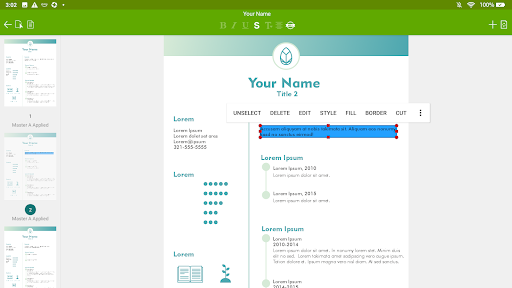
View, edit, print, convert CorelDRAW(.cdr/.cmx) file to PDF, JPG, PNG, WEBP, WEBP(Animation), Microsoft Office Word, PowerPoint and Publisher like never before on your Android !
CDR Editor is an advanced yet easy-to-use CorelDRAW file viewer app. It allows you to read, edit, print, convert CDR document with easy-to-use edit or insert text, table, picture, shape and so on.
CDR Editor can easily export as PDF, Image, Microsoft Office Word, PowerPoint and Publisher formats.
CDR Editor provides the better editor experience for CDR document. You can open various .cdr files, CDR Editor can support all kinds of different versions. CorelDRAW document can be from anywhere on your device, …
Read the full description
View, edit, print, convert CorelDRAW(.cdr/.cmx) file to PDF, JPG, PNG, WEBP, WEBP(Animation), Microsoft Office Word, PowerPoint and Publisher like never before on your Android ! CDR Editor is an advanced yet easy-to-use CorelDRAW file viewer app. It allows you to read, edit, print, convert CDR document with easy-to-use edit or insert text, table, picture, shape and so on. CDR Editor can easily export as PDF, Image, Microsoft Office Word, PowerPoint and Publisher formats. CDR Editor provides the better editor experience for CDR document. You can open various .cdr files, CDR Editor can support all kinds of different versions. CorelDRAW document can be from anywhere on your device, email attachments, documents on the Dropbox, Box, OneDrive, Google Drive and in other Android applications you can store them in CDR Editor. Easily open, edit, export as PDF, Image(JPG/PNG), Microsoft Office Word, PowerPoint and Publisher document formats to share and email back again. CDR Editor works completely offline and you don't need internet connection to make the app working. Unlike other CDR apps, they need internet connection, and need upload your CorelDRAW files, this is not safe for your files. with CDR Editor you can: Read Document Each CDR document page will be parsed with high accuracy, almost all of the document original format and layout can be kept successfully, you can easily view it from one page to another. Edit Document CDR Editor can easily edit CDR document text, and also allows you insert new text, shape(rectangle, round rectangle, oval, triangle, parallelogram, trapezoid, diamond, pentagon, circle, arrow, star, line, line with arrow, dashed line, curve, scribble, etc.), picture and table editing. CDR Editor has a similar object format window, you can easily format these objects, change text font, color, border, fill and rotation, change picture, table, shape, border, fill and rotation. You can easily cut/copy/paste object, insert and delete page, set page background, and so on. Bring to front and send to back object, so that you can rearrange these elements. All of these will be very convenient for your editing. Master Page & Page Reorder CDR Editor has all the same CDR master page features. You can easily insert new page, delete and reorder pages. Import Image & PDF CDR Editor can easily import images(up to 100 at a time) and PDF file. CDR to Microsoft Office Word, PowerPoint and Publisher CDR Editor can easily export as Microsoft Word, PowerPoint and Publisher formats. CDR to PDF CDR Editor can easily export as PDF format. CDR to Image CDR Editor can easily export as JPG, PNG, WEBP and Animated WEBP. Print Document CDR Editor can easily print your CDR document. Other things CDR Editor App lets you do: + Save email attachments Open attachments directly from the Mail app. Also you can open CDR document from any app on the Android device. + Edit & share document on a variety of storage CDR Editor Pro allows you to import files from Dropbox, OneDrive, Box, Google Drive, and so on. Also share document on them. Download our app from Windows, MacOS: You also can easily find Windows version in Microsoft Store and macOS version in Mac App Store. Get started editing & designing today with CDR Editor Pro for Android.
Installs since 26 Aug 2026 Measured
Exact Google Play install counts, collected daily
Ratings
180 ratings, 5 reviews
- 5 ★40%
- 4 ★0.0%
- 3 ★0.0%
- 2 ★0.0%
- 1 ★60%
Recent reviews
Latest public reviews from the store
No reviews in our sample for this app yet.
Top chart positions
Latest Google Play chart ranks by country, last 10 days
Not in any tracked top chart in the last 10 days.
CDR Editor: CorelDRAW history
Release, install milestones, listing and store changes
- Reached 50,000+ installs 13 Sep 2025
- Reached 10,000+ installs 9 Nov 2024
- Reached 5,000+ installs 21 Sep 2024
- Reached 1,000+ installs 13 Jul 2024
- Reached 500+ installs 29 Jun 2024
- First released on the store 16 Jun 2024
Update frequency
How often CDR Editor: CorelDRAW ships a new version, month by month
2 updates in the last 12 months. Less often than most similar apps: they shipped a median of 3 updates in the same year.
Recent versions
Current version 2.1.24
- Version 2.1.249 Sep 2026
- Bug fixes and other improvements - Performance optimize
- Version 2.1.2318 May 2026
- Bug fixes and other improvements - Performance optimize
- Version 2.1.2226 Oct 2025
- Version 2.1.214 Oct 2025
Listing keywords
Words and phrases CDR Editor: CorelDRAW repeats most in its store listing
Top phrases: cdr editor (19), cdr document (6), powerpoint and publisher (5), microsoft office (5), word powerpoint (5).
Highlighted words also appear in the title. Counts cover the title, short description and description.
Business model and tech
From the store listing and declared permissions
- Business model
- Free to downloadIn-app purchases
- Sensitive access
- No sensitive permission declared
Compliance
What the listing and the app package show
- Store status
- Live
- Upkeep
- Updated 9 Sep 2026
- Registered in
- China
- Privacy policy
- Linked on the listing
- Advertising
- No ads declared
- In-app purchases
- Offered
- Age rating
- Everyone
Apps like CDR Editor: CorelDRAW
AI Prompts: AI Image GeneratorPixel Crafts7.6K installs★ 4.33
Bluedot Al Note TakerTwiso Inc.11.8K installs★ 4.71
BI LifeBI Digital16.3K installs★ 4.8
Drift: Notification TickerLight Source Labs5.5K installs★ 4.52
Magnifying Glass with FlashligOne Music Player42.1K installs★ 3.34
Mowazzi: AI Tools DirectoryKhalid Saied19.5K installs★ 4.57
Meeting Summary - AI NotesGODHITECH JSC20.7K installs★ 2.4
Speco GraySpeco Technologies10.9K installs★ 3.67
PI mPowerPI Industries16.9K installs★ 4.5
CDR Editor: CorelDRAW: questions and answers
How many downloads does CDR Editor: CorelDRAW have?
CDR Editor: CorelDRAW has 119,199 installs on Google Play, measured from the store's own count on 18 Nov 2026.
Who makes CDR Editor: CorelDRAW?
CDR Editor: CorelDRAW is published by Canyua Software Technology Co., Ltd., a developer based in CN.
When was CDR Editor: CorelDRAW last updated?
The latest version (2.1.24) was released on 9 Sep 2026.
Is CDR Editor: CorelDRAW free?
Yes. CDR Editor: CorelDRAW is free to download and offers in-app purchases.
Is CDR Editor: CorelDRAW still available?
Yes. CDR Editor: CorelDRAW is live on Google Play as of 18 Nov 2026.
Track CDR Editor: CorelDRAW and its competitors
Watch any app for new versions, rating drops, chart moves and removals. Free plan, no card.