CetusPlay Remote Control
Fire TV Stick Universal Remote Control for TV, KODI, Chromecast, Android TV box+
- Installs
- 14.21M
- Measured
- Rating
- 3.86
- Ratings
- 95.8K
- 2.4K reviews
- Version
- 4.9.6.604
- Updated 4 Nov 2026
- Released
- 2 May 2016
- Tracked since 11 May 2026
- Size
- 18 MB
- Needs 4.1
Screenshots

About CetusPlay Remote Control
The description on the store listing
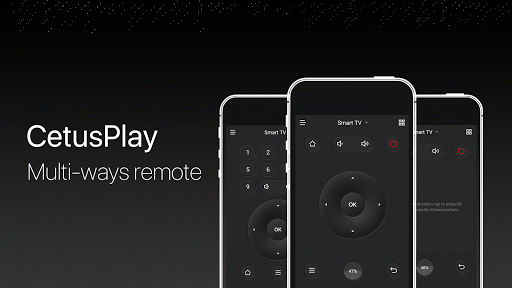
Universal Remote Control for Android TV, TV box, Chromecast, Fire TV, Fire TV Stick, KODI, Smart TV and many more. CetusPlay universal TV remote brings the flawless experience as an alternative to a TV remote with much more unbelievable functionalities. Unique TV remote to support all the possible TVs in the world providing much more than a remote.
<b>[IMPORTANT]: </b>
• We need more help in language localization for more users!
• Make sure both your TV and phone have been updated to the latest version.
• Mouse Mode works on <b> Fire TV/Stick(turn on the ADB debugging), Android TV(rooted) and Android media box.
• Scroll feature only works on the Android box with CetusPlay …
Read the full description
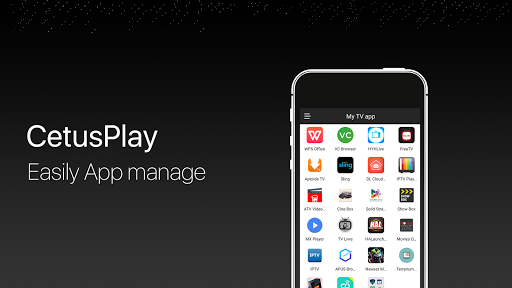
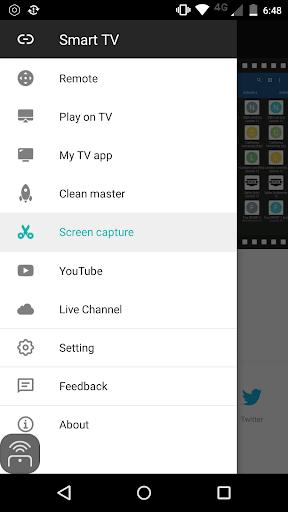
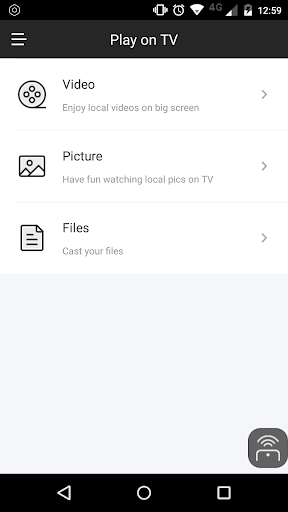
Universal Remote Control for Android TV, TV box, Chromecast, Fire TV, Fire TV Stick, KODI, Smart TV and many more. CetusPlay universal TV remote brings the flawless experience as an alternative to a TV remote with much more unbelievable functionalities. Unique TV remote to support all the possible TVs in the world providing much more than a remote. <b>[IMPORTANT]: </b> • We need more help in language localization for more users! • Make sure both your TV and phone have been updated to the latest version. • Mouse Mode works on <b> Fire TV/Stick(turn on the ADB debugging), Android TV(rooted) and Android media box. • Scroll feature only works on the Android box with CetusPlay Plugin.</b> <b>What's CetusPlay?</b> • As a multi-function remote control app for Android TV box/Fire TV/Android TV <b>Features:</b> • Multiple navigation modes, including Direction-Pad, Touch Pad, Keyboard mode and Mouse mode • Cast your local files(photo, videos, DOC, XLS, PPT, TXT, etc.) from your phone to TV • Live Channels features (add local M3U file and cast to TV/Box/Stick) • Quick launch TV apps through one click on your phone • Clean cache and trash to speed up your TV just one click on the accelerating ball; • Share screen capture when you watch to social media • Help to install KODI remotely on Fire TV/Stick <b>Requirements:</b> • Streaming media player, including Android TV, such as Google Nexus Player, NVIDIA Shield TV, Fire TV/ Stick and Android TV Box like MXQ, MX Pro, H96 Pro, M8S Box. (If you have unsupported devices, please contact us with model info.) • Android devices <b>Notes:</b> <b>For Fire TV/Stick New Users:</b> • Turn on the ADB debugging and restart the Fire TV/Stick • Install the CetusPlay phone version and connect to the Fire TV and let the CetusPlay TV version installed on the TV device. <b>For Fire TV/Stick Updated Users: </b> • Installed the latest version to your phone and TV version to your streaming media player. • Make sure the devices on the same Wi-Fi. • For the mouse click, apps sideload and other premium function, the ADB debugging must be enabled on your streaming media players. The Help Center in the app will guide you through the setup. <b>For Android TV:</b> • In order to enjoy it, please make sure you have done the following steps on your Android TV. - Search and install “CetusPlay- TV version” on your TV. - Make sure all the devices on the same Wi-Fi. <b>Help & Support: </b> • Official website: http://www.cetusplay.com/ • Facebook page: https://www.facebook.com/CetusPlay/ (Search CetusPlay by pages on Facebook) • Or email us: [email protected] We want to hear from you, always. <b>Supported Devices:</b> ▶LeEco Android TV ▶Amazon Fire TV/Fire TV Stick ▶Nvidia Shield TV ▶Google Nexus Player ▶Globalsat GS500 ▶XiaoMi Mi Box ▶ZIDOO X5/X9S/X6 PRO/X1/X9/X1 ▶HiMedia Android TV box Q10 PRO/Q5 PRO/H8 ▶PHILIPS Smart TV Box HMP8100 ▶MELE PCG03/PCG01 ▶PROBOX2 ▶RIKOMAGIC MK902 II ▶MINIX NEO X7/X6/X8/Z64 ▶Matricom G-Box ▶SkyStreamX Streaming Media Player ▶SkyStream ONE Box ▶RQN Android TV Box MXQ ▶Bros Unite M8S TV Box ▶KAT-TV "Elite" ▶PigflyTech Android TV Box ▶COOLEAD M8S TV Box ▶Mifanstech MXQ ▶MX III TV Box ▶DigiXstream DX4 ▶Febite M8S TV Box ▶VENSMILE MXV Plus ▶Telmu MXIII-G ▶Monba M8S Set Top TV Box ▶Kudo TV KD1 Plus Android TV Box S812 ▶Zenoplige MXQ ▶MXQ/MXQ PRO ▶Pigflytech MX3+ plus ▶Mansy Genuine KODI(XBMC) MX Pro ▶Jetstream Box ▶The Dragon Box ▶Tonbux SK-002 ▶UBox Gen.2 ▶GeekBox ▶Tronsmart ▶New NEXBOX ▶SONY Android TV ▶SHARP Android TV ▶MEMOBOX ▶NEXBOX ▶VONTAR Box ▶Tronsmart Vega Box ▶JoinWe Box ▶Andoer Box ▶Inphic Box ▶Transpeed Box ▶LeelBox ▶Vontar Box ▶Beelink Box ▶Docooler Box ▶NewBox ▶Kii Pro DVB ▶DigiXstream Box ▶Monba Box ▶Tictid Box ▶WELLWIN Nettech Box ▶Idroidnation Box ▶YFeel Box ▶Greatever Box ▶Mansy Box ▶AKASO Box ▶Globmall Box ▶DOLAMEE Box ▶Blvk Box
Installs, last 30 days Measured
Exact Google Play install counts, collected daily
Ratings
95,828 ratings, 2,354 reviews
- 5 ★62%
- 4 ★8.0%
- 3 ★6.9%
- 2 ★3.5%
- 1 ★19%
Recent reviews
Latest public reviews from the store
No reviews in our sample for this app yet.
Top chart positions
Latest Google Play chart ranks by country, last 10 days
Not in any tracked top chart in the last 10 days.
CetusPlay Remote Control history
Release, install milestones, listing and store changes
- Reached 10,000,000+ installs 6 Apr 2022
- Reached 5,000,000+ installs 28 Feb 2020
- First released on the store 2 May 2016
Update frequency
How often CetusPlay Remote Control ships a new version, month by month
5 updates in the last 12 months. More often than most similar apps: they shipped a median of 1 updates in the same year.
Recent versions
Current version 4.9.6.604
- Version 4.9.6.6024 Nov 2026
- Version 4.9.6.59226 Jun 2026
- Version 4.9.6.58627 May 2026
- Version 4.9.6.58427 May 2026
Listing keywords
Words and phrases CetusPlay Remote Control repeats most in its store listing
Top phrases: android tv (16), tv box (15), fire tv (13), fire tv stick (9), tv stick (9).
Highlighted words also appear in the title. Counts cover the title, short description and description.
Business model and tech
From the store listing and declared permissions
- Business model
- Free to downloadIn-app purchasesShows ads
- Sensitive access
- No sensitive permission declared
Compliance
What the listing and the app package show
- Store status
- Live
- Upkeep
- Updated 4 Nov 2026
- Registered in
- Indonesia
- Privacy policy
- Linked on the listing
- Advertising
- Shows ads
- In-app purchases
- Offered
- Age rating
- Everyone
Apps like CetusPlay Remote Control
HTTP Custom - AIO Tunnel VPNePro Dev. Team27.3M installs★ 4.11
vConnectVodafone Idea Ltd.6.8M installs★ 4.0
Clickmate - Auto Clicker MacroBattery Stats Saver17.7M installs★ 4.22
VirusBuster MobileTrend Micro Inc. / トレンドマイクロ株式会社13.1M installs★ 4.0
Send files to TVYablio43.7M installs★ 4.2
My FilesColorOS1.4B installs★ 3.75
Tube Video Downloader & Videovideo download.11.2M installs★ 3.49
Skins for Minecraft PERemoro Studios22.3M installs★ 4.26
Satoshi App: Get AirdropsAimee Han9.3M installs★ 3.3
CetusPlay Remote Control: questions and answers
How many downloads does CetusPlay Remote Control have?
CetusPlay Remote Control has 14,207,041 installs on Google Play, measured from the store's own count on 20 Nov 2026.
Who makes CetusPlay Remote Control?
CetusPlay Remote Control is published by CetusPlay Global, a developer based in ID.
When was CetusPlay Remote Control last updated?
The latest version (4.9.6.604) was released on 4 Nov 2026.
Is CetusPlay Remote Control free?
Yes. CetusPlay Remote Control is free to download and offers in-app purchases, and it shows ads.
Is CetusPlay Remote Control still available?
Yes. CetusPlay Remote Control is live on Google Play as of 20 Nov 2026.
Track CetusPlay Remote Control and its competitors
Watch any app for new versions, rating drops, chart moves and removals. Free plan, no card.