
CF.lumen
Adapts your screen's colors based on sun's position, sleep pattern, and sensors
- Installs
- 365K
- Measured
- Rating
- 3.91
- Ratings
- 5.1K
- 562 reviews
- Version
- 3.74
- Updated 22 Dec 2020
- Released
- 10 Apr 2014
- Tracked since 13 May 2026
- Size
- 1 MB
- Needs 5.0
Screenshots
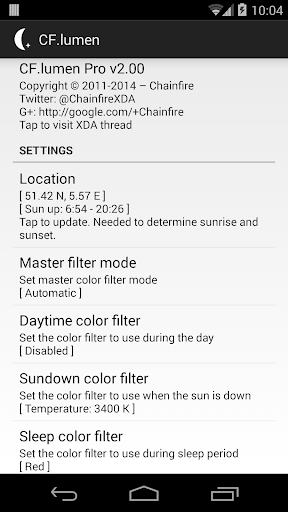
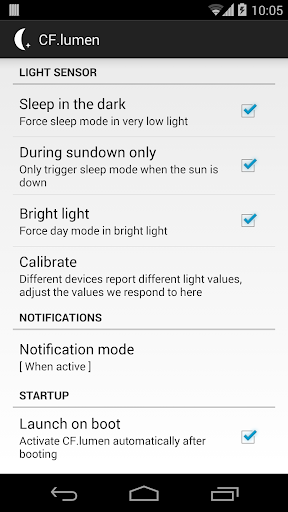
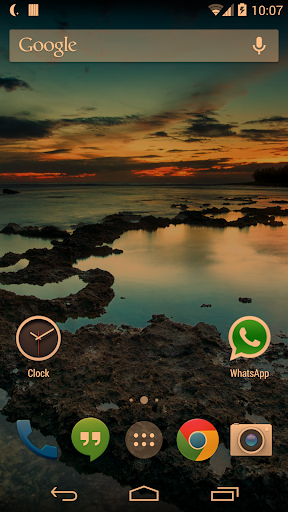


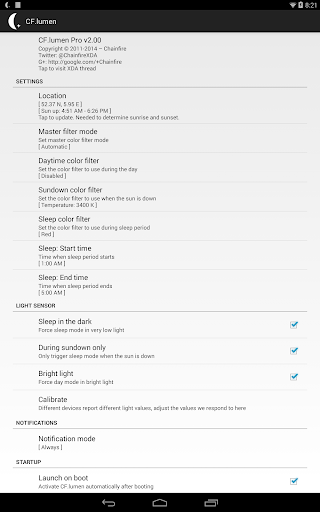
About CF.lumen
The description on the store listing
<i>CF.lumen</i> adapts the colors on your Android device based on the position of the sun, or your custom configuration.
<b>NOTE: Android 5.0 is now required. Versions up to v3.16 that support 4.4 KitKat are still available from the XDA thread (see far below). Performance drop since v3.60? Turn on <i>performance</i> mode.</b>
When using the default settings, your display will get a warmer tint (lower color temperature) when the sun is down, vastly reducing strain on the eyes. Blue light makes your brain want to stay awake, and a lower color temperatures reduces the amount of blue displayed; using this in the evening reduces your brain's effort to keep you awake at night.
During …
Read the full description
<i>CF.lumen</i> adapts the colors on your Android device based on the position of the sun, or your custom configuration. <b>NOTE: Android 5.0 is now required. Versions up to v3.16 that support 4.4 KitKat are still available from the XDA thread (see far below). Performance drop since v3.60? Turn on <i>performance</i> mode.</b> When using the default settings, your display will get a warmer tint (lower color temperature) when the sun is down, vastly reducing strain on the eyes. Blue light makes your brain want to stay awake, and a lower color temperatures reduces the amount of blue displayed; using this in the evening reduces your brain's effort to keep you awake at night. During sleeping hours by default a red filter is used. Red strains your eyes the least, and retains your night vision. <b>Light sensor</b> The light sensor can be used to automagically adjust the color: switch to the sleep filter in full dark, or to the day filter (usually none) under bright lights. Because light sensor quality varies wildly between devices, a calibration option is provided to experiment with. <b>Color filters</b> Several filters are provided. Those named after a color (red, green, blue, ...) do not limit the display to those colors, but convert the displayed image to grayscale first, then display that image in levels of the selected color. This preserves details that would otherwise be lost. Grayscale, invert colors, temperature adjustment and custom R/G/B adjustment filters are also provided. <b>Colorblindness</b> The master color filter setting also has an option for colorblindness enhancement, with settings for protanopia/anomaly, deuteranopia/anomaly and tritanopia/anomaly. These options in theory enhance clarity and color detail. No claims are made to the effectiveness of these filters. These filters were thought up by Google engineers, <i>CF.lumen</i> just includes them. <b>Pro version</b> Upgrading to <i>CF.lumen Pro</i> will <b>support my developments</b>, remove all nags, unlock the option to start at device boot (make sure you test your configuration first), and unlocks notification options. It also enables <b>Tasker integration</b>. In Pro mode, the notification adds convenient buttons to quickly disable the current filter or switch to sleep mode, and you can switch the notification to <i>when enabled</i> mode, which shows the notification only when a color filter is active. In non-Pro mode, the notification only asks you to upgrade to Pro. It may seem that notification is just there to annoy you, but it actually prevents Android from randomly killing the background service taking care of all the work. Getting rid of it without getting the service killed can be done by going to <i>Settings -> Apps -> CF.lumen</i> and unticking <i>Show notifications</i>. Having <i>Chainfire3D Pro</i> (ancient) installed will enable Pro. <b>Performance</b> When no color filter is active, there should not be any noticeable performance impact. When a filter is active, impact depends on device and what you are doing. On some devices we have tested there was no performance impact at all, on others it was slightly noticeable. It also depends on the driver in use. <b>Future</b> Keep in mind that Android's rendering system changes over time. You should be aware that this app may simply stop working on future Android versions without the possibility of a fix. <b>Scary permissions</b> By far most permissions are used only for Google Maps to set your location, and Google Play to provide for In-App Purchases. I cannot make any claims as to what information the Google components do or do not send to Google servers, but no information is sent to me or anyone else (than Google). <b>More</b> Advanced user more information, discussion, and support, can be found in this app's thread on XDA-Developers: http://forum.xda-developers.com/showthread.php?p=51779367
Installs, last 30 days Measured
Exact Google Play install counts, collected daily
Ratings
5,103 ratings, 562 reviews
- 5 ★59%
- 4 ★13%
- 3 ★6.0%
- 2 ★3.9%
- 1 ★18%
Recent reviews
Latest public reviews from the store
- 15 May 2026
bhai log sambhal kar karna nahi to mobile dibba ho jaye ek app se ok
- 6 May 2026
treba miec Root
- 4 May 2026
js love this app btw, with this app i can do a super cool bootanimation
- 26 Apr 2026
Fake
What reviewers bring up
Topics mentioned in the latest 50 reviews, by how many reviews mention them
Liked in good reviews (37 reviews)
- root 4
- support 3
- boot 3
- perfectly 2
- devices 2
- logcat 2
- qpr 2
- pro 2
Raised in bad reviews (12 reviews)
- android 3
- reboot 2
Top chart positions
Latest Google Play chart ranks by country, last 10 days
Not in any tracked top chart in the last 10 days.
CF.lumen history
Release, install milestones, listing and store changes
- Reached 100,000+ installs 26 Nov 2015
- Reached 50,000+ installs 1 Apr 2015
- Reached 10,000+ installs 29 May 2014
- Reached 5,000+ installs 16 Apr 2014
- Reached 1,000+ installs 13 Apr 2014
- First released on the store 10 Apr 2014
Recent versions
Current version 3.74
- Version 3.7422 Dec 2020
Bare minimum(!) to somewhat support rooted users on Android 11. Rootless and injection driver have been removed as they are currently incompatible.
- Version 3.709 Feb 2017
- Version 3.6630 Mar 2016
- Version 3.651 Mar 2016
Listing keywords
Words and phrases CF.lumen repeats most in its store listing
Top phrases: cf lumen (5), filter is active (3), color filter (3), light sensor (3), mode the notification (2).
Highlighted words also appear in the title. Counts cover the title, short description and description.
Business model and tech
From the store listing, the SDKs in the app package and its declared permissions
- Business model
- Free to downloadIn-app purchases
- Built with
- No cross-platform framework or game engine detected
- Ad networks (0)
- None detected
- Subscriptions and payments
- Google Play billing
- Sensitive access
- LocationPhotos, videos and filesDraws over other apps
0 ad, attribution and analytics SDKs detected. SDKs are read from the app package and permissions from the store listing, so code that loads later is not seen.
Technology
5 SDKs found in the app package
Development tools
14 permissions
3 special access, 4 sensitive, 7 standard
- Change system settingsSpecial access
- Draw over other appsSpecial access
- See which apps are usedPACKAGE_USAGE_STATSSpecial access
- Change or delete shared storageSensitive
- Read shared storageSensitive
- Approximate locationSensitive
- Precise locationSensitive
- Control vibrationStandard
- Run a foreground serviceFOREGROUND_SERVICEStandard
- Start when the phone turns onStandard
- Full internet accessStandard
- See network connectionsStandard
Compliance
What the listing and the app package show
- Store status
- Live
- Upkeep
- No update since 22 Dec 2020
- Registered in
- Netherlands
- Privacy policy
- Linked on the listing
- Advertising
- No ads declared
- In-app purchases
- Offered
- Age rating
- Everyone
- Sensitive permissions
- 4 sensitive, 3 special access of 14
- Location access
- Yes, while in use
- Camera and microphone
- Neither
Apps like CF.lumen
Samsung TV RemoteNew World Apps964K installs★ 3.86
Urdu Pana Flex - Banner MakerU&S-Soft221K installs★ 4.55
Grapher - Equation PlotterBasile Van Hoorick1.5M installs★ 4.12
TiviMate CompanionArmobsoft FZE2.3M installs★ 3.23
My BTBhutan Telecom Ltd.685K installs★ 3.97
GalleryMV Gallery761K installs★ 4.5
SQCOMShenzhen SHANGQING INDUSTRIAL CO., LTD418K installs★ 3.74
NINJA TRICK FF BUTTONPAPPS1M installs★ 4.5
Mi Band 4 WatchFacesWallet Passes Alliance3.3M installs★ 3.78
CF.lumen: questions and answers
How many downloads does CF.lumen have?
CF.lumen has 364,823 installs on Google Play, measured from the store's own count on 19 Nov 2026.
Who makes CF.lumen?
CF.lumen is published by Chainfire, a developer based in NL.
When was CF.lumen last updated?
The latest version (3.74) was released on 22 Dec 2020.
Is CF.lumen free?
Yes. CF.lumen is free to download and offers in-app purchases.
Is CF.lumen still available?
Yes. CF.lumen is live on Google Play as of 19 Nov 2026.
Track CF.lumen and its competitors
Watch any app for new versions, rating drops, chart moves and removals. Free plan, no card.