Classic Big Keyboard
Classic keyboard with big keys, newest emojis and many customization options.
- Installs
- 21.34M
- Measured
- Rating
- 3.93
- Ratings
- 142K
- 4.5K reviews
- Version
- 10.3
- Updated 6 Oct 2026
- Released
- 14 Oct 2016
- Tracked since 11 May 2026
- Size
- 19 MB
- Needs 4.1
Screenshots


About Classic Big Keyboard
The description on the store listing
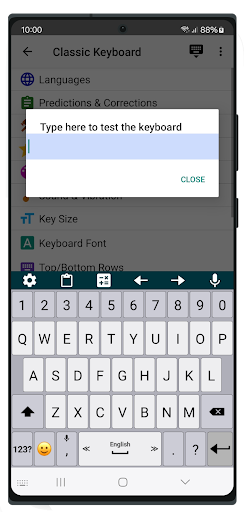
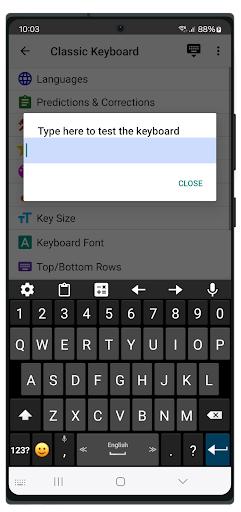
⚙️ Keyboard Customization
• Adjust the size of the keyboard keys and their font.
• Change the typing sound and vibration intensity to fit your style.
• Adjust the keyboard size and font for a more personalized experience.
📚 Dictionaries & Grammar
• Customize your dictionary, benefit from word predictions and auto-corrections.
• Improve typing accuracy with suggested typing corrections.
• Set up custom shortcuts to easily insert your favorite phrases.
⚡ Typing Features
• Type faster with swipe typing.
• Convert speech to text instantly with voice typing.
• Set up your typing preferences for faster and more efficient typing (e.g., adjust delete speed, use volume buttons to …
Read the full description
⚙️ Keyboard Customization • Adjust the size of the keyboard keys and their font. • Change the typing sound and vibration intensity to fit your style. • Adjust the keyboard size and font for a more personalized experience. 📚 Dictionaries & Grammar • Customize your dictionary, benefit from word predictions and auto-corrections. • Improve typing accuracy with suggested typing corrections. • Set up custom shortcuts to easily insert your favorite phrases. ⚡ Typing Features • Type faster with swipe typing. • Convert speech to text instantly with voice typing. • Set up your typing preferences for faster and more efficient typing (e.g., adjust delete speed, use volume buttons to move the cursor backward and forward, double space to period and more). 😄 Emoji Keyboard Features • Resize the emoji keyboard screen to your preference. • Access the latest emojis with the emoji keyboard, always up-to-date. • Quickly switch between typing and the emoji keyboard for fast emoji access. • 🎨 Customizable Themes • Personalize the look and theme of your keyboard design. • Choose your favorite theme from a variety of unique themes in Classic Keyboard. • Set a personal background photo (available for premium users) to make your keyboard truly unique. 🗣️ Gesture Controls • Set up custom gestures to perform quick actions, like swiping the spacebar up to open a special utility keyboard. 💡 Tips • Swipe the spacebar left or right to quickly switch between languages. • Hold or double-tap the shift key for "caps lock." • Hold the emoji button to open a text-based emoji popup. • Show hidden symbols by long-pressing keys (enable in Settings → Themes → Show hidden symbols). 🌍 Multilingual Support • Type in multiple languages and switch languages with ease: Afrikaans (Afrikaans) Arabic (العربية) Armenian (հայերեն) Basque (Euskara) Belarusian (Беларуская) Bengali (বাঙালি) Bulgarian (български) Catalan (Català) Croatian (Hrvatski) Czech (čeština) Danish (Dansk) Dutch (Nederlands) English Esperanto (Esperanto) Finnish (Suomi) French (Français) Georgian (ქართული) German (Deutsch) Greek (ελληνικά) Hebrew (עברית) Hindi (हिन्दी) Hungarian (Magyar) Icelandic (íslensku) Indonesian (bahasa Indonesia) Italian (Italiano) Kurdish (Kurdî, کوردی) Latvian (Latviešu) Lithuanian (Lietuvių) Luxembourgish (lëtzebuergesch) Malayalam (മലയാളം) Norwegian (Nynorsk) Persian (فارسی) Polish (Polski) Portuguese (Português) Romanian (Română) Russian (Pусский) Serbian (српски / srpski) Sinhala (සිංහල) Slovak (Slovenčina) Slovenian (Slovenščina) Songhay (Songhay) Spanish (Español) Swedish (Svenska) Tamil (தமிழ்) Tatar (Tatarça) Turkish (Türkçe) Thai (ไทย) Ukrainian (Українська) Urdu (اردو)
Installs, last 30 days Measured
Exact Google Play install counts, collected daily
Ratings
142,320 ratings, 4,475 reviews
- 5 ★55%
- 4 ★14%
- 3 ★11%
- 2 ★6.2%
- 1 ★14%
Recent reviews
Latest public reviews from the store
- 13 Jan 2025
Good
- 6 Feb 2024
Great
- 2 Apr 2023
2years
- 7 Jun 2021
Good for L&T employees
Top chart positions
Latest Google Play chart ranks by country, last 10 days
Not in any tracked top chart in the last 10 days.
Classic Big Keyboard history
Release, install milestones, listing and store changes
- Reached 10,000,000+ installs 21 Dec 2019
- Reached 5,000,000+ installs 24 Jun 2018
- First released on the store 14 Oct 2016
Update frequency
How often Classic Big Keyboard ships a new version, month by month
5 updates in the last 12 months. More often than most similar apps: they shipped a median of 4 updates in the same year.
Recent versions
Current version 10.3
- Version 10.36 Oct 2026
1. New themes and customization studio. 2. Simple handle for quick keyboard size and font adjustments. 3. Direct access to a full number pad from the symbols layout. 4. Individual per-language settings for secondary long-press key symbols. 5. General bug fixes and performance enhancements.
- Version 10.115 Jul 2026
1. Unicode 17.0 Support: Added the latest emojis. 2. New Symbols Layout: Instantly access hundreds of new symbols. 3. Multi-Column Clipboard: Layout automatically adapts to your screen width and orientation. 4. Premium users: Improve experience. 5. Italian: Smarter suggestions. 6. Bug Fixes: Performance and stability improvements.
- Version 10.05 Jun 2026
1 Row customization: build your own top and bottom keyboard rows with custom keys, actions, and popup characters. 2. Add many more symbols to the "All" symbols screen. 3. Fixes
- Version 9.927 Mar 2026
1. Enhanced Auto-Correction: Improved accuracy for automatic text corrections. (Note: Please enable this feature in Settings). 2. Data Management: Added new Backup and Restore options, accessible via the three-dot menu on the Settings page. 3. Bug Fix: Resolved an issue where text suggestions remained active after being disabled. 4. Improve translations
Listing keywords
Words and phrases Classic Big Keyboard repeats most in its store listing
Top phrases: emoji keyboard (4), quickly switch between (2), set up custom (2), show hidden symbols (2), classic keyboard (2).
Highlighted words also appear in the title. Counts cover the title, short description and description.
Business model and tech
From the store listing, the SDKs in the app package and its declared permissions
- Business model
- Free to downloadIn-app purchasesShows ads
- Built with
- No cross-platform framework or game engine detected
- Ad networks (3)
- AdMobAppLovinFacebook Audience Network
- Subscriptions and payments
- Google Play billing
- Attribution and measurement
- Open Measurement
- Analytics and crash reports
- Firebase
- Sensitive access
- Photos, videos and filesAdvertising ID
4 ad, attribution and analytics SDKs detected. SDKs are read from the app package and permissions from the store listing, so code that loads later is not seen.
Technology
26 SDKs found in the app package
Ad networks
Advertising and install-attribution SDKs found in the app package
- AdMob
- AppLovin
- Facebook Audience Network
- Open Measurement
19 permissions
0 special access, 3 sensitive, 16 standard
- Change or delete shared storageSensitive
- Read shared storageSensitive
- Show notificationsPOST_NOTIFICATIONSSensitive
- Ad attribution (Privacy Sandbox)ACCESS_ADSERVICES_ATTRIBUTIONStandard
- Ad topics (Privacy Sandbox)ACCESS_ADSERVICES_TOPICSStandard
- Read how it was installed (install referrer)BIND_GET_INSTALL_REFERRER_SERVICEStandard
- Read the advertising IDAD_IDStandard
- Read the advertising ID (Privacy Sandbox)ACCESS_ADSERVICES_AD_IDStandard
- Control vibrationStandard
- Keep the phone awakeStandard
- Run a foreground serviceFOREGROUND_SERVICEStandard
- Full internet accessStandard
Compliance
What the listing and the app package show
- Store status
- Live
- Upkeep
- Updated 6 Oct 2026
- Registered in
- Israel
- Privacy policy
- Linked on the listing
- Advertising
- Shows ads
- In-app purchases
- Offered
- Age rating
- Mature 17+
- Sensitive permissions
- 3 sensitive of 19
- Location access
- No
- Camera and microphone
- Neither
Apps like Classic Big Keyboard
HaloVPN: Fast Secure VPN ProxyHalo Online31.9M installs★ 4.53
Authenticator App - SafeAuthSafeAuth Services.37.3M installs★ 4.33
Pawxy - Fast VPN & Web BrowserPawxy Inc.9.9M installs★ 4.63
Mi Movistar ColombiaMovistar Colombia16.5M installs★ 3.54
Language Translator iGlotTRANSLATE14M installs★ 4.64
QRscanner: Barcode & QR appLyrebird Studio Teknoloji Limited Şirketi30.2M installs★ 4.5
IMEI tracker find my deviceHammer Security - Phone Anti-Theft systems10.2M installs★ 4.2
Electrodoc - electronics toolsIODEMA Srl15.7M installs★ 4.65
TurboSpeed: Game Mode FPSSTVN29.8M installs★ 4.31
Classic Big Keyboard: questions and answers
How many downloads does Classic Big Keyboard have?
Classic Big Keyboard has 21,335,663 installs on Google Play, measured from the store's own count on 19 Nov 2026.
Who makes Classic Big Keyboard?
Classic Big Keyboard is published by Apps Technologies, a developer based in IL.
When was Classic Big Keyboard last updated?
The latest version (10.3) was released on 6 Oct 2026.
Is Classic Big Keyboard free?
Yes. Classic Big Keyboard is free to download and offers in-app purchases, and it shows ads.
Is Classic Big Keyboard still available?
Yes. Classic Big Keyboard is live on Google Play as of 19 Nov 2026.
Track Classic Big Keyboard and its competitors
Watch any app for new versions, rating drops, chart moves and removals. Free plan, no card.