
Classic eReader Lite
Classic eReader is a simple and intuitive app for reading books in epub format.
- Installs
- 1.25K
- Measured
- Rating
- —
- Ratings
- —
- Version
- Varies with device
- Updated 27 Mar 2023
- Released
- 26 Jan 2020
- Tracked since 11 May 2026
- Size
- 7 MB
- Needs 5.0
Screenshots


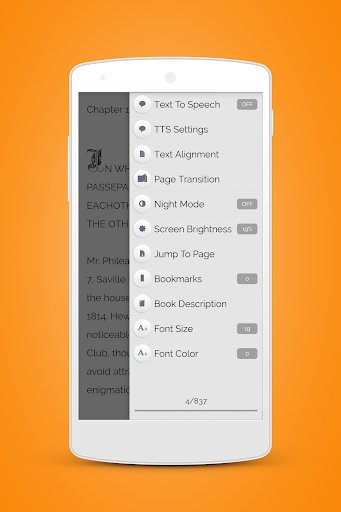


About Classic eReader Lite
The description on the store listing
This is the free version (with ads) of Classic eReader. To get the premium app with NO ADS! 🎉, go to:
https://market.android.com/details?id=com.bart.ereader
Classic eReader - your favorite free Android book reader, is a simple and intuitive ereader app for reading books in epub format.
Some features of the Classic eReader:
✔ redesigned user interface, optimized for phones, 7'' and 10'' tablets,
✔ TalkBack support,
✔ Dropbox synchronization option so you can read your favorite books on any of your android devices (Dropbox account is needed to be able to use this option),
✔ full dark mode theme customizable from Settings → General → Night Mode,
✔ organizes your books …
Read the full description
This is the free version (with ads) of Classic eReader. To get the premium app with NO ADS! 🎉, go to: https://market.android.com/details?id=com.bart.ereader Classic eReader - your favorite free Android book reader, is a simple and intuitive ereader app for reading books in epub format. Some features of the Classic eReader: ✔ redesigned user interface, optimized for phones, 7'' and 10'' tablets, ✔ TalkBack support, ✔ Dropbox synchronization option so you can read your favorite books on any of your android devices (Dropbox account is needed to be able to use this option), ✔ full dark mode theme customizable from Settings → General → Night Mode, ✔ organizes your books in (multilevel) collections, ✔ highlighting and notes, ✔ library icons view or book covers view options, ✔ library search option for books and collections, ✔ multi-select feature (select multiple books and/or collections to move or delete), ✔ multiple book import (you can select multiple folders and/or books to import in your library), ✔ online library with most read books from the public domain (free books in English, for all ages), ✔ statistics with time spent reading per month, ✔ built in Text To Speech (TTS - reads the text in the book aloud). Supported languages: German, English (+localizations), Spanish (+localizations), French (+localizations), Japanese, Korean, Dutch, Polish, Portuguese (+localizations), Russian, Chinese (+localizations), (*) ✔ option to customize the TTS voice pitch and speech rate, ✔ text align, text color and font resize options, ✔ option to change the page transition mode (7 available transitions at the moment), ✔ night mode reading feature, ✔ screen brightness change feature, ✔ jump to page option, ✔ bookmarks (add, manage and go to bookmark), ✔ book description, ✔ page progress, ✔ full screen reading mode, ✔ you can open epub files in Classic eReader from any external file explorer, ✔ option to add book to "My Library" when opening it from "Find On Device" or an external file explorer, ✔ sorting options for books and collections in "My Library" (setup from Settings → General → My Library), ✔ option to open last read book on app start (setup from Settings → General → Read). For issues/bugs and new features requests, please send an email to: [email protected] ________________ <p>(*) The Text To Speech feature is built upon Google Text To Speech ( Google TTS ) engine. For a complete list of supported languages, go to: https://market.android.com/details?id=com.google.android.tts You can install / update Google TTS directly from the Classic eReader app (if your device has access to Google Play Store), from the 'Settings' section.</p>
Installs since 28 Aug 2026 Measured
Exact Google Play install counts, collected daily
Ratings
- 5 ★0.0%
- 4 ★0.0%
- 3 ★0.0%
- 2 ★0.0%
- 1 ★0.0%
Recent reviews
Latest public reviews from the store
- 6 Jan 2026
Great app! Very useful!
Top chart positions
Latest Google Play chart ranks by country, last 10 days
Not in any tracked top chart in the last 10 days.
Classic eReader Lite history
Release, install milestones, listing and store changes
- Reached 1,000+ installs 27 Mar 2023
- Reached 500+ installs 6 Apr 2021
- Reached 100+ installs 28 Aug 2020
- Reached 50+ installs 28 Jul 2020
- Reached 10+ installs 30 Mar 2020
- Reached 5+ installs 29 Feb 2020
- First released on the store 26 Jan 2020
Recent versions
Current version Varies with device
- Version 3.330 Mar 2021
- Version 3.123 Oct 2020
- Version 3.01 Oct 2020
- Version 2.816 Sep 2020
Listing keywords
Words and phrases Classic eReader Lite repeats most in its store listing
Top phrases: classic ereader (8), text to speech (3), settings general (3), books and collections (2), books in epub (2).
Highlighted words also appear in the title. Counts cover the title, short description and description.
Business model and tech
From the store listing, the SDKs in the app package and its declared permissions
- Business model
- Free to downloadShows ads
- Built with
- No cross-platform framework or game engine detected
- Ad networks (1)
- AdMob
- Analytics and crash reports
- FirebaseGoogle Analytics
- Sensitive access
- Nearby devicesAdvertising ID
3 ad, attribution and analytics SDKs detected. SDKs are read from the app package and permissions from the store listing, so code that loads later is not seen.
Technology
20 SDKs found in the app package
Ad networks
Advertising and install-attribution SDKs found in the app package
- AdMob
13 permissions
1 special access, 1 sensitive, 11 standard
- Set exact alarmsSCHEDULE_EXACT_ALARMSpecial access
- Show notificationsPOST_NOTIFICATIONSSensitive
- Ad attribution (Privacy Sandbox)ACCESS_ADSERVICES_ATTRIBUTIONStandard
- Ad topics (Privacy Sandbox)ACCESS_ADSERVICES_TOPICSStandard
- Read the advertising IDAD_IDStandard
- Read the advertising ID (Privacy Sandbox)ACCESS_ADSERVICES_AD_IDStandard
- Keep the phone awakeStandard
- Run a foreground serviceFOREGROUND_SERVICEStandard
- Pair with Bluetooth devicesStandard
- Full internet accessStandard
- See network connectionsStandard
- See Wi-Fi connectionsStandard
Compliance
What the listing and the app package show
- Store status
- Live
- Upkeep
- No update since 27 Mar 2023
- Registered in
- Cyprus
- Privacy policy
- Linked on the listing
- Advertising
- Shows ads
- In-app purchases
- None declared
- Age rating
- Everyone
- Sensitive permissions
- 1 sensitive, 1 special access of 13
- Location access
- No
- Camera and microphone
- Neither
Apps like Classic eReader Lite
Korean Bible - 한글성경AppsForLife Ltd.8.1K installs★ 4.57
गुरुचरित्र / GurucharitraNishikant Dipak Padave99.2K installs★ 4.6
Dakhód Iápi Wičhóie WówapiDakhota Iapi Okhodakichiye3.1K installs★ 4.84
US Historical DocumentsWorkman Consulting LLC2.1K installs★ 4.36
STAT!RefTeton Data Systems18K installs★ 4.5
Stations of the CrossForget Me Not Apps17.9K installs★ 4.75
教檢與教甄題庫MENG CHIA TSAI17.3K installs★ 5.0
Terço Mariano em ÁudioGloriah Apps11.6K installs★ 4.4
Китоби Тоҷикон Б.Ғафуров китобAhliddin Zardakov22.2K installs★ 4.1
Classic eReader Lite: questions and answers
How many downloads does Classic eReader Lite have?
Classic eReader Lite has 1,255 installs on Google Play, measured from the store's own count on 20 Nov 2026.
Who makes Classic eReader Lite?
Classic eReader Lite is published by Bartolomei Development, a developer based in CY.
When was Classic eReader Lite last updated?
The latest version (Varies with device) was released on 27 Mar 2023.
Is Classic eReader Lite free?
Yes. Classic eReader Lite is free to download, and it shows ads.
Is Classic eReader Lite still available?
Yes. Classic eReader Lite is live on Google Play as of 20 Nov 2026.
Track Classic eReader Lite and its competitors
Watch any app for new versions, rating drops, chart moves and removals. Free plan, no card.