
Clock
Alarm clock, world clock, timer, stopwatch. Attractive design and ease of use.
- Installs
- 23.55K
- Measured
- Rating
- 3.81
- Ratings
- 118
- 18 reviews
- Version
- 1.3.1
- Updated 30 Oct 2026
- Released
- 5 Feb 2020
- Tracked since 11 May 2026
- Size
- 8 MB
- Needs 4.4
Screenshots


About Clock
The description on the store listing
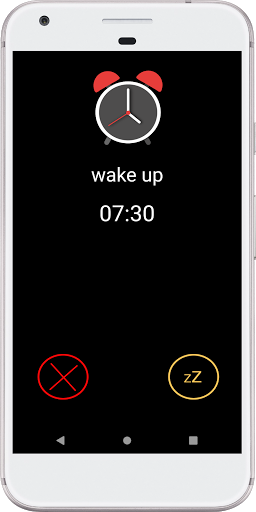
<b>Alarm clock</b>, <b>World clock</b>, <b>Timer</b>, <b> Stopwatch</b>. Attractive design and ease of use. You can <b>turn off or postpone</b> the alarm clock by <b>turning on the room light</b>, <b>shaking the phone</b> and other options. <b>Select an mp3 or music file as alarm tone</b>, use the <b>camera flash light to wake</b> you up before the alarm starts ringing and many other features.
<b>Alarm clock features:</b>
✓ <b>Turn off the alarm when you turn on the light in the room</b>, so it will be easier to turn off the alarm, especially if you prefer to have the telephone not too close to where you sleep. In addition, also being the light of the room turned on will help you …
Read the full description
<b>Alarm clock</b>, <b>World clock</b>, <b>Timer</b>, <b> Stopwatch</b>. Attractive design and ease of use. You can <b>turn off or postpone</b> the alarm clock by <b>turning on the room light</b>, <b>shaking the phone</b> and other options. <b>Select an mp3 or music file as alarm tone</b>, use the <b>camera flash light to wake</b> you up before the alarm starts ringing and many other features. <b>Alarm clock features:</b> ✓ <b>Turn off the alarm when you turn on the light in the room</b>, so it will be easier to turn off the alarm, especially if you prefer to have the telephone not too close to where you sleep. In addition, also being the light of the room turned on will help you not stay asleep ✓ <b>Volume increase gradually</b> to wake you up gently ✓ <b>Turn off the alarm by shaking the device</b> ✓ <b>Use the external volume button</b> to turn off or postpone the alarm ✓ <b>Select from the different tones of the device</b> to sound like an alarm or <b>select an mp3 or music file</b> to wake you up with your favorite music ✓ Choose between the alarm <b>sounds, vibrates or both</b> ✓ Ability to <b>turn off or snooze</b> the alarm and sound again in a few minutes ✓ <b>Set the volume</b> you want the alarm to sound ✓ Alarm can <b>use the camera flash light</b> turning on or blinking helping you wake up. You can also set the time between the flash light starts and the alarm starts ringing, this way you can wake up gently or if you do not sleep alone avoid waking the other person. ✓ <b>Name your alarms</b> to differentiate them ✓ <b>Set the time</b> that will <b>remain sounding</b> the alarm ✓ <b>Set the time</b> that the alarm will <b>sound again</b> if you snooze it <b>World Clock Features:</b> ✓ Attractive clock, you can see the local time in <b>digital and analog</b> format ✓ You can set to display the hours in <b>24-hour or 12-hour</b> format ✓ Show <b>current date</b> ✓ You can add <b>any city in the world </b> to view its time <b>Timer Features:</b> ✓ <b>Multiple timers</b> ✓ <b>Preset timer buttons</b> so with a single finger movement you can set your timer quickly ✓ You can set your <b>music tone</b> and <b>volume</b> to alert you when the timer is full ✓ Select an <b>mp3 or music file</b> as a timer tone <b>Stopwatch Features:</b> ✓ Possibility of adding <b>laps</b> to your stopwatch ✓ Possibility to <b>pause</b> your stopwatch ✓ <b>Graphically</b> show the difference between your <b>current lap</b> and the <b>previous lap</b> ✓ Possibility to <b>share</b> with your contacts by Email, WhastsApp, Twitter... your results <b>Important Notes:</b> ✓ The phone must be on for the alarm to work.. ✓ Task killer applications can interfere with alarm clock applications. If you notice some problem with alarms that are not activated and you use task-killing applications, you must add Alarm Clock to the white list. Alarm clock is just a tool, the responsible for waking you up is yourself. We are not responsible for a malfunction or misuse of the application. If you notice any error you can write to [email protected] and we will try to solve it as soon as possible.
Installs since 29 Aug 2026 Measured
Exact Google Play install counts, collected daily
Ratings
118 ratings, 18 reviews
- 5 ★57%
- 4 ★11%
- 3 ★1.8%
- 2 ★13%
- 1 ★18%
Recent reviews
Latest public reviews from the store
No reviews in our sample for this app yet.
Top chart positions
Latest Google Play chart ranks by country, last 10 days
Not in any tracked top chart in the last 10 days.
Clock history
Release, install milestones, listing and store changes
- Reached 10,000+ installs 30 Aug 2020
- Reached 5,000+ installs 23 May 2020
- Reached 1,000+ installs 28 Mar 2020
- Reached 500+ installs 14 Mar 2020
- Reached 100+ installs 18 Feb 2020
- Reached 50+ installs 15 Feb 2020
- First released on the store 5 Feb 2020
Update frequency
How often Clock ships a new version, month by month
1 updates in the last 12 months. More often than most similar apps: they shipped a median of 0 updates in the same year.
Recent versions
Current version 1.3.1
- Version 1.3.130 Oct 2026
Refreshed design and usability improvements for a clearer, simpler, and more intuitive experience.
- Version 1.1.023 Nov 2022
- Version 1.0.313 Apr 2022
- Version 1.0.122 Feb 2020
Listing keywords
Words and phrases Clock repeats most in its store listing
Top phrases: alarm clock (7), turn off (6), mp3 or music (3), off the alarm (3), select an mp3 (3).
Highlighted words also appear in the title. Counts cover the title, short description and description.
Business model and tech
From the store listing and declared permissions
- Business model
- Free to download
- Sensitive access
- CameraPhotos, videos and files
17 permissions
3 special access, 4 sensitive, 10 standard
- Change Do Not DisturbACCESS_NOTIFICATION_POLICYSpecial access
- Set exact alarmsSCHEDULE_EXACT_ALARMSpecial access
- Show full-screen alertsUSE_FULL_SCREEN_INTENTSpecial access
- Take photos and videosSensitive
- Read music and audioREAD_MEDIA_AUDIOSensitive
- Read shared storageSensitive
- Show notificationsPOST_NOTIFICATIONSSensitive
- Control the flashlightStandard
- Control vibrationStandard
- Keep the phone awakeStandard
- Run a foreground serviceFOREGROUND_SERVICEStandard
- Start when the phone turns onStandard
Compliance
What the listing and the app package show
- Store status
- Live
- Upkeep
- Updated 30 Oct 2026
- Privacy policy
- Linked on the listing
- Advertising
- No ads declared
- In-app purchases
- None declared
- Age rating
- Everyone
- Sensitive permissions
- 4 sensitive, 3 special access of 17
- Location access
- No
- Camera and microphone
- Camera
Apps like Clock
Remote Control For Trane ACBotnoke33.9K installs★ 1.89
Username CheckerLuiz Santos25.6K installs★ 3.96
Amoa: easy scanner & inventoryThe Mobile-First Company88.2K installs★ 3.86
Fake GPS Go Pro Location SpoofAndroiDSC3.4K installs★ 4.42
Big Button Keyboard: Big Keys9appstech23.9K installs★ 3.99
Bluetooth Auto ConnectDoctor-iT27.4K installs★ 4.0
TogglDevdpkay8.2K installs★ 4.4
AI Prompt Generator AppZunaira Sardar51.3K installs★ 3.89
Efile Scan-PDF ScanCHANDLER SERVICES LLC12.3K installs★ 4.48
Clock: questions and answers
How many downloads does Clock have?
Clock has 23,552 installs on Google Play, measured from the store's own count on 14 Nov 2026.
Who makes Clock?
Clock is published by adrianismyname.
When was Clock last updated?
The latest version (1.3.1) was released on 30 Oct 2026.
Is Clock free?
Yes. Clock is free to download.
Is Clock still available?
Yes. Clock is live on Google Play as of 14 Nov 2026.
Track Clock and its competitors
Watch any app for new versions, rating drops, chart moves and removals. Free plan, no card.