
Clock
Manage time with alarms, world clock, timer & stopwatch. Set alarms after calls!
- Installs
- 3.35K
- Measured
- Rating
- —
- Ratings
- —
- Version
- Varies with device
- Updated 3 Sep 2025
- Released
- 18 Feb 2025
- Tracked since 12 May 2026
- Size
- —
Screenshots



About Clock
The description on the store listing
Welcome to Clock: Alarm Clock & Timer
The ultimate time management app for Android! Stay productive with a feature-packed clock designed to meet all your needs. Whether you need a stylish clock interface, flexible alarm customization, or advanced time-tracking tools, this app has everything you need.
Key Features:
• Alarm: Set and customize alarms with different ringtones and settings.
• World Clock: Easily access local times by adding cities across various time zones.
• Timer: Use preset timers for daily tasks or create your own.
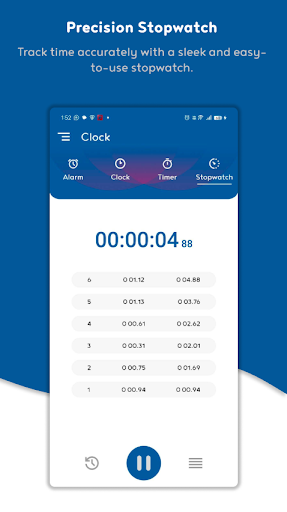
• Stopwatch: Accurately track time intervals for any activity.
• After-Call Screen: View the time and instantly set an alarm after every call. …
Read the full description
Welcome to Clock: Alarm Clock & Timer The ultimate time management app for Android! Stay productive with a feature-packed clock designed to meet all your needs. Whether you need a stylish clock interface, flexible alarm customization, or advanced time-tracking tools, this app has everything you need. Key Features: • Alarm: Set and customize alarms with different ringtones and settings. • World Clock: Easily access local times by adding cities across various time zones. • Timer: Use preset timers for daily tasks or create your own. • Stopwatch: Accurately track time intervals for any activity. • After-Call Screen: View the time and instantly set an alarm after every call. After-Call Screen! Quickly set alarms, start the stopwatch, or create custom timers right after a call ends. No need to switch apps—stay organized and manage your time with a single tap. Whether you're setting reminders, timing workouts, or preparing for your next meeting, the After-Call Screen makes time management effortless. Help Shape the Future of Alarm Clock! Your feedback matters! Share your ideas and feature requests via email or comments, and help us improve Alarm Clock to better serve your needs.
Installs since 29 Aug 2026 Measured
Exact Google Play install counts, collected daily
Ratings
- 5 ★0.0%
- 4 ★0.0%
- 3 ★0.0%
- 2 ★0.0%
- 1 ★0.0%
Recent reviews
Latest public reviews from the store
- 18 May 2026
good
- 16 May 2026
still haven't opened the app lol
- 16 May 2026
going to sleep
- 15 May 2026
good
What reviewers bring up
Topics mentioned in the latest 13 reviews, by how many reviews mention them
Liked in good reviews (10 reviews)
No topic comes up twice.
Raised in bad reviews (3 reviews)
- ads 2
Top chart positions
Latest Google Play chart ranks by country, last 10 days
Not in any tracked top chart in the last 10 days.
Clock history
Release, install milestones, listing and store changes
- Reached 1,000+ installs 22 Jun 2025
- Reached 500+ installs 13 Apr 2025
- First released on the store 18 Feb 2025
Recent versions
Current version Varies with device
- Version 1.63 Sep 2025
- Version 1.57 Aug 2025
- Version 1.430 Jul 2025
- Version 1.314 Apr 2025
Listing keywords
Words and phrases Clock repeats most in its store listing
Top phrases: after call (4), after call screen (3), alarm clock (3), call screen (3), clock timer (2).
Highlighted words also appear in the title. Counts cover the title, short description and description.
Business model and tech
From the store listing and declared permissions
- Business model
- Free to downloadShows ads
- Sensitive access
- No sensitive permission declared
Compliance
What the listing and the app package show
- Store status
- Live
- Upkeep
- Updated 3 Sep 2025
- Registered in
- India
- Privacy policy
- Linked on the listing
- Advertising
- Shows ads
- In-app purchases
- None declared
- Age rating
- Everyone
Apps like Clock
들어서 화면켜기Won3.5K installs★ 4.0
Height PredictionEcliptic App Ventures45.9K installs★ 2.4
Speicers`Pro VPNEldiablolucifer202021.2K installs★ 4.14
Lightning Tracker with AlertsYaksh Software4.3K installs★ 3.0
Mana Pathi (Unit Converter)Shirish Koirala2.2K installs★ 4.6
Multi-tab Calc - A simple app.Naoyuki Rikiji1.3K installs★ 5.0
Photo Recovery PlusBillApps7.1K installs★ 4.53
Just Silence. Scheduled.Akid Soft1.6K installs★ 5.0
- WoWp AssistantВиталий Робиновский2K installs★ 4.2
Clock: questions and answers
How many downloads does Clock have?
Clock has 3,345 installs on Google Play, measured from the store's own count on 7 Nov 2026.
Who makes Clock?
Clock is published by Solution Photo Apps, a developer based in IN.
When was Clock last updated?
The latest version (Varies with device) was released on 3 Sep 2025.
Is Clock free?
Yes. Clock is free to download, and it shows ads.
Is Clock still available?
Yes. Clock is live on Google Play as of 7 Nov 2026.
Track Clock and its competitors
Watch any app for new versions, rating drops, chart moves and removals. Free plan, no card.