
Clock, Date and Weather Widget
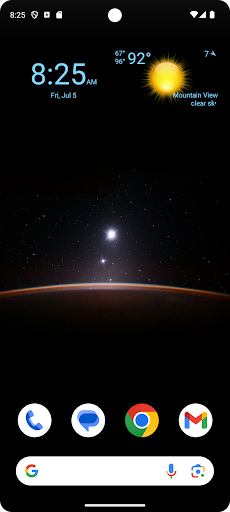
Display digital clock, date and current weather on your home screen.
- Installs
- 263K
- Measured
- Rating
- 3.7
- Ratings
- 573
- 47 reviews
- Version
- 1.1.4
- Updated 27 Aug 2026
- Released
- 27 Apr 2023
- Tracked since 13 May 2026
- Size
- —
Screenshots



About Clock, Date and Weather Widget
The description on the store listing
Display digital clock, date and current weather on your home screen.
Features:
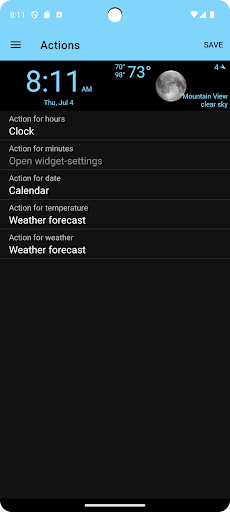
- Select widget click actions: tap on widget to show weather forecast, widget settings or pick any installed application
- Show the current weather for the device location or choose a specific location
- Show current weather, weather forecast and air quality
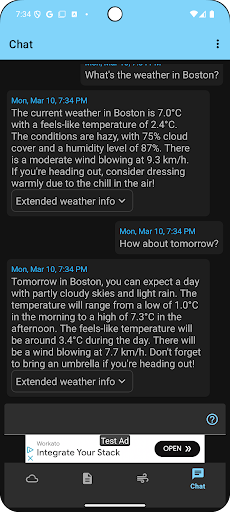
- Weather Assistant, ask questions about the weather and get weather-related recommendations for any location worldwide
- Widget preview during setup
- Material design UI
- Select widget text- and background-color from the material design color palettes.
Add the widget to your home screen:
- On a Home screen, touch and hold an empty space.
- …
Read the full description
Display digital clock, date and current weather on your home screen. Features: - Select widget click actions: tap on widget to show weather forecast, widget settings or pick any installed application - Show the current weather for the device location or choose a specific location - Show current weather, weather forecast and air quality - Weather Assistant, ask questions about the weather and get weather-related recommendations for any location worldwide - Widget preview during setup - Material design UI - Select widget text- and background-color from the material design color palettes. Add the widget to your home screen: - On a Home screen, touch and hold an empty space. - Tap Widgets. - Find Clock, Date and Weather Widget. - To check the list of available widgets for the app, tap the app. - Touch and hold a widget. You’ll get images of your Home screens. - Slide the widget to where you want it. Lift your finger. Tip: Touch and hold the Clock, Date and Weather Widget app and then tap Widgets. Resize a widget: - On your home screen, touch and hold the widget. - Lift your finger. - To resize, drag the dots. - When you're done, tap outside the widget.
Installs since 29 Aug 2026 Measured
Exact Google Play install counts, collected daily
Ratings
573 ratings, 47 reviews
- 5 ★53%
- 4 ★12%
- 3 ★6.7%
- 2 ★4.3%
- 1 ★24%
Recent reviews
Latest public reviews from the store
- 19 May 2026
It does its job!
- 9 May 2026
good
- 2 Apr 2026
I love the clock, date, and weather app! It keeps you up to date, all the time?
- 27 Jan 2026
I used to like it.
What reviewers bring up
Topics mentioned in the latest 50 reviews, by how many reviews mention them
Liked in good reviews (26 reviews)
- able 2
Raised in bad reviews (18 reviews)
- location 3
- weather 3
- widget 2
- date 2
- down 2
Top chart positions
Latest Google Play chart ranks by country, last 10 days
- Countries ranked
- 3
- Best rank
- #102
- Top 10 placements
- 0
- of 3 chart placements
- Average rank
- #117.7
Best countries on Google Play
- 🇬🇧 United Kingdom · Top free, Weather#102
- 🇺🇸 United States · Top free, Weather#115
- 🇮🇳 India · Top free, Weather#136
Clock, Date and Weather Widget history
Release, install milestones, listing and store changes
- Moved from Personalization to Weather 30 Jun 2025
- Reached 100,000+ installs 23 Jul 2024
- Reached 50,000+ installs 2 Nov 2023
- First released on the store 27 Apr 2023
Update frequency
How often Clock, Date and Weather Widget ships a new version, month by month
3 updates in the last 12 months. More often than most similar apps: they shipped a median of 2 updates in the same year.
Recent versions
Current version 1.1.4
- Version 1.1.427 Aug 2026
It is now possible to change the size of the clock, date, and weather on the home screen widget.
- Version 1.1.29 Jul 2026
• Hourly Forecast 4 days and Daily Forecast 16 days.
- Version 1.1.112 Mar 2026
• Hourly Forecast 4 days and Daily Forecast 16 days.
- Version 1.1.017 May 2025
Listing keywords
Words and phrases Clock, Date and Weather Widget repeats most in its store listing
Top phrases: clock date (5), home screen (5), touch and hold (4), current weather (4), date and weather (3).
Highlighted words also appear in the title. Counts cover the title, short description and description.
Business model and tech
From the store listing and declared permissions
- Business model
- Free to downloadIn-app purchasesShows ads
- Subscriptions and payments
- Google Play billing
- Sensitive access
- LocationAdvertising ID
14 permissions
0 special access, 3 sensitive, 11 standard
- Approximate locationSensitive
- Location in the backgroundACCESS_BACKGROUND_LOCATIONSensitive
- Precise locationSensitive
- Ad attribution (Privacy Sandbox)ACCESS_ADSERVICES_ATTRIBUTIONStandard
- Ad topics (Privacy Sandbox)ACCESS_ADSERVICES_TOPICSStandard
- Read the advertising IDAD_IDStandard
- Read the advertising ID (Privacy Sandbox)ACCESS_ADSERVICES_AD_IDStandard
- Keep the phone awakeStandard
- Run a foreground serviceFOREGROUND_SERVICEStandard
- Full internet accessStandard
- See network connectionsStandard
- AttestATTESTStandard
Compliance
What the listing and the app package show
- Store status
- Live
- Upkeep
- Updated 27 Aug 2026
- Registered in
- Denmark
- Privacy policy
- Linked on the listing
- Advertising
- Shows ads
- In-app purchases
- Offered
- Age rating
- Everyone
- Sensitive permissions
- 3 sensitive of 14
- Location access
- Yes, also in the background
- Camera and microphone
- Neither
Apps like Clock, Date and Weather Widget
WeatherHubDATA INFORMATION SERVICES GmbH86.3K installs★ 3.33
WeatherWatchWeatherWatch125K installs★ 2.0
Vremenska napovedmatto136K installs★ 4.2
Kustom Weather PluginKustom Industries252K installs★ 3.6
WSPA WeatherNexstar Inc.60.8K installs★ 2.38
KUTV WXSinclair Broadcast Group Inc40.3K installs★ 4.88
Daily Weather Forecast: LiveCamp Hubs44.4K installs★ 4.15
Q2 STORMTracker Weather AppThe E.W. Scripps Company30.3K installs★ 4.62
Meteo Assist - magnetic stormsValery Nikolaev71.1K installs★ 4.67
Clock, Date and Weather Widget: questions and answers
How many downloads does Clock, Date and Weather Widget have?
Clock, Date and Weather Widget has 263,478 installs on Google Play, measured from the store's own count on 14 Nov 2026.
Who makes Clock, Date and Weather Widget?
Clock, Date and Weather Widget is published by aac, a developer based in DK.
When was Clock, Date and Weather Widget last updated?
The latest version (1.1.4) was released on 27 Aug 2026.
Is Clock, Date and Weather Widget free?
Yes. Clock, Date and Weather Widget is free to download and offers in-app purchases, and it shows ads.
Is Clock, Date and Weather Widget still available?
Yes. Clock, Date and Weather Widget is live on Google Play as of 14 Nov 2026.
Track Clock, Date and Weather Widget and its competitors
Watch any app for new versions, rating drops, chart moves and removals. Free plan, no card.