
Clock Timer Vault
Hide Photos, Videos & Files in this great Clock Vault App. Simple and practical.
- Installs
- 352K
- Measured
- Rating
- 4.05
- Ratings
- 1.1K
- 9 reviews
- Version
- Varies with device
- Updated 15 Mar 2024
- Released
- 25 Jul 2021
- Tracked since 12 May 2026
- Size
- —
Screenshots



About Clock Timer Vault
The description on the store listing
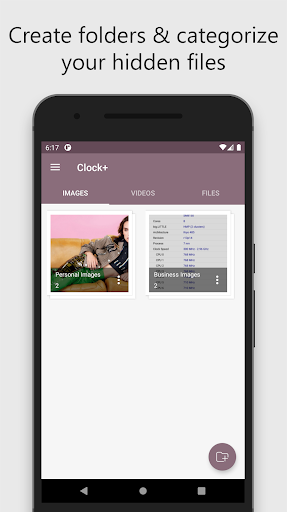
Hide Photos, Videos and Files. The app allows you to hide personal images, videos and files in hidden albums that are behind the secret clock. The app image looks like a simple clock, but it has a secret vault behind it.
☆ Hide private photos, videos and files under the watch.
☆ Access the hidden albums using time password on the clock screen of this app.
☆ Keep secret photos, videos & files hidden and safe.
The app works like normal clock.
When you enter the password you made using the timer, it will open the hidden albums.
-----------MAIN FUNCTION-----------
【Secret door】
- Disguised and discreet watch, hide private photos, videos & files.
- On the front is a watch app …
Read the full description
Hide Photos, Videos and Files. The app allows you to hide personal images, videos and files in hidden albums that are behind the secret clock. The app image looks like a simple clock, but it has a secret vault behind it. ☆ Hide private photos, videos and files under the watch. ☆ Access the hidden albums using time password on the clock screen of this app. ☆ Keep secret photos, videos & files hidden and safe. The app works like normal clock. When you enter the password you made using the timer, it will open the hidden albums. -----------MAIN FUNCTION----------- 【Secret door】 - Disguised and discreet watch, hide private photos, videos & files. - On the front is a watch app that camouflages your private files. 【Fingerprint App Lock】 - You can use your fingerprint to unlock the Secret Time vault and AppLock Fingerprint. 【Protection files】 - Turn “ON” application protection option in settings. This protects you from deleting the app and private files by mistake. -----------SPECIAL FEATURE ----------- - Clock Vault, makes it easy to protect your private files ensuring your file is safe even if your phone is lost or damaged. - This is a powerful vault gallery! Try this amazing functional photo locker to hide images, videos & files safe. - How to use Clock Lock? Step 1: Launch our Clock Vault and press the middle clock button. Step 2: Set a desired time password by hours and minutes, after press the middle button of the watch. Step 3: Now repeat the password to confirm. IMPORTANT: Do not uninstall this app before restoring your personal files, otherwise they will be lost forever. - Device administrators permission: The Clock Vault app needs device administrator permission to prevent it from being uninstalled by intruders and this app never use this permission except for uninstall prevention. Enable this Settings permission. - Accessibility service permission: Allow accessibility service permission to use App Lock so that you can use quick feature and reduce battery usage. ----------- Frequently Asked----------- 1- How to hide files for new users? Answer: Open Clock Lock app, set password and then turn on mailbox, you can upload photos, videos and files in Vaulty Gallery! 2, Forgot password. How can I reset it? To reset password you have to open our Timer lock and input 10:10 hours on the clock and press middle button. It password reset screen will open with secret question set, answer it correctly and set new password or press on button? Symbol on the screen and it will open the restart screen. Contact Us: [email protected]
Installs since 19 Jul 2026 Measured
Exact Google Play install counts, collected daily
Ratings
1,071 ratings, 9 reviews
- 5 ★56%
- 4 ★28%
- 3 ★5.5%
- 2 ★5.5%
- 1 ★5.5%
Recent reviews
Latest public reviews from the store
- 8 Jul 2024
Worth phone's space.
- 21 Jul 2023
Good Application, only give catagory wise filter option.
- 7 Mar 2022
It's a fabulous app but I rated it 4 because I cannot view my cumulative total inflow & outflow from one end rather I can only it monthly. Therefore, please if you can add that feature it will be good. Also add autobackup.
- 9 Dec 2021
I swear your app has made taking account of my expenses easier. Thank you so much for creating this app. I really do recommend, especially if you're always too busy to capture expenses when necessary
Top chart positions
Latest Google Play chart ranks by country, last 10 days
Not in any tracked top chart in the last 10 days.
Clock Timer Vault history
Release, install milestones, listing and store changes
- Reached 100,000+ installs 12 Oct 2022
- Reached 50,000+ installs 11 May 2022
- Reached 10,000+ installs 10 Nov 2021
- Reached 5,000+ installs 13 Oct 2021
- First released on the store 25 Jul 2021
Recent versions
Current version Varies with device
- Version 1.1.515 Mar 2024
- Version 1.1.41 Dec 2023
- Version 1.1.325 Aug 2023
- Version 1.1.24 Nov 2022
Listing keywords
Words and phrases Clock Timer Vault repeats most in its store listing
Top phrases: photos videos (6), videos and files (4), clock vault (4), videos files (4), photos videos files (3).
Highlighted words also appear in the title. Counts cover the title, short description and description.
Business model and tech
From the store listing, the SDKs in the app package and its declared permissions
- Business model
- Free to downloadIn-app purchasesShows ads
- Built with
- No cross-platform framework or game engine detected
- Ad networks (2)
- AdMobUnity Ads
- Subscriptions and payments
- Google Play billing
- Analytics and crash reports
- Firebase
- Sensitive access
- CameraPhotos, videos and filesAdvertising ID
3 ad, attribution and analytics SDKs detected. SDKs are read from the app package and permissions from the store listing, so code that loads later is not seen.
Technology
39 SDKs found in the app package
Ad networks
Advertising and install-attribution SDKs found in the app package
- AdMob
- Unity Ads
14 permissions
1 special access, 3 sensitive, 10 standard
- Manage all filesMANAGE_EXTERNAL_STORAGESpecial access
- Take photos and videosSensitive
- Change or delete shared storageSensitive
- Read shared storageSensitive
- Read how it was installed (install referrer)BIND_GET_INSTALL_REFERRER_SERVICEStandard
- Read the advertising IDAD_IDStandard
- Keep the phone awakeStandard
- Run a foreground serviceFOREGROUND_SERVICEStandard
- Start when the phone turns onStandard
- Use the fingerprint readerUSE_FINGERPRINTStandard
- Full internet accessStandard
- See network connectionsStandard
Compliance
What the listing and the app package show
- Store status
- Live
- Upkeep
- No update since 15 Mar 2024
- Registered in
- Brazil
- Privacy policy
- Linked on the listing
- Advertising
- Shows ads
- In-app purchases
- Offered
- Age rating
- Everyone
- Sensitive permissions
- 3 sensitive, 1 special access of 14
- Location access
- No
- Camera and microphone
- Camera
Apps like Clock Timer Vault
Hide My phone numberAHMED SOUSANE554K installs★ 2.89
Remote Control for Daikin ACMobile-Care201K installs★ 3.29
AlphaVPN - Proxy VPNAlpha VPN & Proxy Team84K installs★ 4.18
Date and TimePoint App597K installs★ 3.63
JawdatiARPCE Algérie362K installs★ 3.29
Sticker Maker StudioBlazing App Studio308K installs★ 4.27
Auto Connect Bluetooth FinderGalaxy studio apps228K installs★ 4.55
UgreenAudioUgreen Group GmbH352K installs★ 2.96
هوش مصنوعی فارسی | هوش پلاسMatrix.Group265K installs★ 4.05
Clock Timer Vault: questions and answers
How many downloads does Clock Timer Vault have?
Clock Timer Vault has 351,899 installs on Google Play, measured from the store's own count on 15 Nov 2026.
Who makes Clock Timer Vault?
Clock Timer Vault is published by GSW Connect, a developer based in BR.
When was Clock Timer Vault last updated?
The latest version (Varies with device) was released on 15 Mar 2024.
Is Clock Timer Vault free?
Yes. Clock Timer Vault is free to download and offers in-app purchases, and it shows ads.
Is Clock Timer Vault still available?
Yes. Clock Timer Vault is live on Google Play as of 15 Nov 2026.
Track Clock Timer Vault and its competitors
Watch any app for new versions, rating drops, chart moves and removals. Free plan, no card.