
Clock Widget
Beautiful, customisable clocks for your home screen.
- Installs
- 594K
- Measured
- Rating
- 4.12
- Ratings
- 1.9K
- 47 reviews
- Version
- 5.1.0
- Updated 18 Oct 2026
- Released
- 7 Nov 2023
- Tracked since 12 May 2026
- Size
- —
Screenshots


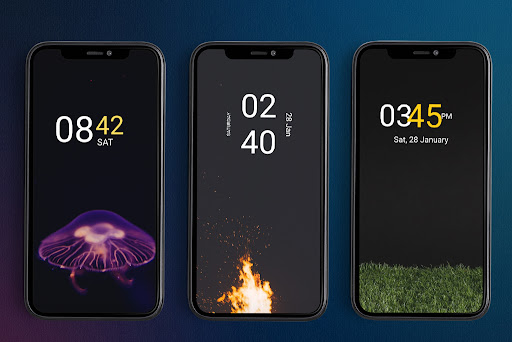


About Clock Widget
The description on the store listing
Clock Widget: Your Perfect Timepiece, Right on Your Home Screen
Searching for the ideal clock widget to personalize your Android home screen? Look no further! Clock Widget offers a beautiful and functional collection of both analog and digital clocks, customizable to perfectly match your style.
A Clock for Every Taste:
* Classic Analog: Choose from elegant round or square analog clock faces, reminiscent of traditional timepieces. Customize the hands and background to create a timeless look.
* Modern Digital: Prefer a sleek, modern feel? Our digital clock widgets display time and date in a clear, easy-to-read format. Personalize colors, fonts, and even toggle between 12/24-hour …
Read the full description
Clock Widget: Your Perfect Timepiece, Right on Your Home Screen Searching for the ideal clock widget to personalize your Android home screen? Look no further! Clock Widget offers a beautiful and functional collection of both analog and digital clocks, customizable to perfectly match your style. A Clock for Every Taste: * Classic Analog: Choose from elegant round or square analog clock faces, reminiscent of traditional timepieces. Customize the hands and background to create a timeless look. * Modern Digital: Prefer a sleek, modern feel? Our digital clock widgets display time and date in a clear, easy-to-read format. Personalize colors, fonts, and even toggle between 12/24-hour formats. Effortless Customization: Tailor your clock widget to perfectly complement your home screen theme. Adjust colors for hours, minutes, weekdays, and months. Choose your preferred date format, and resize the widget to fit your layout. Key Features: * At-a-Glance Time & Date: Quickly check the time and date without opening any other apps. * Highly Customizable: Personalize colors, fonts, and formats to match your style. * Analog & Digital Options: Choose the clock style that suits you best. * Resizable Widgets: Fit your clock perfectly onto your home screen. * Offline Functionality: Enjoy uninterrupted timekeeping, no internet connection required. * Premium Design: Experience a beautifully crafted clock widget, designed for seamless integration with your Android device. Transform your home screen with Clock Widget. Download now and experience the perfect blend of style and functionality!
Installs, last 30 days Measured
Exact Google Play install counts, collected daily
Ratings
1,923 ratings, 47 reviews
- 5 ★62%
- 4 ★13%
- 3 ★14%
- 2 ★4.2%
- 1 ★7.0%
Recent reviews
Latest public reviews from the store
No reviews in our sample for this app yet.
Top chart positions
Latest Google Play chart ranks by country, last 10 days
Not in any tracked top chart in the last 10 days.
Clock Widget history
Release, install milestones, listing and store changes
- Reached 100,000+ installs 28 Nov 2024
- Reached 50,000+ installs 20 Aug 2024
- Reached 10,000+ installs 18 May 2024
- Reached 5,000+ installs 4 May 2024
- Reached 1,000+ installs 6 Apr 2024
- Reached 500+ installs 24 Feb 2024
- Reached 100+ installs 13 Jan 2024
- First released on the store 7 Nov 2023
Update frequency
How often Clock Widget ships a new version, month by month
2 updates in the last 12 months. More often than most similar apps: they shipped a median of 0 updates in the same year.
Recent versions
Current version 5.1.0
- Version 5.1.018 Oct 2026
- Version 4.9.95 Jan 2026
Minor bug fixes
- Version 4.525 Jul 2025
- Version 4.25 Jun 2025
Listing keywords
Words and phrases Clock Widget repeats most in its store listing
Top phrases: clock widget (7), home screen (6), match your style (2), personalize colors fonts (2), colors fonts (2).
Highlighted words also appear in the title. Counts cover the title, short description and description.
Business model and tech
From the store listing and declared permissions
- Business model
- Free to downloadIn-app purchasesShows ads
- Subscriptions and payments
- Google Play billing
- Sensitive access
- Advertising ID
13 permissions
0 special access, 0 sensitive, 13 standard
- Ad attribution (Privacy Sandbox)ACCESS_ADSERVICES_ATTRIBUTIONStandard
- Ad topics (Privacy Sandbox)ACCESS_ADSERVICES_TOPICSStandard
- Read how it was installed (install referrer)BIND_GET_INSTALL_REFERRER_SERVICEStandard
- Read the advertising IDAD_IDStandard
- Read the advertising ID (Privacy Sandbox)ACCESS_ADSERVICES_AD_IDStandard
- Keep the phone awakeStandard
- Run a foreground serviceFOREGROUND_SERVICEStandard
- Full internet accessStandard
- See network connectionsStandard
- Internal app permissionDYNAMIC_RECEIVER_NOT_EXPORTED_PERMISSIONStandard
- Set an alarmStandard
- Google Play license checkStandard
Compliance
What the listing and the app package show
- Store status
- Live
- Upkeep
- Updated 18 Oct 2026
- Registered in
- India
- Privacy policy
- Linked on the listing
- Advertising
- Shows ads
- In-app purchases
- Offered
- Age rating
- Everyone
- Sensitive permissions
- 0 sensitive of 13
- Location access
- No
- Camera and microphone
- Neither
Apps like Clock Widget
Visual Password - Lock ScreenSunMoon JSC512K installs★ 3.43
Puppies Wallpapers in 4KWallpapers4K776K installs★ 4.5
Hi Tech Launcher ThemeCMM Launcher INC209K installs★ 4.38
Purple Wallpaper HDIbrahim Tornado345K installs★ 4.34
Woody Land Tree Parallax 3DArtPaper Apps & Wallpapers130K installs★ 4.43
Tasty Mickey Macaroon Keyboard2025 Tech Cool Theme for Android321K installs★ 4.76
MM Railway FreeMMMeyer595K installs★ 3.84
Galaxy Cool Man Keyboard ThemeFun Keyboard Theme for Android666K installs★ 4.25
Animals Wallpaper HDT-M324K installs★ 4.76
Clock Widget: questions and answers
How many downloads does Clock Widget have?
Clock Widget has 593,899 installs on Google Play, measured from the store's own count on 20 Nov 2026.
Who makes Clock Widget?
Clock Widget is published by Atomdev Labs, a developer based in IN.
When was Clock Widget last updated?
The latest version (5.1.0) was released on 18 Oct 2026.
Is Clock Widget free?
Yes. Clock Widget is free to download and offers in-app purchases, and it shows ads.
Is Clock Widget still available?
Yes. Clock Widget is live on Google Play as of 20 Nov 2026.
Track Clock Widget and its competitors
Watch any app for new versions, rating drops, chart moves and removals. Free plan, no card.