Cloudcast
Play online videos from one device to another, from anywhere on the planet!
- Installs
- 63.72K
- Measured
- Rating
- 3.5
- Ratings
- 353
- 27 reviews
- Version
- 1.3
- Updated 2 Feb 2017
- Released
- 29 Nov 2013
- Tracked since 12 May 2026
- Size
- 2 MB
- Needs 2.3
Screenshots


About Cloudcast
The description on the store listing
What is Cloudcast?
Cloudcast lets you play online entertainment from one device to another device, from anywhere on the planet! The device could be your child's tablet in the next room or a loved one's on the other side of the world! Unlike Chromecast, Cloudcast is NOT limited to your Wi-Fi network and you can stream content from ANY website in your device! The process of casting through the cloud is also called 'cloudcast'. Yes, it's a verb and we invented it! So the term 'Cloudcast' not only refers to the app or the service but also the process itself.
Pairing two devices is easy. There is no account signup, just enter a pairing key from one device into the other. Browse and play …
Read the full description
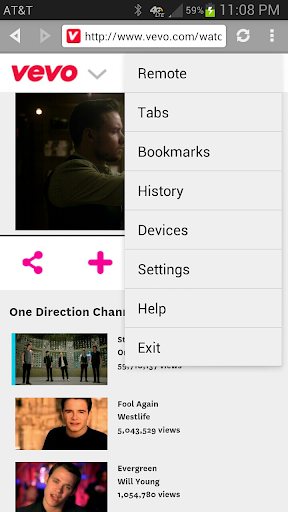
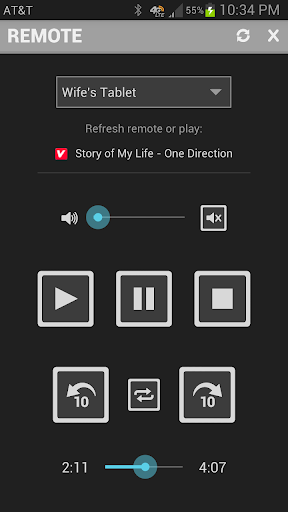
What is Cloudcast? Cloudcast lets you play online entertainment from one device to another device, from anywhere on the planet! The device could be your child's tablet in the next room or a loved one's on the other side of the world! Unlike Chromecast, Cloudcast is NOT limited to your Wi-Fi network and you can stream content from ANY website in your device! The process of casting through the cloud is also called 'cloudcast'. Yes, it's a verb and we invented it! So the term 'Cloudcast' not only refers to the app or the service but also the process itself. Pairing two devices is easy. There is no account signup, just enter a pairing key from one device into the other. Browse and play online videos in the web browser and cloudcast them using the remote to any paired device. Once you start cloudcasting you can pause, rewind, skip, seek, loop, mute or adjust the volume just like you would using a TV remote. You could use Cloudcast to play videos from your phone to a TV using an Android stick even if you're nowhere near the TV! Please note that not all videos in the web are in high definition, so they might not look the same on your HD TV as they look in a small screen. You can find Android sticks here: https://www.google.com/search?q=android+stick Depending on your device's Wi-Fi sleep policy you will even be able to wake the device up and play the media. Cloudcast comes with the necessary controls to block devices when you don't want to be disturbed or prefer to get a notification instead of playing the video directly. Yes, if you're pulling pranks on your friends with Cloudcast they could block your device! You can cloudcast entire YouTube playlists! Skip forward and backward between videos in the playlist as well. A great way to keep kids entertained even if you can't be right next to them. Think of Cloudcast as a more powerful Chromecast for the cloud! Cloudcast requires the latest version of Google Play and YouTube apps. It runs on Android 2.2 and above. Please share your experiences with Cloudcast and track issues here: https://plus.google.com/communities/114472572789223334184 How do I cloudcast? Cloudcasting is easy and fun! Follow these steps: * Install Cloudcast in two or more Android devices * Pair devices using pairing keys in the devices menu * Browse the web for entertainment * Play videos in full view to launch the cast menu (in Android 4.3 & earlier) * Start videos to launch the cast menu (in Android 4.4 & later) * Select the device to cast * Press play in the remote and voila! * Cloudcast to any paired device in the world!! Why should I cloudcast? What do I use it for? To have fun, of course! Imagine a world where you can play a video from one phone to another, half way across the world! Surprise that someone with a video you found on the web. Entertain a child even when you are not right next to them. Control your TV when it is connected to an Android device from anywhere in the world. Share a laugh with a friend while watching a video together even if you're in two different places! Does Cloudcast work with Chromecast? No, Cloudcast only works in Android devices. One device acts as a remote, which casts the video and the other device acts as a player that plays the video. You could plug an Android stick or any tablet with HDMI output to your TV and cloudcast videos from your phone to your TV. Download "Split Browser with Chromecast" app to cast videos from a web browser. What is the difference between the free and UNLIMITED versions? • Free version contains ads and can only cloudcast for 10 minutes at a time. • UNLIMITED version has no time limits and contains no ads. HTC USERS: HTC Phones (Jelly Bean and older Android versions) can only cast YouTube videos. For more FAQs on Cloudcast: http://www.appestry.biz/cc
Installs since 28 Aug 2026 Measured
Exact Google Play install counts, collected daily
Ratings
353 ratings, 27 reviews
- 5 ★33%
- 4 ★17%
- 3 ★33%
- 2 ★0.0%
- 1 ★17%
Recent reviews
Latest public reviews from the store
- 18 Nov 2021
How setup icloud email?.
- 23 Nov 2020
Nice app
- 18 Jul 2017
Gmail OAuth 2.0 doesn't work. No attachments. No "select all recipients" option (i.e. if you're sending to 100 people, you need to tap 100 checkboxes). Occasional problem with character encoding. Gmail on STMP with TLS works - tested.
- 3 May 2016
Works great once you get the hang of it. Love the additional custom fields!
What reviewers bring up
Topics mentioned in the latest 15 reviews, by how many reviews mention them
Liked in good reviews (13 reviews)
- mail 5
- merge 4
- customer support 2
- developing 2
- feature 2
- however 2
- images 2
- google 2
Raised in bad reviews (1 reviews)
No topic comes up twice.
Top chart positions
Latest Google Play chart ranks by country, last 10 days
Not in any tracked top chart in the last 10 days.
Cloudcast history
Release, install milestones, listing and store changes
- Reached 50,000+ installs 5 Jul 2015
- Reached 10,000+ installs 5 Feb 2014
- Reached 5,000+ installs 11 Jan 2014
- First released on the store 29 Nov 2013
Update frequency
How often Cloudcast ships a new version, month by month
0 updates in the last 12 months. Less often than most similar apps: they shipped a median of 1 updates in the same year.
Recent versions
Current version 1.3
- Version 1.32 Feb 2017
1.3: • Removed app permissions that are no longer used • App optimizations, bug fixes and support for more devices ---- 1.2: • Fixes YouTube player in Lollipop and newer versions ---- Thanks y'all for your feedback!
- Version 1.221 Nov 2016
- Version 1.0924 Aug 2015
- Version 1.0816 May 2014
Listing keywords
Words and phrases Cloudcast repeats most in its store listing
Top phrases: play online (3), device from anywhere (2), device to another (2), launch the cast (2), menu in android (2).
Highlighted words also appear in the title. Counts cover the title, short description and description.
Business model and tech
From the store listing, the SDKs in the app package and its declared permissions
- Business model
- Free to downloadIn-app purchasesShows ads
- Built with
- No cross-platform framework or game engine detected
- Ad networks (1)
- AdMob
- Subscriptions and payments
- Google Play billing
- Sensitive access
- No sensitive permission declared
1 ad, attribution and analytics SDKs detected. SDKs are read from the app package and permissions from the store listing, so code that loads later is not seen.
Technology
5 SDKs found in the app package
Ad network libraries
Ad networks
Advertising and install-attribution SDKs found in the app package
- AdMob
6 permissions
0 special access, 0 sensitive, 6 standard
- Control vibrationStandard
- Keep the phone awakeStandard
- Full internet accessStandard
- See network connectionsStandard
- Receive push messagesStandard
- In-app purchases with Google PlayStandard
Compliance
What the listing and the app package show
- Store status
- Live
- Upkeep
- No update since 2 Feb 2017
- Privacy policy
- Linked on the listing
- Advertising
- Shows ads
- In-app purchases
- Offered
- Age rating
- Everyone
- Sensitive permissions
- 0 sensitive of 6
- Location access
- No
- Camera and microphone
- Neither
Apps like Cloudcast
Fort AssistantVitaly Rabinouski83.4K installs★ 3.38
Ai Voice Language LearningHealthy Apps.49.3K installs★ 4.8
Talking BoyPhoneLiving LLC85.1K installs★ 3.0
Hologram MakerSLC Studios150K installs★ 3.74
Home TvBtox184K installs★ 4.8
La Pulga Cuento de la Granjaefecto3D307K installs★ 3.8
Cosplan - Cosplay with friendsCosplan19.6K installs★ 3.06
South Indian Actress PhotosPlusdigit38.6K installs★ 4.2
UrgooUrgoo Cinema161K installs★ 2.29
Cloudcast: questions and answers
How many downloads does Cloudcast have?
Cloudcast has 63,718 installs on Google Play, measured from the store's own count on 14 Nov 2026.
Who makes Cloudcast?
Cloudcast is published by Appestry.
When was Cloudcast last updated?
The latest version (1.3) was released on 2 Feb 2017.
Is Cloudcast free?
Yes. Cloudcast is free to download and offers in-app purchases, and it shows ads.
Is Cloudcast still available?
Yes. Cloudcast is live on Google Play as of 14 Nov 2026.
Track Cloudcast and its competitors
Watch any app for new versions, rating drops, chart moves and removals. Free plan, no card.