
Contacts App For Android
Contacts app with Phone Book, Favorites, After Call Screen and Contact Manager
- Installs
- 15.54K
- Measured
- Rating
- 3.67
- Ratings
- 84
- 10 reviews
- Version
- Varies with device
- Released
- 25 Jun 2025
- Tracked since 13 May 2026
- Size
- —
Screenshots


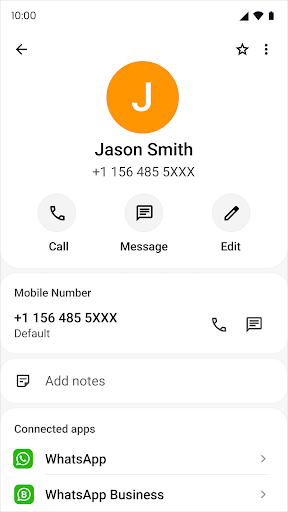


About Contacts App For Android
The description on the store listing
<b>Contacts</b> is a trusted & modern Android contacts app designed to help you easily manage your contact information. It offers a clean, simple, & organized interface for viewing, editing, & saving contacts easily.
Whether you’re calling, messaging, or adding new contacts, <b>Contacts App</b> gives you a fast & reliable experience. Stay organized & connected with advanced features like <b>After Call Screen, Notes on Caller Details</b>, & a <b>smart dialpad</b> for quick access.
<b>🌟 Key Features of Contacts App</b>
<b>Contacts List</b>
• Access all your contacts in a clean & organized list.
• Quickly find anyone with our fast search feature.
• Manage contacts efficiently with …
Read the full description
<b>Contacts</b> is a trusted & modern Android contacts app designed to help you easily manage your contact information. It offers a clean, simple, & organized interface for viewing, editing, & saving contacts easily. Whether you’re calling, messaging, or adding new contacts, <b>Contacts App</b> gives you a fast & reliable experience. Stay organized & connected with advanced features like <b>After Call Screen, Notes on Caller Details</b>, & a <b>smart dialpad</b> for quick access. <b>🌟 Key Features of Contacts App</b> <b>Contacts List</b> • Access all your contacts in a clean & organized list. • Quickly find anyone with our fast search feature. • Manage contacts efficiently with a simple & intuitive user interface. • Perfect for both personal & professional use. <b>Dialpad</b> • Call directly with an intuitive dialpad, designed for quick & accurate dialing. • Use the dialpad to find contacts instantly by typing a few numbers. • Make dialing fast & effortless with our easy dialer experience. <b>Create New Contacts</b> • Add a new contact in just a few taps. • Store details like phone numbers, personal notes, & more. • Share any of your contacts securely with one tap. • Keep your phonebook updated & organized with ease. <b>Swipe Actions</b> • Swipe left to send a message, swipe right to make a call. • Communicate faster & stay in touch effortlessly. <b>Search & Find</b> • Instantly search by name. • Locate people easily even in large address books. • Save time with our advanced contact search tools. <b>Favorites</b> • Quickly connect with your favorite contacts with a single tap. • Add frequently contacted people to favorites for instant access. • Always stay connected with your most important people. <b>Contact Details Screen</b> • View complete contact information on a single screen. • Add notes, assign custom ringtones, or send WhatsApp messages directly. • Edit, delete, or share contact details easily. <b>Themes & Personalization</b> • Switch between light & dark modes for comfortable viewing anytime. • Enjoy a modern & elegant design optimized for Android devices. <b>Language Support</b> • Use the app in your preferred language – simple, intuitive, & globally friendly. • Designed for users across English-speaking countries & beyond. <b>After Call Screen</b> • Enhance your post-call experience with our smart After Call Screen. • Quickly send a message, save a new contact, or call back immediately. • Useful for saving a number, calling back, or sending quick SMS replies. <b>Privacy & Security</b> • Contacts App never shares or sells your data without consent. • All contacts & personal details remain safely stored on your device. ⚙️ <b>How to Access & Use the Contacts App</b> • <b>To open the app:</b> Find & tap “Contacts,” or access it from your All Apps list. • <b>To add a contact:</b> Tap the “+” button, fill in details such as name, phone number, or email, & save. • <b>To edit a contact:</b> Select the contact, tap the pencil icon, & update information. • <b>To call or message:</b> Swipe left or right in the contacts list or use the smart dialer. <b>Contacts App</b> is more than just a phonebook — it’s a complete <b>contact management tool</b> built for modern Android users who value simplicity, speed, & organization. Whether for work or personal connections, our app helps you manage your address book like a pro. Stay organized, stay connected, & experience the <b>best contacts app for Android</b> — a fast, secure, & user-friendly way to manage your communication. Download Contacts App for Android today & enjoy a clean, organized, & secure way to manage all your contacts — trusted by users worldwide. ⚠️ <b>Disclaimer</b> • Contacts App is an independent Android application developed to enhance your contact management experience. • It is not affiliated with Google, Samsung, or any phone manufacturer. • Some features may require phone, contact, or overlay permissions for full functionality.
Installs since 14 Nov 2026 Measured
Exact Google Play install counts, collected daily
Daily history starts once this app is in our daily install sample.
Ratings
84 ratings, 10 reviews
- 5 ★0.0%
- 4 ★0.0%
- 3 ★0.0%
- 2 ★0.0%
- 1 ★0.0%
Recent reviews
Latest public reviews from the store
- 24 Mar 2026
nice
Top chart positions
Latest Google Play chart ranks by country, last 10 days
Not in any tracked top chart in the last 10 days.
Contacts App For Android history
Release, install milestones, listing and store changes
- First released on the store 25 Jun 2025
Listing keywords
Words and phrases Contacts App For Android repeats most in its store listing
Top phrases: after call screen (4), after call (4), call screen (4), clean organized (2), complete contact (2).
Highlighted words also appear in the title. Counts cover the title, short description and description.
Business model and tech
From the store listing and declared permissions
- Business model
- Free to download
- Sensitive access
- No sensitive permission declared
Compliance
What the listing and the app package show
- Store status
- Live
- Registered in
- Vietnam
- Privacy policy
- Linked on the listing
- Advertising
- No ads declared
- In-app purchases
- None declared
- Age rating
- Everyone
Apps like Contacts App For Android
오직 온라인센터오직(주)242K installs★ 4.3
Simple LAN Chatnathanield.com12.4K installs★ 3.63
aDataConMonamazing-create13.6K installs★ 4.3
Universal TV Remote for All TVAlphard Solutions56K installs★ 3.17
Auto Scroll TTAbyssiniatech64.2K installs★ 2.67
Whistle SoundsInfinite_Apps64.4K installs★ 3.5
QR Barcode : Scanner & CreateScan Team320K installs★ 3.38
Calendario de Puerto Rico 2025FamilyAppsPro15.2K installs★ 4.57
Watt VA Amp Volt CalculationsElectroMission Co.53.2K installs★ 1.0
Contacts App For Android: questions and answers
How many downloads does Contacts App For Android have?
Contacts App For Android has 15,539 installs on Google Play, measured from the store's own count on 14 Nov 2026.
Who makes Contacts App For Android?
Contacts App For Android is published by Trusted Tool Apps, a developer based in VN.
Is Contacts App For Android free?
Yes. Contacts App For Android is free to download.
Is Contacts App For Android still available?
Yes. Contacts App For Android is live on Google Play as of 14 Nov 2026.
Track Contacts App For Android and its competitors
Watch any app for new versions, rating drops, chart moves and removals. Free plan, no card.