
Contacts Backup
Contacts Backup is the easiest way to backup and restore your contacts/phonebook
- Installs
- 647K
- Measured
- Rating
- 4.25
- Ratings
- 7.2K
- 581 reviews
- Version
- Varies with device
- Updated 3 Nov 2026
- Released
- 3 May 2012
- Tracked since 13 May 2026
- Size
- 2 MB
- Needs 4.0
Screenshots



About Contacts Backup
The description on the store listing
The fastest Contacts Backup app on android is here!
Why just backup your contacts to SD Card, with this app you can backup your contacts onto the Cloud (Remote Server) which is 100% secure, fast and reliable.
Why Contacts Backup (Cloud)?
This application is free with No Ads.
Very simple and intuitive UI which is supported by phones and tablets of all resolutions.
Its fast compared to other backup apps.
This app retrieves ALL contacts stored on your Android™ device and saves it on the Cloud Server.
NOTE:
If you loose your Android™ device no need to worry, your contacts are backed up on the Server, which can be retrieved at any time using your credentials. …
Read the full description
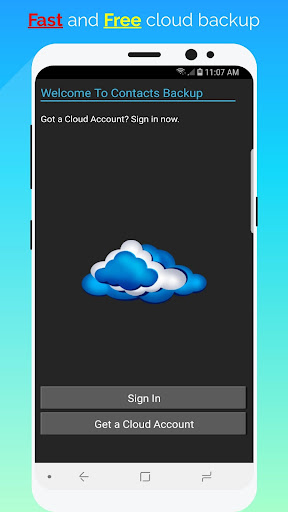
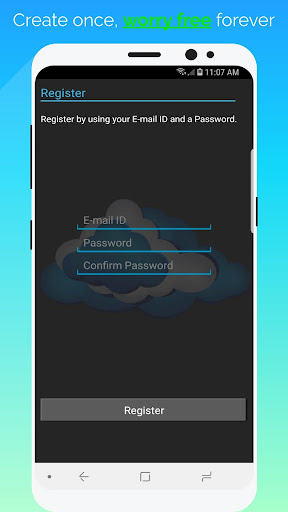
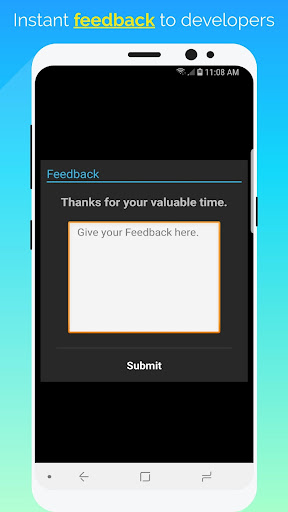
The fastest Contacts Backup app on android is here! Why just backup your contacts to SD Card, with this app you can backup your contacts onto the Cloud (Remote Server) which is 100% secure, fast and reliable. Why Contacts Backup (Cloud)? This application is free with No Ads. Very simple and intuitive UI which is supported by phones and tablets of all resolutions. Its fast compared to other backup apps. This app retrieves ALL contacts stored on your Android™ device and saves it on the Cloud Server. NOTE: If you loose your Android™ device no need to worry, your contacts are backed up on the Server, which can be retrieved at any time using your credentials. ⇩⇩⇩⇩⇩⇩⇩⇩⇩⇩⇩⇩⇩⇩⇩⇩⇩⇩⇩⇩ HOW TO USE THIS APP: The first time you open this app, you will be presented with a EULA Screen, accept the agreement and then you will be taken to the Welcome screen. Press the GET A CLOUD ACCOUNT button, you will be then taken to the Registration screen. Type in your E-mail ID and a appropriate password, press the REGISTER button and you are DONE. On the MainScreen press appropriate options to either RESTORE or BACKUP your contacts. ⇩⇩⇩⇩⇩⇩⇩⇩⇩⇩⇩⇩⇩⇩⇩⇩⇩⇩⇩⇩ HOW TO CREATE BACKUP: 1)Login into the application using your credentials. 2)Press the Backup button on the MainScreen. Let the uploading finish and then you have successfully uploaded your contacts onto the Server. ⇩⇩⇩⇩⇩⇩⇩⇩⇩⇩⇩⇩⇩⇩⇩⇩⇩⇩⇩⇩ HOW TO RESTORE: 1)Login into the application using your credentials. 2)Press the Restore button on the MainScreen. Let the downloading finish and then you have successfully restored your contacts into the phone. ⇩⇩⇩⇩⇩⇩⇩⇩⇩⇩⇩⇩⇩⇩⇩⇩⇩⇩⇩⇩ DELETE CONTACTS: Have you messed up while restoring your contacts using some other application or want to delete all the contacts from the Phone or Server, then just press the DELETE button on the MainScreen. Let the process finish and then you have successfully deleted all the contacts from the phone or server. BE VERY CAREFUL WHILE USING THIS DELETE FEATURE. ⇩⇩⇩⇩⇩⇩⇩⇩⇩⇩⇩⇩⇩⇩⇩⇩⇩⇩⇩⇩ OTHER FEATURES: 1) FEEDBACK: Do you have any problem with this application, want to add some features or report some bugs, then use this realtime feedback to send us your queries, we are always ready to solve them. 2) AUTO-LOGIN: You do no want to give your credentials every time you sign into this app, then use the auto-login feature provided with this app. 3) SHARE: Want to share this wonderful app with your friends, then use the SHARE option from within the app. ENJOY :) ⇩⇩⇩⇩⇩⇩⇩⇩⇩⇩⇩⇩⇩⇩⇩⇩⇩⇩⇩⇩
Installs since 21 Jul 2026 Measured
Exact Google Play install counts, collected daily
Ratings
7,160 ratings, 581 reviews
- 5 ★72%
- 4 ★12%
- 3 ★4.0%
- 2 ★0.9%
- 1 ★11%
Recent reviews
Latest public reviews from the store
- 26 Oct 2025
Fast, Free, Safe Way to backup your contacts on the cloud. I've used it for many years on several devices without problems. Few, if any, ads, doesn't freeze up, fast and efficient. Highly recommended.
- 23 Sep 2025
good app, I use long time
- 18 Aug 2025
no way to transfer this app to SD card
- 30 May 2025
very nice application
What reviewers bring up
Topics mentioned in the latest 50 reviews, by how many reviews mention them
Liked in good reviews (32 reviews)
- application 3
- backup 3
- highly 3
- outstanding 2
- efficient 2
- useful 2
- safe 2
Raised in bad reviews (16 reviews)
- contacts 6
- restored 3
- click 2
Top chart positions
Latest Google Play chart ranks by country, last 10 days
Not in any tracked top chart in the last 10 days.
Contacts Backup history
Release, install milestones, listing and store changes
- First released on the store 3 May 2012
Update frequency
How often Contacts Backup ships a new version, month by month
1 updates in the last 12 months. Less often than most similar apps: they shipped a median of 3 updates in the same year.
Recent versions
Current version Varies with device
- Version 7.110 Aug 2026
Bug fix
- Version 7.023 Feb 2025
All user data is now encrypted during transmission for enhanced security.
Listing keywords
Words and phrases Contacts Backup repeats most in its store listing
Top phrases: contacts backup (4), backup your contacts (3), phone or server (2), android device (2), auto login (2).
Highlighted words also appear in the title. Counts cover the title, short description and description.
Business model and tech
From the store listing, the SDKs in the app package and its declared permissions
- Business model
- Free to download
- Built with
- No cross-platform framework or game engine detected
- Ad networks (0)
- None detected
- Analytics and crash reports
- FirebaseCrashlyticsfabric
- Sensitive access
- ContactsAccounts on the device
1 ad, attribution and analytics SDKs detected. SDKs are read from the app package and permissions from the store listing, so code that loads later is not seen.
Technology
10 SDKs found in the app package
8 permissions
0 special access, 3 sensitive, 5 standard
- Change contactsSensitive
- Read contactsSensitive
- See accounts on the deviceSensitive
- Read how it was installed (install referrer)BIND_GET_INSTALL_REFERRER_SERVICEStandard
- Keep the phone awakeStandard
- Full internet accessStandard
- See network connectionsStandard
- Receive push messagesStandard
Compliance
What the listing and the app package show
- Store status
- Live
- Upkeep
- Updated 3 Nov 2026
- Registered in
- United States
- Privacy policy
- Linked on the listing
- Advertising
- No ads declared
- In-app purchases
- None declared
- Age rating
- Everyone
- Sensitive permissions
- 3 sensitive of 8
- Location access
- No
- Camera and microphone
- Neither
Apps like Contacts Backup
Frequency Sound GeneratorDCZT687K installs★ 4.4
SocksHttpSlipkProjects2M installs★ 4.51
Persian Iranian CalendarOssen Manso551K installs★ 3.93
FIPE Plus - Preço de VeículosFATTO861K installs★ 5.0
HUD Speedometer Speed MonitorFUNNY APPS920K installs★ 4.28
V2Ray plugin for HTTP InjectorEvozi2.5M installs★ 4.13
Unfollow Analyzer - UnfollowerUnfollow Soft Team356K installs★ 3.93
Authenticator App · 2FAFirstOrder.Apps436K installs★ 4.46
Rare Candy - Collect TogetherRare Candy390K installs★ 4.88
Contacts Backup: questions and answers
How many downloads does Contacts Backup have?
Contacts Backup has 646,581 installs on Google Play, measured from the store's own count on 16 Nov 2026.
Who makes Contacts Backup?
Contacts Backup is published by Arth Patel, a developer based in US.
When was Contacts Backup last updated?
The latest version (Varies with device) was released on 3 Nov 2026.
Is Contacts Backup free?
Yes. Contacts Backup is free to download.
Is Contacts Backup still available?
Yes. Contacts Backup is live on Google Play as of 16 Nov 2026.
Track Contacts Backup and its competitors
Watch any app for new versions, rating drops, chart moves and removals. Free plan, no card.