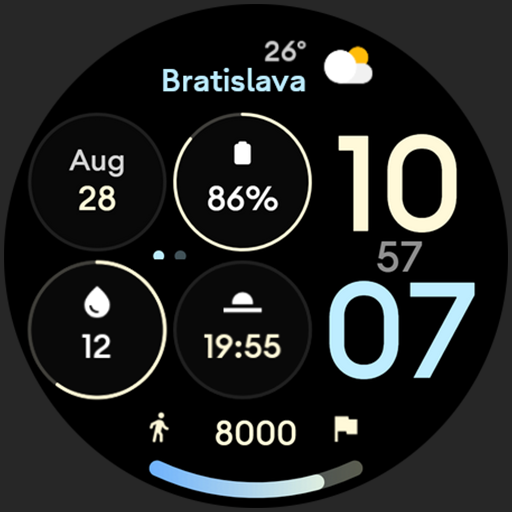
Control Dash: Watch face
Productivity watch face with 6 custom complications & pure black background.
- Installs
- 5.54K
- Measured
- Rating
- 5.0
- Ratings
- 55
- 4 reviews
- Version
- 1.0.10
- Updated 4 Aug 2026
- Released
- 16 Aug 2023
- Tracked since 12 May 2026
- Size
- —
Screenshots




About Control Dash: Watch face
The description on the store listing
<b>Only for Wear OS API 28+ devices</b>
<i>// Not suitable for rectangular watches</i>
<font color="#897eff"><i>Powered by <b>Watch Face Format</b></i></font>
<big><b><a href="https://www.google.com/url?q=https%3A%2F%2Famoledwatchfaces.com&sa=D&sntz=1&usg=AOvVaw351EA2hKuGQCFOrAwqOZ-4">amoledwatchfaces.com</a></b></big>
<big><b><font color="#fd5f00">BUY ONE GET ONE OFFER!</font></b></big>
<b><a href="https://www.google.com/url?q=https%3A%2F%2Famoledwatchfaces.com%2Fbogo&sa=D&sntz=1&usg=AOvVaw14p8AKM9q3UNr3BFxMVn7h">amoledwatchfaces.com/bogo</a></b>
<big><b><font color="#fd5f00">CUSTOM COMPLICATION APPS</font></b></big>
<b><a …
Read the full description
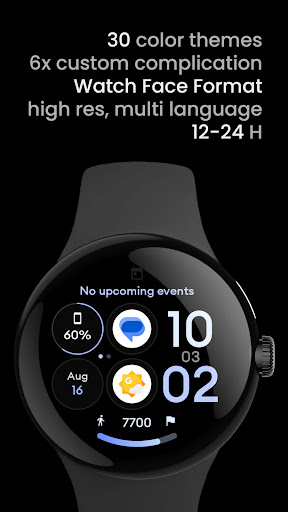
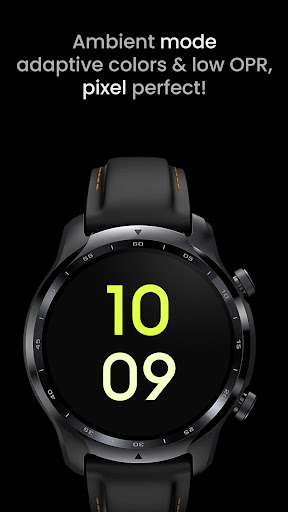
<b>Only for Wear OS API 28+ devices</b> <i>// Not suitable for rectangular watches</i> <font color="#897eff"><i>Powered by <b>Watch Face Format</b></i></font> <big><b><a href="https://www.google.com/url?q=https%3A%2F%2Famoledwatchfaces.com&sa=D&sntz=1&usg=AOvVaw351EA2hKuGQCFOrAwqOZ-4">amoledwatchfaces.com</a></b></big> <big><b><font color="#fd5f00">BUY ONE GET ONE OFFER!</font></b></big> <b><a href="https://www.google.com/url?q=https%3A%2F%2Famoledwatchfaces.com%2Fbogo&sa=D&sntz=1&usg=AOvVaw14p8AKM9q3UNr3BFxMVn7h">amoledwatchfaces.com/bogo</a></b> <big><b><font color="#fd5f00">CUSTOM COMPLICATION APPS</font></b></big> <b><a href="https://www.google.com/url?q=https%3A%2F%2Famoledwatchfaces.com%2Fapps&sa=D&sntz=1&usg=AOvVaw332c_tXcBcNqVOa3KP7NOC">amoledwatchfaces.com/apps</a></b> <font color="#897eff"><big><b>FEATURES</b></big></font> • Watch Face Format 1 • dashboard look with 4 main complication slots • digital seconds + AMPM indicator (dots) • LONG_TEXT complication suitable for Weather or Next Event complications • true black background • high resolution • steps progress bar • utilizes WFF (Watch Face Format) • Wear OS 4 support • PNGQuant optimized layers > battery friendly • unique ambient mode with low OPR & adaptive color & two optional layouts • 1x app shortcut complication <font color="#897eff"><big><b>USER CONFIGURATIONS</b></big></font> • Color (30x) • Steps Bar • AOD (2x) • Custom Complications (6x) Installation and troubleshooting guide <b><a href="https://www.google.com/url?q=https%3A%2F%2Famoledwatchfaces.com%2Fguide&sa=D&sntz=1&usg=AOvVaw0zOFR26IvrkzArG6O2DKmO">amoledwatchfaces.com/guide</a></b> Please send any issues reports or help requests to our support address <b><a href="mailto:[email protected]">[email protected]</a></b> Join our Telegram group for live support and discussion <b><a href="https://www.google.com/url?q=https%3A%2F%2Ft.me%2Famoledwatchfaces&sa=D&sntz=1&usg=AOvVaw2_1_2GFU-QaMauLvtJgiw-">t.me/amoledwatchfaces</a></b> Newsletter <b><a href="https://www.google.com/url?q=https%3A%2F%2Famoledwatchfaces.com%2Fcontact%23newsletter&sa=D&sntz=1&usg=AOvVaw14LrTz_wD0vHb-o8AI-CIJ">amoledwatchfaces.com/contact#newsletter</a></b> <i>amoledwatchfaces™ - Awf</i>
Installs since 29 Aug 2026 Measured
Exact Google Play install counts, collected daily
Ratings
55 ratings, 4 reviews
- 5 ★100%
- 4 ★0.0%
- 3 ★0.0%
- 2 ★0.0%
- 1 ★0.0%
Recent reviews
Latest public reviews from the store
- 20 Sep 2025
so cool !!
- 17 Sep 2025
WOW!!! Super cool watch face. Love the style and layout. Thank you for your amazing work always . appreciate it
- 11 Mar 2025
This is an excellent exclusive design. Thank you.
- 8 Mar 2025
Wow, love the default settings on this. Beautiful colors, font options and on/off switches. The switches make it really easy to customize the seconds, notifications and am/pm options. Awesome work!!!
What reviewers bring up
Topics mentioned in the latest 5 reviews, by how many reviews mention them
Liked in good reviews (5 reviews)
- face 2
- wow 2
Raised in bad reviews (0 reviews)
No topic comes up twice.
Top chart positions
Latest Google Play chart ranks by country, last 10 days
Not in any tracked top chart in the last 10 days.
Control Dash: Watch face history
Release, install milestones, listing and store changes
- Reached 5,000+ installs 19 Apr 2026
- Reached 1,000+ installs 24 Oct 2024
- Reached 100+ installs 12 Nov 2023
- Reached 50+ installs 18 Sep 2023
- Reached 10+ installs 21 Aug 2023
- First released on the store 16 Aug 2023
Update frequency
How often Control Dash: Watch face ships a new version, month by month
1 updates in the last 12 months. More often than most similar apps: they shipped a median of 0 updates in the same year.
Recent versions
Current version 1.0.10
- Version 1.0.104 Aug 2026
v1.1.0 • added Am-Pm Indicator toggle v1.0.8 • huge optimizations (decreased watchface.xml size by 75%) • bottom slot Arc is now fully customizable (RANGED_VALUE, LONG_TEXT) • better gradient previews • correct AOD handling v1.0.7 • minified watchface.xml v1.0.6 • rebuilt in Android Studio using Watch Face Format 1 • removed unused resources • optimizations Note: Remove watch face from favorites and add it back to ensure watch face runs smoothly after update.
- Version 1.0.714 Jul 2024
- Version 1.0.615 Dec 2023
Listing keywords
Words and phrases Control Dash: Watch face repeats most in its store listing
Top phrases: font color (6), watch face (5), big font (4), big font color (3), font big href (3).
Highlighted words also appear in the title. Counts cover the title, short description and description.
Business model and tech
From the store listing and declared permissions
- Business model
- Paid, $1.49
- Sensitive access
- No sensitive permission declared
3 permissions
1 special access, 0 sensitive, 2 standard
- Ask to uninstall appsREQUEST_DELETE_PACKAGESSpecial access
- Internal app permissionDYNAMIC_RECEIVER_NOT_EXPORTED_PERMISSIONStandard
- Google Play license checkStandard
Compliance
What the listing and the app package show
- Store status
- Live
- Upkeep
- Updated 4 Aug 2026
- Registered in
- Slovakia
- Privacy policy
- Linked on the listing
- Advertising
- No ads declared
- In-app purchases
- None declared
- Age rating
- Everyone
- Sensitive permissions
- 0 sensitive, 1 special access of 3
- Location access
- No
- Camera and microphone
- Neither
Apps like Control Dash: Watch face
Persons with Disabilities RegiBytize, Inc.31.1K installs★ 4.3
TestApp.ioTestApp.io17.6K installs★ 3.75
Camera Suite for HeroM-Apps3.6K installs★ 2.7
Aria AI – Private Offline AIAlphaY15.6K installs★ 2.29
عميل خط الناقلsaad.dawood9012.8K installs★ 3.75
AES Encryption (256-Bit)Coding Fries8.3K installs★ 3.33
TypeDroid Pro with KeyboardShantanu Deshmukh2.4K installs★ 4.5
CargaYaEquipo Cargaya21.9K installs★ 4.1
Central COMPLETA 2.0COMPLETA Telecomunicações17.2K installs★ 2.2
Control Dash: Watch face: questions and answers
How many downloads does Control Dash: Watch face have?
Control Dash: Watch face has 5,537 installs on Google Play, measured from the store's own count on 21 Nov 2026.
Who makes Control Dash: Watch face?
Control Dash: Watch face is published by amoledwatchfaces™, a developer based in SK.
When was Control Dash: Watch face last updated?
The latest version (1.0.10) was released on 4 Aug 2026.
Is Control Dash: Watch face free?
No. Control Dash: Watch face is a paid app priced at $1.49.
Is Control Dash: Watch face still available?
Yes. Control Dash: Watch face is live on Google Play as of 21 Nov 2026.
Track Control Dash: Watch face and its competitors
Watch any app for new versions, rating drops, chart moves and removals. Free plan, no card.