
- Installs
- 16.51K
- Measured
- Rating
- —
- Ratings
- —
- Version
- Varies with device
- Updated 8 Dec 2025
- Released
- 12 May 2021
- Tracked since 13 May 2026
- Size
- —
Also on App Store: Creative Cast (2 ratings)
Screenshots
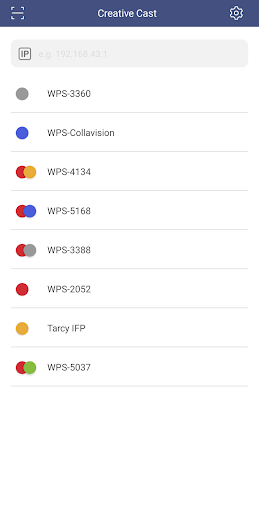
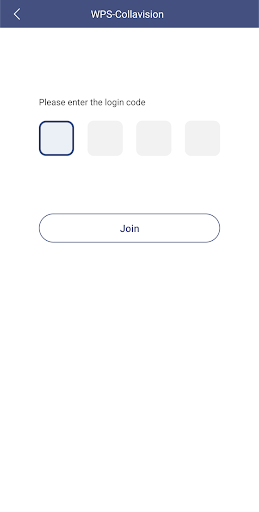
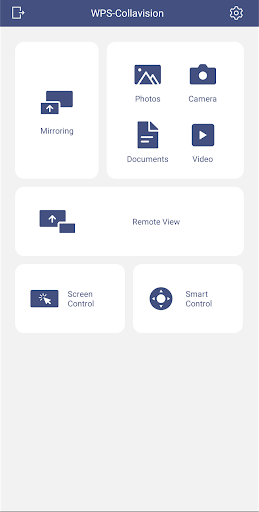



About Creative Cast
The description on the store listing
Creative Cast makes it possible to connect Android devices to Optoma displays (projectors, interactive flat panels and LED displays). Once connected you will be able to mirror your screen, share images, documents and videos, along with live broadcasting via your camera.
Functionality
Multiple devices
- Supports multiple devices for easy content sharing
Screen-mirroring
- Share your screen on an Optoma display (with supported apps)
File sharing
- Easily share documents (PDF) and images (JPEG and PNG) to connected displays
Wireless camera
- Share images in real-time via the camera on your base device
Getting started
Use the steps below to establish a connection between a …
Read the full description
Creative Cast makes it possible to connect Android devices to Optoma displays (projectors, interactive flat panels and LED displays). Once connected you will be able to mirror your screen, share images, documents and videos, along with live broadcasting via your camera. Functionality Multiple devices - Supports multiple devices for easy content sharing Screen-mirroring - Share your screen on an Optoma display (with supported apps) File sharing - Easily share documents (PDF) and images (JPEG and PNG) to connected displays Wireless camera - Share images in real-time via the camera on your base device Getting started Use the steps below to establish a connection between a terminal (TX) display, projector or IFP (RXs) and the Creative Cast App. 1. Launch the Creative Cast App on your Android device and Optoma display 2. Creative Cast will display all connectable devices on the same network 3. Select the display you want to connect to 4. Navigate the home screen to select the required features and functions Visit the Optoma website for information on supported models www.optoma.com
Installs since 29 Aug 2026 Measured
Exact Google Play install counts, collected daily
Ratings
- 5 ★0.0%
- 4 ★0.0%
- 3 ★0.0%
- 2 ★0.0%
- 1 ★0.0%
Recent reviews
Latest public reviews from the store
No reviews in our sample for this app yet.
Top chart positions
Latest Google Play chart ranks by country, last 10 days
Not in any tracked top chart in the last 10 days.
Creative Cast history
Release, install milestones, listing and store changes
- Reached 10,000+ installs 8 Dec 2024
- Reached 5,000+ installs 9 Dec 2023
- Reached 1,000+ installs 14 Nov 2022
- Reached 500+ installs 17 Jul 2022
- First released on the store 12 May 2021
Update frequency
How often Creative Cast ships a new version, month by month
1 updates in the last 12 months. More often than most similar apps: they shipped a median of 0 updates in the same year.
Recent versions
Current version Varies with device
- Version v2.0.148 Dec 2025
- Version v2.0.1115 Apr 2024
- Version v2.0.105 Mar 2024
- Version v2.0.631 Oct 2023
Listing keywords
Words and phrases Creative Cast repeats most in its store listing
Top phrases: creative cast (5), multiple devices (2), optoma display (2), share images (2).
Highlighted words also appear in the title. Counts cover the title, short description and description.
Business model and tech
From the store listing, the SDKs in the app package and its declared permissions
- Business model
- Free to download
- Built with
- No cross-platform framework or game engine detected
- Ad networks (0)
- None detected
- Sensitive access
- LocationCameraMicrophonePhotos, videos and filesNearby devicesAdvertising ID
0 ad, attribution and analytics SDKs detected. SDKs are read from the app package and permissions from the store listing, so code that loads later is not seen.
Technology
31 SDKs found in the app package
22 permissions
0 special access, 9 sensitive, 13 standard
- Record audioSensitive
- Take photos and videosSensitive
- Change or delete shared storageSensitive
- Read photosREAD_MEDIA_IMAGESSensitive
- Read shared storageSensitive
- Read videosREAD_MEDIA_VIDEOSensitive
- Approximate locationSensitive
- Precise locationSensitive
- Connect to paired Bluetooth devicesBLUETOOTH_CONNECTSensitive
- Read how it was installed (install referrer)BIND_GET_INSTALL_REFERRER_SERVICEStandard
- Read the advertising IDAD_IDStandard
- Control vibrationStandard
Compliance
What the listing and the app package show
- Store status
- Live
- Upkeep
- Updated 8 Dec 2025
- Privacy policy
- Linked on the listing
- Advertising
- No ads declared
- In-app purchases
- None declared
- Age rating
- Everyone
- Sensitive permissions
- 9 sensitive of 22
- Location access
- Yes, while in use
- Camera and microphone
- Both
Apps like Creative Cast
MACCMobileGovernment of Malaysia10K installs★ 4.2
안산제일교회윤종진12.3K installs★ 4.7
E-RIM POLDA KALTENGKepolisian Negara Republik Indonesia3.5K installs★ 4.7
Dstny SEDestiny Sweden AB59.3K installs★ 2.8
VOIPOVOIPO.COM4.7K installs★ 3.0
DLD4.0Department of livestock development23.8K installs★ 3.4
Mocha X11 LiteMochaSoft11.5K installs★ 2.33
Commencement WGUSocio Labs LLC12.4K installs★ 4.73
Shanghainese Wu Basic PhrasesQvyshift LLC4.5K installs★ 4.42
Creative Cast: questions and answers
How many downloads does Creative Cast have?
Creative Cast has 16,513 installs on Google Play, measured from the store's own count on 21 Nov 2026.
Who makes Creative Cast?
Creative Cast is published by Optoma Corp..
When was Creative Cast last updated?
The latest version (Varies with device) was released on 8 Dec 2025.
Is Creative Cast free?
Yes. Creative Cast is free to download.
Is Creative Cast still available?
Yes. Creative Cast is live on Google Play as of 21 Nov 2026.
Track Creative Cast and its competitors
Watch any app for new versions, rating drops, chart moves and removals. Free plan, no card.