
- Installs
- 75
- Measured
- Rating
- —
- Ratings
- —
- Version
- Varies with device
- Released
- 29 Jun 2026
- Tracked since 20 Jul 2026
- Size
- —
Screenshots
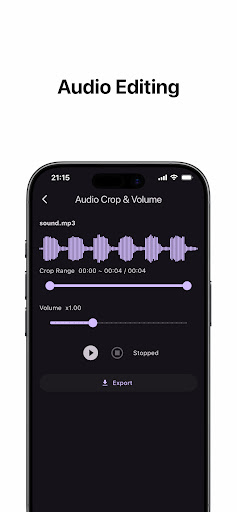


About Crop audio: Audio Editor
The description on the store listing
Crop exactly what you need from MP3 and WAV files, and even adjust the volume.
View the waveform to select the perfect range, preview instantly, and export right away.
Crop audio is a simple audio editing tool that lets you precisely cut exactly the part you want from audio files and even adjust the volume.
Without any complex editing software, just a few taps allow you to crop MP3 and WAV files to your desired range and immediately save or share them.
Use it for various purposes, such as ringtones, alarm sounds, social media clips, or extracting parts of lecture and meeting recordings.
■ Key Features
· Waveform Visualizer
When you load an audio file, the full waveform unfolds …
Read the full description
Crop exactly what you need from MP3 and WAV files, and even adjust the volume. View the waveform to select the perfect range, preview instantly, and export right away. Crop audio is a simple audio editing tool that lets you precisely cut exactly the part you want from audio files and even adjust the volume. Without any complex editing software, just a few taps allow you to crop MP3 and WAV files to your desired range and immediately save or share them. Use it for various purposes, such as ringtones, alarm sounds, social media clips, or extracting parts of lecture and meeting recordings. ■ Key Features · Waveform Visualizer When you load an audio file, the full waveform unfolds on the screen, letting you visually check loud and quiet parts to decide where to cut. · Precise Range Selection (Crop) Drag the sliders to freely adjust the start and end points. The selected range is highlighted in color right on the waveform. · Volume Adjustment Boost or lower the volume as much as you need, from 0.1x to 3.0x. Easily adjust tracks that were recorded too quietly or too loudly. · Preview with Play / Pause / Stop Before exporting, you can preview the selected range with the adjusted volume applied. Freely play, pause, and stop to make sure it's exactly what you want. · Fast Export & Share Once editing is done, you can instantly save it as a file or share it with other apps. ■ Recommended For - Anyone who wants to extract a short clip from a long track to use as a ringtone or alarm. - Anyone looking to extract specific parts from lectures, meetings, or interview recordings. - Anyone who needs to trim audio clips short for social media uploads. - Anyone who needs to adjust a track because the volume is too quiet or too loud. ■ Supported Formats Supports MP3 and WAV files. Get your audio editing done quickly and effortlessly with Crop audio—simple, yet packed with all the essential features you need!
Installs since 27 Aug 2026 Measured
Exact Google Play install counts, collected daily
Ratings
- 5 ★0.0%
- 4 ★0.0%
- 3 ★0.0%
- 2 ★0.0%
- 1 ★0.0%
Recent reviews
Latest public reviews from the store
No reviews in our sample for this app yet.
Top chart positions
Latest Google Play chart ranks by country, last 10 days
Not in any tracked top chart in the last 10 days.
Crop audio: Audio Editor history
Release, install milestones, listing and store changes
- First released on the store 29 Jun 2026
Listing keywords
Words and phrases Crop audio: Audio Editor repeats most in its store listing
Top phrases: mp3 and wav (3), crop audio (3), wav files (3), adjust the volume (2), anyone who needs (2).
Highlighted words also appear in the title. Counts cover the title, short description and description.
Business model and tech
From the store listing and declared permissions
- Business model
- Free to downloadShows ads
- Sensitive access
- No sensitive permission declared
Compliance
What the listing and the app package show
- Store status
- Live
- Privacy policy
- Linked on the listing
- Advertising
- Shows ads
- In-app purchases
- None declared
- Age rating
- Everyone
Apps like Crop audio: Audio Editor
들어서 화면켜기Won3.5K installs★ 4.0
Height PredictionEcliptic App Ventures45.9K installs★ 2.4
Speicers`Pro VPNEldiablolucifer202021.2K installs★ 4.14
Lightning Tracker with AlertsYaksh Software4.3K installs★ 3.0
Mana Pathi (Unit Converter)Shirish Koirala2.2K installs★ 4.6
Multi-tab Calc - A simple app.Naoyuki Rikiji1.3K installs★ 5.0
Just Silence. Scheduled.Akid Soft1.6K installs★ 5.0
- WoWp AssistantВиталий Робиновский2K installs★ 4.2
LINKa: напишиLINKa7.9K installs★ 4.4
Crop audio: Audio Editor: questions and answers
How many downloads does Crop audio: Audio Editor have?
Crop audio: Audio Editor has 75 installs on Google Play, measured from the store's own count on 19 Nov 2026.
Who makes Crop audio: Audio Editor?
Crop audio: Audio Editor is published by drendrendren.
Is Crop audio: Audio Editor free?
Yes. Crop audio: Audio Editor is free to download, and it shows ads.
Is Crop audio: Audio Editor still available?
Yes. Crop audio: Audio Editor is live on Google Play as of 19 Nov 2026.
Track Crop audio: Audio Editor and its competitors
Watch any app for new versions, rating drops, chart moves and removals. Free plan, no card.