
CrossLink Wireless
Companion app for use with j5create WormholeSwitch USB-C Dock Wireless Charger
- Installs
- 1.58K
- Measured
- Rating
- —
- Ratings
- —
- Version
- Varies with device
- Released
- 20 Jan 2025
- Tracked since 13 May 2026
- Size
- —
Also on App Store: CrossLink - Wireless
Screenshots
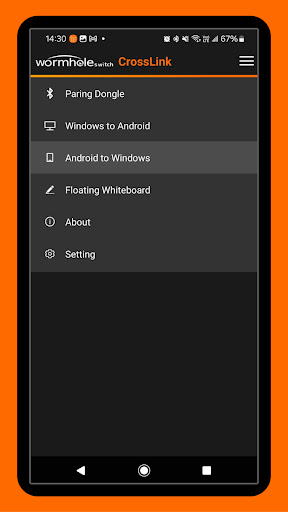
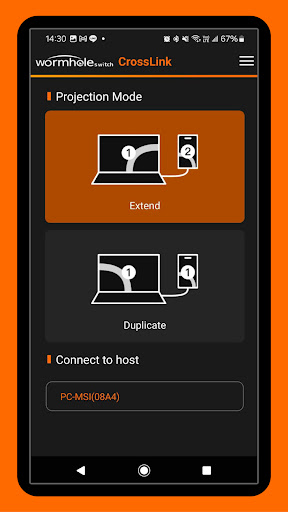
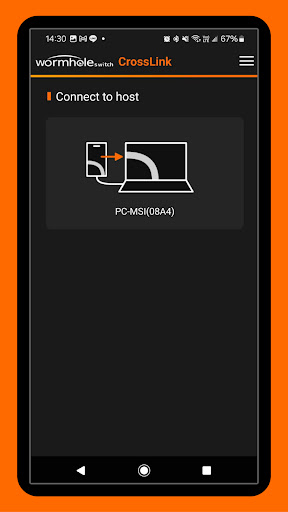


About CrossLink Wireless
The description on the store listing
This companion application is designed to be used with j5create WormholeSwitch USB-C Dock Wireless Charger.
The j5create WormholeSwitch USB-C Dock Wireless Charger is a USB Dock with host-to-host wireless connectivity feature. In addition to its hub, holder and wireless charging functions, the included Bluetooth dongle also provides pairing identification to help Windows PC and iPad/iPhone connect wirelessly via local Wi-Fi or hotspot connection. After the connection is successful, you can use this APP to mirror the Windows PC main screen and view and operate it directly on iPad/iPhone. Gesture events or stylus trajectories and pen pressure on iPad/iPhone can also be reflected in …
Read the full description
This companion application is designed to be used with j5create WormholeSwitch USB-C Dock Wireless Charger. The j5create WormholeSwitch USB-C Dock Wireless Charger is a USB Dock with host-to-host wireless connectivity feature. In addition to its hub, holder and wireless charging functions, the included Bluetooth dongle also provides pairing identification to help Windows PC and iPad/iPhone connect wirelessly via local Wi-Fi or hotspot connection. After the connection is successful, you can use this APP to mirror the Windows PC main screen and view and operate it directly on iPad/iPhone. Gesture events or stylus trajectories and pen pressure on iPad/iPhone can also be reflected in Windows, just like having an extra touch screen in Windows. In addition to this mirror mode, this APP also provides the function of generating a virtual second screen in Windows, and this second screen can be projected to iPad/iPhone for viewing and operation. Conversely, we can also project the content of iPad/iPhone to Windows PC through this wireless connection. This function is just like AirPlay. You can see iPad/iPhone screen content and operations directly on the Windows PC screen. In addition, through the Bluetooth dongle, users can switch the keyboard and mouse from Windows to iPad/iPhone, allowing users to use the mouse connected to Windows to control iPad/iPhone while watching the projected content, or Use the keyboard connected to Windows to input text directly on iPad/iPhone. In addition to video screen projection and duplication, the app also supports an AirDrop-like feature that allows you to easily share media content such as videos, photos, or files to the "Downloads" location on your Windows PC. You can also share files to your iPad/iPhone by right-clicking the file in Windows Explorer and selecting the Share menu function, just like using AirDrop on a Mac. In addition, we also provide a file selector located in the main panel to directly select the file to be transferred.
Installs since 2 Sep 2026 Measured
Exact Google Play install counts, collected daily
Daily history starts once this app is in our daily install sample.
Ratings
- 5 ★0.0%
- 4 ★0.0%
- 3 ★0.0%
- 2 ★0.0%
- 1 ★0.0%
Recent reviews
Latest public reviews from the store
- 7 Dec 2025
Thank You
- 29 Sep 2025
please open my account in thus app
- 18 Sep 2025
not bad
Top chart positions
Latest Google Play chart ranks by country, last 10 days
Not in any tracked top chart in the last 10 days.
CrossLink Wireless history
Release, install milestones, listing and store changes
- First released on the store 20 Jan 2025
Listing keywords
Words and phrases CrossLink Wireless repeats most in its store listing
Top phrases: ipad iphone (10), windows pc (5), usb dock (4), dock wireless charger (3), j5create wormholeswitch usb (3).
Highlighted words also appear in the title. Counts cover the title, short description and description.
Business model and tech
From the store listing and declared permissions
- Business model
- Free to download
- Sensitive access
- No sensitive permission declared
Compliance
What the listing and the app package show
- Store status
- Live
- Privacy policy
- Linked on the listing
- Advertising
- No ads declared
- In-app purchases
- None declared
- Age rating
- Everyone
Apps like CrossLink Wireless
들어서 화면켜기Won3.5K installs★ 4.0
Height PredictionEcliptic App Ventures45.9K installs★ 2.4
Speicers`Pro VPNEldiablolucifer202021.2K installs★ 4.14
Lightning Tracker with AlertsYaksh Software4.3K installs★ 3.0
Mana Pathi (Unit Converter)Shirish Koirala2.2K installs★ 4.6
Multi-tab Calc - A simple app.Naoyuki Rikiji1.3K installs★ 5.0
Photo Recovery PlusBillApps7.1K installs★ 4.53
Just Silence. Scheduled.Akid Soft1.6K installs★ 5.0
- WoWp AssistantВиталий Робиновский2K installs★ 4.2
CrossLink Wireless: questions and answers
How many downloads does CrossLink Wireless have?
CrossLink Wireless has 1,580 installs on Google Play, measured from the store's own count on 2 Sep 2026.
Who makes CrossLink Wireless?
CrossLink Wireless is published by j5create (Kaijet Technology).
Is CrossLink Wireless free?
Yes. CrossLink Wireless is free to download.
Is CrossLink Wireless still available?
Yes. CrossLink Wireless is live on Google Play as of 2 Sep 2026.
Track CrossLink Wireless and its competitors
Watch any app for new versions, rating drops, chart moves and removals. Free plan, no card.