Crow Media Player
A fun audio companion for your Crow textbooks! Just look, tap, and listen!
- Installs
- 150
- Measured
- Rating
- —
- Ratings
- —
- Version
- Varies with device
- Updated 2 Dec 2025
- Released
- 18 Nov 2024
- Tracked since 14 May 2026
- Size
- —
Also on App Store: Crow Media Player (2 ratings), Crow Media Player
Screenshots



About Crow Media Player
The description on the store listing
A fun audio companion for your Crow textbook! Just look, tap, and listen!
Audio available for:
Bíiluukaalilaah! - Speak Crow! Level 1
Bíiluukaalilaah! - Speak Crow! Level 2
Chihpám Bachimmiléek - Prairie Dog Goes to School
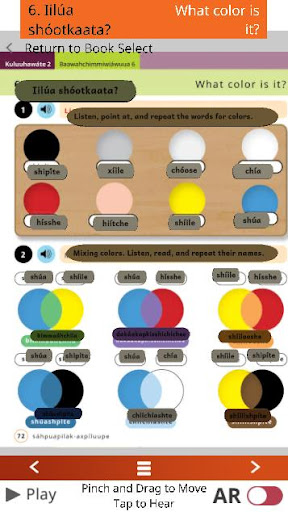
The Crow Media Player is a companion to the Crow Language Consortium series of textbooks and children's books. Just point your phone at the page and tap to hear Native speakers pronounce the words. The AR and Page Modes give you complete access to the textbook vocabulary and audio with an easy tap and swipe interface.
-Augmented reality (AR) places audio players right on the page in every unit!
-Hit the Play button in the bottom left corner to play through …
Read the full description
A fun audio companion for your Crow textbook! Just look, tap, and listen! Audio available for: Bíiluukaalilaah! - Speak Crow! Level 1 Bíiluukaalilaah! - Speak Crow! Level 2 Chihpám Bachimmiléek - Prairie Dog Goes to School The Crow Media Player is a companion to the Crow Language Consortium series of textbooks and children's books. Just point your phone at the page and tap to hear Native speakers pronounce the words. The AR and Page Modes give you complete access to the textbook vocabulary and audio with an easy tap and swipe interface. -Augmented reality (AR) places audio players right on the page in every unit! -Hit the Play button in the bottom left corner to play through All Audio within the unit. Play always starts from the last played audio so you will pick up where you left off. Instructions: The Crow Media Player is easy to use. You’ll start out in Books, where you can select your book. Tap the book again to enter Page Mode. If you are asked to allow camera use, press agree or yes if you wish to use AR Mode. Tap the AR Mode Switch to switch to the camera view. Tap Play to start auto-playback. Tap the right or left arrows to proceed to the next or previous Section. Tap the hamburger button to select the section from a list. Page Mode - Pinch to zoom - Drag to navigate between pages - Press Play to start auto-playback of all audio in the section - Tap buttons on page to play audio - Tap a button on the page and then tap Play to start auto-playback from that button AR Mode - Tap the AR Mode Switch to enter AR Mode - Look at the page in your book through your phone or tablet's camera - You will see the page overlay and you may tap buttons to hear the audio * Image recognition performance may vary depending on the device. * Some devices are not compatible with AR mode. If your device isn’t compatible, you will see a warning that will return you to Page Mode. About the Crow Language Consortium: The Crow Language Consortium provides accessible language-learning tools and resources — textbooks, apps, dictionaries and more — to help preserve Crow. Get to know us at https://crowlanguage.org and check out some of our other Crow products! Thanks to the generous support of -St. Labre Indian School -Santa Fe Natural Tobacco Company Foundation -Humanities Montana
Installs Measured
Exact Google Play install counts, collected daily
Daily history starts once this app is in our daily install sample.
Ratings
- 5 ★0.0%
- 4 ★0.0%
- 3 ★0.0%
- 2 ★0.0%
- 1 ★0.0%
Recent reviews
Latest public reviews from the store
No reviews in our sample for this app yet.
Top chart positions
Latest Google Play chart ranks by country, last 10 days
Not in any tracked top chart in the last 10 days.
Crow Media Player history
Release, install milestones, listing and store changes
- Reached 100+ installs 2 Dec 2025
- Reached 50+ installs 12 Aug 2025
- Reached 10+ installs 28 Jan 2025
- Reached 5+ installs 17 Dec 2024
- First released on the store 18 Nov 2024
Recent versions
Current version Varies with device
- Version 1.65 Dec 2024
Listing keywords
Words and phrases Crow Media Player repeats most in its store listing
Top phrases: ar mode (6), crow language consortium (3), crow media player (3), play to start (3), start auto playback (3).
Highlighted words also appear in the title. Counts cover the title, short description and description.
Business model and tech
From the store listing and declared permissions
- Business model
- Free to download
- Sensitive access
- No sensitive permission declared
Compliance
What the listing and the app package show
- Store status
- Live
- Upkeep
- Updated 2 Dec 2025
- Registered in
- United States
- Privacy policy
- Linked on the listing
- Advertising
- No ads declared
- In-app purchases
- None declared
- Age rating
- Everyone
Apps like Crow Media Player
Ayat Kursi - Fadilat & KhasiatHIJRAH Insani10.2K installs★ 4.7
내공스터디 관리자IronTrain4.6K installs★ 4.9
수원대학교 수강신청수원대학교34.9K installs★ 3.1
تنزيلةTaha Ben Ashur13.6K installs★ 5.0
मध्यकालीन भारत का इतिहासSuren Tech Lab24K installs★ 3.4
365 Morning & Evening PrayersELEGANT X STUDIO™17.5K installs★ 3.71
Chitas GuideThe Saber Team3.7K installs★ 5.0
GradStar AppPlum systems33K installs★ 1.7
- Mars ViewTobias Thierer4K installs★ 3.67
Crow Media Player: questions and answers
How many downloads does Crow Media Player have?
Crow Media Player has 150 installs on Google Play, measured from the store's own count on 14 May 2026.
Who makes Crow Media Player?
Crow Media Player is published by Crow Language Consortium, Inc., a developer based in US.
When was Crow Media Player last updated?
The latest version (Varies with device) was released on 2 Dec 2025.
Is Crow Media Player free?
Yes. Crow Media Player is free to download.
Is Crow Media Player still available?
Yes. Crow Media Player is live on Google Play as of 14 May 2026.
Track Crow Media Player and its competitors
Watch any app for new versions, rating drops, chart moves and removals. Free plan, no card.