
CSV File Viewer
CSV File Viewer For Android | CSV Reader - view small and large-sized CSV files.
- Installs
- 3.50M
- Measured
- Rating
- 4.04
- Ratings
- 9.7K
- 433 reviews
- Version
- 13.2
- Updated 6 Aug 2026
- Released
- 3 Jun 2019
- Tracked since 13 May 2026
- Size
- 9 MB
- Needs 4.4
Screenshots




About CSV File Viewer
The description on the store listing
CSV Reader - Simple, fast, and powerful tool for reading csv files.
A CSV file is a Comma-separated values file, which allows data to be saved in a tabular format. The mime type for .CSV file is text/comma-separated-values. Comma-separated values files are essential for data analysis and management.
Comma-separated values (CSV) file format is used to store tabular data, such as a spreadsheet or database. Each line in a Comma-separated values file corresponds to a record or row of the table, and fields within each record are separated by commas.
CSV File Reader is an awesome app for viewing both small and large-sized .CSV files. Our CSV File Viewer app empowers you to effortlessly …
Read the full description
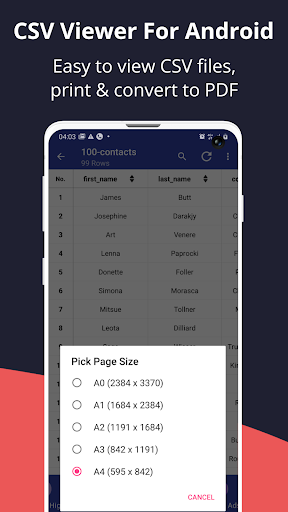
CSV Reader - Simple, fast, and powerful tool for reading csv files. A CSV file is a Comma-separated values file, which allows data to be saved in a tabular format. The mime type for .CSV file is text/comma-separated-values. Comma-separated values files are essential for data analysis and management. Comma-separated values (CSV) file format is used to store tabular data, such as a spreadsheet or database. Each line in a Comma-separated values file corresponds to a record or row of the table, and fields within each record are separated by commas. CSV File Reader is an awesome app for viewing both small and large-sized .CSV files. Our CSV File Viewer app empowers you to effortlessly open and read CSV files on your Android device, making data accessibility a breeze. CSV File Viewer imports and reads .CSV files effortlessly and directly from your android device. If you work with data sets, or you need to view spreadsheet data, this is the perfect tool for you. Whether you are a data analyst, business professional, or simply someone who frequently works with CSV files, our CSV Viewer App has got you covered. No matter where you are, you can quickly access your CSV data with just a few taps. <b>CSV Reader App comes with a lot of interesting features;</b> 1.) User-friendly interface designed for CSV enthusiasts. Customize the display to suit your preferences. 2.) Lightning-Fast Loading: Quickly open large CSV documents without any lag. CSV File Opener is optimized for performance to ensure you get access to your data instantly. 3.) CSV file picker: Seamlessly import and read csv files directly from your device local storage, email attachments, or cloud services. 4.) Powerful data viewing with customizable display options. 5.) Copy cell, row, or column data with ease. 6.) Enable and Disable line numbers for enhanced clarity. 7.) Advanced Sorting: Easily sort your data in ascending and descending orders. 8.) Scroll to table top, bottom or table section with precision. 9.) Search and Filter: Find specific data points fast with our advanced search and filtering options. Save time by locating exactly what you need in seconds. 10.) Customizable display options: Text size, font, alignment, color, size. Background color and cell highlight. 11.) Offline Access: CSV Viewer App allows you access all your CSV files anytime, anywhere, even without an internet connection. 12.) Secure and Private: Your data is safe and secure. CSV Reader App prioritizes user privacy and data protection. 14.) Print CSV document. 15.) CSV to PDF Converter: Convert CSV files to PDF document for seamless sharing with our csv to pdf converter feature. <b>Why choose CSV Reader ?</b> <b>Efficiency:</b> CSV Reader is specifically designed to handle small and large datasets with speed and reliability. <b>Versatility:</b> CSV Reader is perfect for students, researchers, business professionals, and individuals who deals with .csv files. <b>Security:</b> CSV File Opener stores all your csv files and data locally on your device. This ensures privacy and security. CSV File Viewer is the ultimate solution for all your CSV file viewing needs. Whether you are a seasoned professional or a casual user, download CSV File Viewer For Android now and unlock the power of effortless data management on your android device. Join other satisfied users and improve the way you read and view .csv documents. Thanks for using CSV File Viewer For Android. If you have any questions or feature requests, feel free to contact us. Thanks.
Installs, last 30 days Measured
Exact Google Play install counts, collected daily
Ratings
9,728 ratings, 433 reviews
- 5 ★58%
- 4 ★13%
- 3 ★6.6%
- 2 ★2.0%
- 1 ★20%
Recent reviews
Latest public reviews from the store
No reviews in our sample for this app yet.
Top chart positions
Latest Google Play chart ranks by country, last 10 days
Not in any tracked top chart in the last 10 days.
CSV File Viewer history
Release, install milestones, listing and store changes
- Reached 1,000,000+ installs 19 Nov 2021
- Reached 500,000+ installs 8 Jan 2021
- Reached 100,000+ installs 5 Mar 2020
- Reached 50,000+ installs 14 Nov 2019
- Reached 10,000+ installs 8 Aug 2019
- Reached 5,000+ installs 25 Jul 2019
- Reached 1,000+ installs 2 Jul 2019
- Reached 500+ installs 26 Jun 2019
Update frequency
How often CSV File Viewer ships a new version, month by month
4 updates in the last 12 months. More often than most similar apps: they shipped a median of 2 updates in the same year.
Recent versions
Current version 13.2
- Version 13.26 Aug 2026
• Fixed several reported issues • Improved overall stability and reliability • Improved compatibility with newer Android devices
- Version 13.127 Jul 2026
• Fixed several reported issues • Improved overall stability and reliability • Improved compatibility with newer Android devices
- Version 1315 May 2026
• Fixed several reported issues • Improved overall stability and reliability • Improved compatibility with newer Android devices
- Version 126 May 2026
• Fixed several reported issues • Improved overall stability and reliability • Improved compatibility with newer Android devices
Listing keywords
Words and phrases CSV File Viewer repeats most in its store listing
Top phrases: csv file (15), csv files (11), csv file viewer (7), csv reader (7), file viewer (7).
Highlighted words also appear in the title. Counts cover the title, short description and description.
Business model and tech
From the store listing, the SDKs in the app package and its declared permissions
- Business model
- Free to downloadIn-app purchasesShows ads
- Built with
- No cross-platform framework or game engine detected
- Ad networks (2)
- AdMobStartapp
- Subscriptions and payments
- Google Play billing
- Attribution and measurement
- Open Measurement
- Analytics and crash reports
- Firebase
- Sensitive access
- Photos, videos and filesAdvertising ID
3 ad, attribution and analytics SDKs detected. SDKs are read from the app package and permissions from the store listing, so code that loads later is not seen.
Technology
33 SDKs found in the app package
Ad networks
Advertising and install-attribution SDKs found in the app package
- AdMob
- Open Measurement
- Startapp
14 permissions
0 special access, 2 sensitive, 12 standard
- Change or delete shared storageSensitive
- Read shared storageSensitive
- Ad attribution (Privacy Sandbox)ACCESS_ADSERVICES_ATTRIBUTIONStandard
- Ad topics (Privacy Sandbox)ACCESS_ADSERVICES_TOPICSStandard
- Read how it was installed (install referrer)BIND_GET_INSTALL_REFERRER_SERVICEStandard
- Read the advertising IDAD_IDStandard
- Read the advertising ID (Privacy Sandbox)ACCESS_ADSERVICES_AD_IDStandard
- Keep the phone awakeStandard
- Run a foreground serviceFOREGROUND_SERVICEStandard
- Full internet accessStandard
- See network connectionsStandard
- Ad idAd_IDStandard
Compliance
What the listing and the app package show
- Store status
- Live
- Upkeep
- Updated 6 Aug 2026
- Registered in
- Nigeria
- Privacy policy
- Linked on the listing
- Advertising
- Shows ads
- In-app purchases
- Offered
- Age rating
- Everyone
- Sensitive permissions
- 2 sensitive of 14
- Location access
- No
- Camera and microphone
- Neither
Apps like CSV File Viewer
Smart Transfer - Copy My DataZamenPlay1.5M installs★ 3.91
MaxClean - Cleaner & ManagerIMPACTSOLTER9.7M installs★ 3.62
Hancom Office ViewerHancom Inc.20.6M installs★ 2.89
Positive Thinking Status PicsSendGroupSMS.com1.2M installs★ 4.86
Proton Drive: Cloud StorageProton AG1.8M installs★ 4.37
Recover Deleted Messages AppBattery Stats Saver4.7M installs★ 4.29
WiFi Finder: Hotspot MapInstabridge Sweden AB557K installs★ 4.36
WebCode - html, css, js ideALIF Technology2M installs★ 4.36
UNJSPF Digital CEUNICC58.4K installs★ 4.61
CSV File Viewer: questions and answers
How many downloads does CSV File Viewer have?
CSV File Viewer has 3,503,074 installs on Google Play, measured from the store's own count on 19 Nov 2026.
Who makes CSV File Viewer?
CSV File Viewer is published by The AppGuru, a developer based in NG.
When was CSV File Viewer last updated?
The latest version (13.2) was released on 6 Aug 2026.
Is CSV File Viewer free?
Yes. CSV File Viewer is free to download and offers in-app purchases, and it shows ads.
Is CSV File Viewer still available?
Yes. CSV File Viewer is live on Google Play as of 19 Nov 2026.
Track CSV File Viewer and its competitors
Watch any app for new versions, rating drops, chart moves and removals. Free plan, no card.