
CSV File Viewer - Smart CSV
Effortlessly explore CSV Editor: AI assistant, PDF/chart, filter, SQL, and more
- Installs
- 145K
- Measured
- Rating
- 4.03
- Ratings
- 1.2K
- 50 reviews
- Version
- 2026.11.19
- Updated 29 Oct 2026
- Released
- 13 Feb 2022
- Tracked since 14 May 2026
- Size
- —
Also on App Store: CSV File Viewer - Smart CSV (20 ratings)
Screenshots


About CSV File Viewer - Smart CSV
The description on the store listing
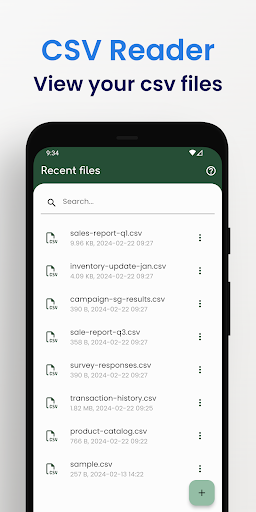
More than a basic csv reader, it's your comprehensive CSV file explorer. Uncover all this with Smart CSV Viewer:
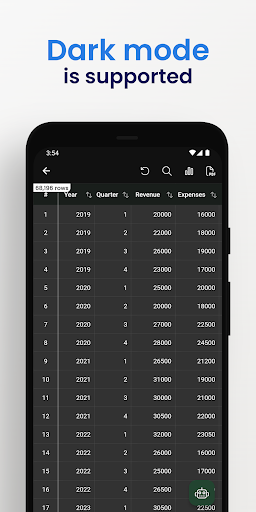
- Easy to view your CSV file.
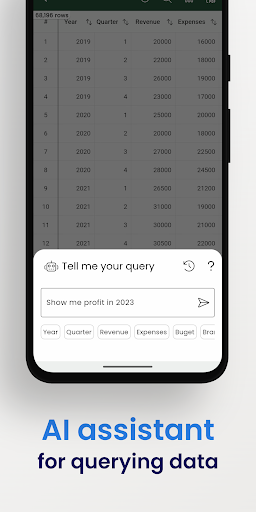
- Use AI Assistant to query CSV content.
- Show column image URL as an image.
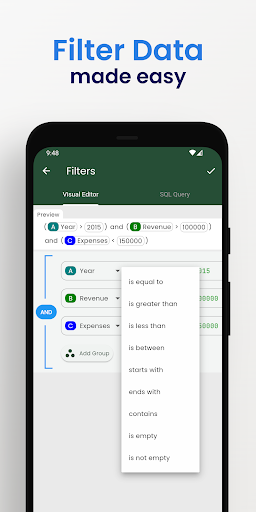
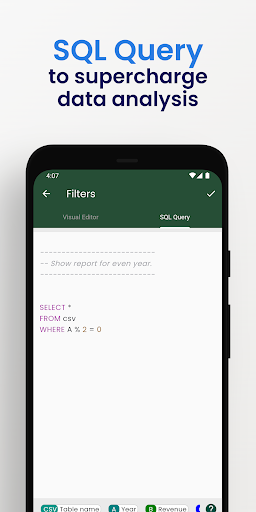
- Analyzing your data is easy by using visual filters or SQL queries.
- Easy filter data with Visual Filter Editor.
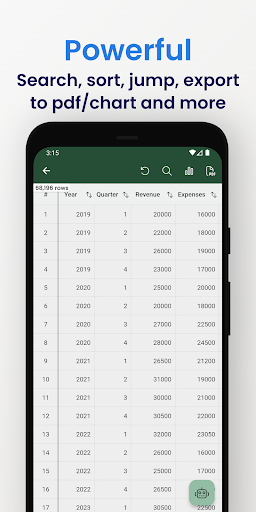
- Generate a chart image.
- Convert to PDF file. A CSV file can be custom data and style to export to a pdf file as you want.
- Manage all the exported files and share them with your friends.
- Easy to search your content.
- Copy the selected rows.
- Support both csv & tsv file format.
- Files open instantly after import, even those of large …
Read the full description
More than a basic csv reader, it's your comprehensive CSV file explorer. Uncover all this with Smart CSV Viewer: - Easy to view your CSV file. - Use AI Assistant to query CSV content. - Show column image URL as an image. - Analyzing your data is easy by using visual filters or SQL queries. - Easy filter data with Visual Filter Editor. - Generate a chart image. - Convert to PDF file. A CSV file can be custom data and style to export to a pdf file as you want. - Manage all the exported files and share them with your friends. - Easy to search your content. - Copy the selected rows. - Support both csv & tsv file format. - Files open instantly after import, even those of large size. - and more. <b># FAQ</b> - Q: What is csv file? - A: From wikipedia: Comma-separated values (CSV) is a text file format that uses commas to separate values, and newlines to separate records. A CSV file stores tabular data (numbers and text) in plain text, where each line of the file typically represents one data record. Each record consists of the same number of fields, and these are separated by commas in the CSV file. --- - Q: Which chart types are supported? - A: Currently, Smart CSV Viewer support column chart, bar chart, line chart, area chart, spline chart, scatter chart, step line chart, and step area chart. --- - Q: What do you mean by “customizable”? - A: In Smart CSV Viewer you can custom as much as you can. For example, when you only want to copy a part of data in a row, you can use the “filter” feature to exclude it. You can extract data by column. When you export to a pdf file, you can custom the style (color scheme) to match your expectation. More than a CSV converter tool, now you can change the look of your pdf file by styling it. --- - Q: Why my file not being updated? - A: If your file has been updated, you will need to re-import it. During the import process, the CSV file will be imported into the SQLite database. Consequently, you will be able to instantly view the updated file and utilize SQL queries to retrieve your data. If you have any questions, don't hesitate to contact us: Website: https://minimalistapps.github.io/smartcsv/ Email: [email protected] We hope you are more productive with Smart CSV!
Installs, last 30 days Measured
Exact Google Play install counts, collected daily
Ratings
1,246 ratings, 50 reviews
- 5 ★65%
- 4 ★14%
- 3 ★6.7%
- 2 ★3.6%
- 1 ★11%
Recent reviews
Latest public reviews from the store
No reviews in our sample for this app yet.
Top chart positions
Latest Google Play chart ranks by country, last 10 days
Not in any tracked top chart in the last 10 days.
CSV File Viewer - Smart CSV history
Release, install milestones, listing and store changes
- Reached 100,000+ installs 20 Dec 2025
- Reached 50,000+ installs 7 Sep 2024
- Reached 10,000+ installs 4 Aug 2023
- Reached 5,000+ installs 6 Feb 2023
- Reached 1,000+ installs 5 Sep 2022
- First released on the store 13 Feb 2022
Update frequency
How often CSV File Viewer - Smart CSV ships a new version, month by month
3 updates in the last 12 months. More often than most similar apps: they shipped a median of 0 updates in the same year.
Recent versions
Current version 2026.11.19
- Version 2026.10.2929 Oct 2026
• New: Batch PDF (Pro): turn many CSV files into PDFs in one go • New: export to Excel (.xlsx) from the ⋯ menu • New: paste into the table, plus a Cut / Copy / Paste / Clear toolbar when you select cells • New: favorite files, pinned at the top of your list • Layout: zoom the table from 0.5× to 2×, go full screen and set options per column • Bug fixes and performance improvements
- Version 2026.07.2423 Jul 2026
- Bug fixes and performance improvements. We hope you're loving Smart CSV. Tell us what you think by leaving a review! :)
- Version 2026.03.1717 Mar 2026
- Bug fixes and performance improvements. We hope you're loving Smart CSV. Tell us what you think by leaving a review! :)
- Version 2025.11.032 Nov 2025
- Bug fixes and performance improvements. We hope you're loving Smart CSV. Tell us what you think by leaving a review! :)
Listing keywords
Words and phrases CSV File Viewer - Smart CSV repeats most in its store listing
Top phrases: csv file (8), smart csv (5), pdf file (4), smart csv viewer (3), csv viewer (3).
Highlighted words also appear in the title. Counts cover the title, short description and description.
Business model and tech
From the store listing and declared permissions
- Business model
- Free to downloadIn-app purchases
- Sensitive access
- No sensitive permission declared
Compliance
What the listing and the app package show
- Store status
- Live
- Upkeep
- Updated 29 Oct 2026
- Registered in
- Vietnam
- Privacy policy
- Linked on the listing
- Advertising
- No ads declared
- In-app purchases
- Offered
- Age rating
- Everyone
Apps like CSV File Viewer - Smart CSV
Appointments Planner SchedulerLaurentiu Popa395K installs★ 3.99
PDF Editor: Remove Page & PassSmartapps store109K installs★ 4.38
PDF Scanner & Doc Scanner AppWdream Limited480K installs★ 4.64
Hindi Thoughts (Suvichar)Arvind Chand Katoch116K installs★ 3.5
note book - daily writingLixi LLC112K installs★ 4.42
Pdf Studio: Reader & ListenerSAT One Plus150K installs★ 3.51
Direct Messages, Delete ChatSuper Ludo™ Games430K installs★ 3.88
All Document Reader & ViewerApp Bulls Inc - Office Suite330K installs★ 4.05
Breeding WheelEmbrapa168K installs★ 4.32
CSV File Viewer - Smart CSV: questions and answers
How many downloads does CSV File Viewer - Smart CSV have?
CSV File Viewer - Smart CSV has 145,275 installs on Google Play, measured from the store's own count on 20 Nov 2026.
Who makes CSV File Viewer - Smart CSV?
CSV File Viewer - Smart CSV is published by MinimalistApps, a developer based in VN.
When was CSV File Viewer - Smart CSV last updated?
The latest version (2026.11.19) was released on 29 Oct 2026.
Is CSV File Viewer - Smart CSV free?
Yes. CSV File Viewer - Smart CSV is free to download and offers in-app purchases.
Is CSV File Viewer - Smart CSV still available?
Yes. CSV File Viewer - Smart CSV is live on Google Play as of 20 Nov 2026.
Track CSV File Viewer - Smart CSV and its competitors
Watch any app for new versions, rating drops, chart moves and removals. Free plan, no card.