
Darker (Screen Filter)
Darker can lower your screen brightness to extremely low levels.
- Installs
- 3.14M
- Measured
- Rating
- 3.75
- Ratings
- 22K
- 860 reviews
- Version
- Varies with device
- Updated 22 Aug 2026
- Released
- 19 Oct 2013
- Tracked since 13 May 2026
- Size
- —
Screenshots



About Darker (Screen Filter)
The description on the store listing
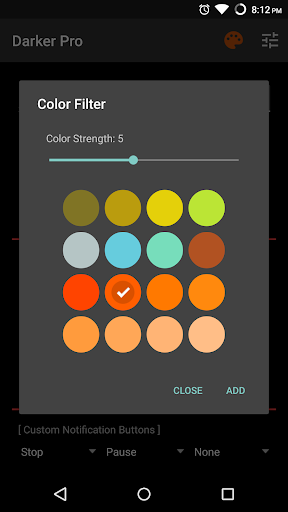
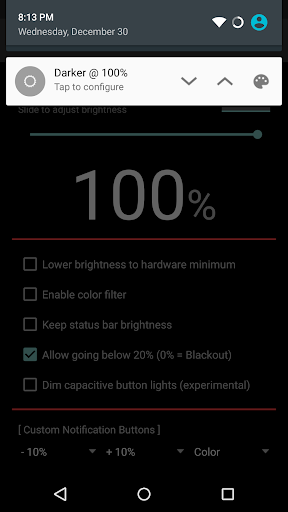
Darker can lower your screen brightness to extremely low levels, to help prevent eyestrain during the night. Use the built-in color filter* to adjust the color of your display, perfect for filtering out harsh white backgrounds during the night.
This app is fully functional and does not include advertisements. Additional paid features are unlockable through an In-app purchase.
Xiaomi device / MIUI users need to go to Settings → Installed apps → Darker → Other permissions, and enable "Display pop-up window" for Darker to work correctly.
Paid features include:
» Auto-On & Auto-Off
» Start at boot
» Lower brightness below 20%
» Darken navigation bar
» Custom filter colors
» …
Read the full description
Darker can lower your screen brightness to extremely low levels, to help prevent eyestrain during the night. Use the built-in color filter* to adjust the color of your display, perfect for filtering out harsh white backgrounds during the night. This app is fully functional and does not include advertisements. Additional paid features are unlockable through an In-app purchase. Xiaomi device / MIUI users need to go to Settings → Installed apps → Darker → Other permissions, and enable "Display pop-up window" for Darker to work correctly. Paid features include: » Auto-On & Auto-Off » Start at boot » Lower brightness below 20% » Darken navigation bar » Custom filter colors » Root mode » Customizable notification buttons • Up to three buttons can be added for quick access. • Buttons to increase and decrease the brightness (+5%, -5%, +10%, -10%) • Buttons to set a specific brightness (@0%, @10%, @20%, ... , @90%, @100%) • Quick toggles (stop, pause, reset, color filter) Note: When manually installing APK files, Android blocks the "Install" button from being pressed when Darker is running. This is NOT a bug. It's a protective measure to prevent malicious apps from camouflaging the install button. Pausing Darker will solve this. Darker requires the use of accessibility services to darken the screen, no data will be accessed or shared via the AccessibilityService API. *The color filter is similar to how the desktop version of f.lux works. Selecting a redder color will reduce more bluelight emitted from the display. <b>Tasker Support</b> Darker has Tasker support, use these intents to send commands to Darker: darker.STOP darker.PAUSE darker.INCREASE_5 darker.INCREASE_10 darker.DECREASE_5 darker.DECREASE_10 darker.SET_10 darker.SET_20 darker.SET_30 darker.SET_40 darker.SET_50 darker.SET_60 darker.SET_70 darker.SET_80 darker.SET_90 darker.SET_100 darker.TOGGLE_COLOR darker.ENABLE_COLOR darker.DISABLE_COLOR Add the above intents to Tasker by going to Action Category→System→Send Intent→Action, leave the other fields default, and note that the intents are case sensitive. These two intents below need an additional parameter in the "Extra" field darker.SETCOLOR "Extra" field: COLOR:1~16 (Colors are numbered left to right, top to bottom) darker.COLORSTRENGTH "Extra" field: STRENGTH:1~10 The intent below needs the "Target" field set to "Service" darker.START <b>FlickStart Support</b> Darker can work in conjunction with FlickStart, an app which can send commands to Darker by using the sensors on your phone or Android Wear device. The command set for Darker is available for download on the FlickStart website. Simply download the command set and import it into FlickStart.
Installs, last 30 days Measured
Exact Google Play install counts, collected daily
Ratings
21,951 ratings, 860 reviews
- 5 ★60%
- 4 ★13%
- 3 ★4.6%
- 2 ★4.6%
- 1 ★18%
Recent reviews
Latest public reviews from the store
No reviews in our sample for this app yet.
What reviewers bring up
Topics mentioned in the latest 10 reviews, by how many reviews mention them
Liked in good reviews (0 reviews)
No topic comes up twice.
Raised in bad reviews (10 reviews)
- transaction 2
- registering 2
- atleast 2
- account 2
- camera 2
- saying 2
- access 2
- system 2
Top chart positions
Latest Google Play chart ranks by country, last 10 days
Not in any tracked top chart in the last 10 days.
Darker (Screen Filter) history
Release, install milestones, listing and store changes
- Reached 1,000,000+ installs 30 Nov 2018
- Reached 500,000+ installs 2 Aug 2016
- Reached 100,000+ installs 17 Jul 2014
- Reached 50,000+ installs 21 Mar 2014
- Moved from Tools to Health & Fitness 13 Feb 2014
- Reached 10,000+ installs 24 Nov 2013
- Reached 5,000+ installs 8 Nov 2013
- Reached 1,000+ installs 27 Oct 2013
Recent versions
Current version Varies with device
- Version 4.1.019 Oct 2021
- Version 4.0.11 Jun 2020
- Version 3.19 Feb 2018
- Version 3.010 Jan 2018
Listing keywords
Words and phrases Darker (Screen Filter) repeats most in its store listing
Top phrases: darker set darker (10), darker set (10), set darker (10), set darker set (9), color filter (3).
Highlighted words also appear in the title. Counts cover the title, short description and description.
Business model and tech
From the store listing and declared permissions
- Business model
- Free to downloadIn-app purchases
- Subscriptions and payments
- Google Play billing
- Sensitive access
- Draws over other apps
5 permissions
1 special access, 0 sensitive, 4 standard
- Draw over other appsSpecial access
- Run a foreground serviceFOREGROUND_SERVICEStandard
- Start when the phone turns onStandard
- Access superuserACCESS_SUPERUSERStandard
- In-app purchases with Google PlayStandard
Compliance
What the listing and the app package show
- Store status
- Live
- Upkeep
- Updated 22 Aug 2026
- Privacy policy
- Linked on the listing
- Advertising
- No ads declared
- In-app purchases
- Offered
- Age rating
- Everyone
- Sensitive permissions
- 0 sensitive, 1 special access of 5
- Location access
- No
- Camera and microphone
- Neither
Apps like Darker (Screen Filter)
Back pain relief exercisesVladimir Apps1.4M installs★ 4.75
Fitness & Bodybuildingi-Care Fit Studio1.7M installs★ 4.47
30 day challenge - CHESTPassion4Profession Apps3.8M installs★ 4.23
CashWalk - Walk Work Earn CashAlpha Network593K installs★ 4.34
Fitness PointZero One GmbH1.4M installs★ 3.91
Weight Track AssistantKevin Tung4.7M installs★ 3.41
200 Push Ups - Home WorkoutValeriia Trypolska1.4M installs★ 4.64
vRace (Virtual Race)VnExpress.net444K installs★ 3.0
Relaxing Sounds for SleepingGeniusTools Labs1.2M installs★ 4.67
Darker (Screen Filter): questions and answers
How many downloads does Darker (Screen Filter) have?
Darker (Screen Filter) has 3,140,378 installs on Google Play, measured from the store's own count on 19 Nov 2026.
Who makes Darker (Screen Filter)?
Darker (Screen Filter) is published by mlhgdevelopment.
When was Darker (Screen Filter) last updated?
The latest version (Varies with device) was released on 22 Aug 2026.
Is Darker (Screen Filter) free?
Yes. Darker (Screen Filter) is free to download and offers in-app purchases.
Is Darker (Screen Filter) still available?
Yes. Darker (Screen Filter) is live on Google Play as of 19 Nov 2026.
Track Darker (Screen Filter) and its competitors
Watch any app for new versions, rating drops, chart moves and removals. Free plan, no card.