
Designer Tools Pro
Mockup and Background for WhatsApp, Facebook, Messenger
- Installs
- 14.84M
- Measured
- Rating
- 4.08
- Ratings
- 15.8K
- 20 reviews
- Version
- 2.2.0
- Updated 5 Nov 2026
- Released
- 5 Jan 2020
- Tracked since 13 May 2026
- Size
- 5 MB
- Needs 6.0
Screenshots



About Designer Tools Pro
The description on the store listing
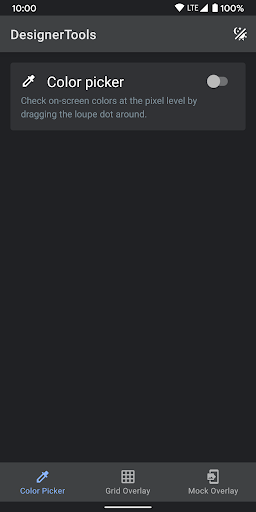
Designer Tools Pro provides a suite of features to review and validate app specifications. Whether it be checking your keylines or that shade of blue, you’ll definitely want to add this app to your toolkit. Even if you provide redlines, these are a great way to verify each and every pixel.
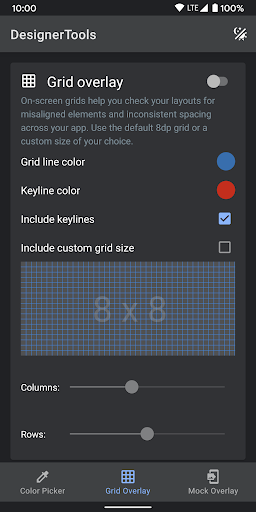
Grid Overlay - Quickly toggle on-screen grids to check layouts for inconsistent spacing or mis-aligned elements. You can even customize the grid size, grid line and keyline colors.
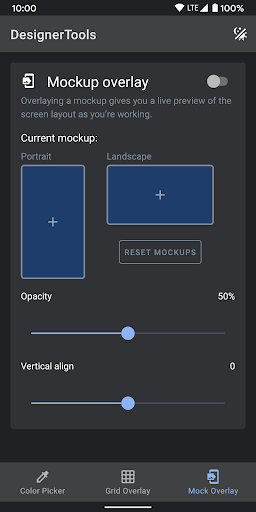
Mockup Overlay - Display a mockup image over your app. This gives you a high-fidelity opportunity to see how the design spec matches the developed user interface. Choose from portrait or landscape overlays and tune the …
Read the full description
Designer Tools Pro provides a suite of features to review and validate app specifications. Whether it be checking your keylines or that shade of blue, you’ll definitely want to add this app to your toolkit. Even if you provide redlines, these are a great way to verify each and every pixel. Grid Overlay - Quickly toggle on-screen grids to check layouts for inconsistent spacing or mis-aligned elements. You can even customize the grid size, grid line and keyline colors. Mockup Overlay - Display a mockup image over your app. This gives you a high-fidelity opportunity to see how the design spec matches the developed user interface. Choose from portrait or landscape overlays and tune the opacity for an effective comparison. You can also adjust vertical position on mockup image Color Picker - Use your finger to drag around a loupe magnifier and identity the hex codes of colors at the pixel level you can also tap on hex text to copy it into clipboard. Disclosure: The app uses the AccessibilityService API to display a floating popup to enable multitasking. No data is collected or shared using the AccessibilityService API!
Installs, last 30 days Measured
Exact Google Play install counts, collected daily
Ratings
15,837 ratings, 20 reviews
- 5 ★67%
- 4 ★8.4%
- 3 ★5.3%
- 2 ★3.2%
- 1 ★16%
Recent reviews
Latest public reviews from the store
- 3 Mar 2026
Работает плавно!
Top chart positions
Latest Google Play chart ranks by country, last 10 days
- Countries ranked
- 1
- Best rank
- #93
- Top 10 placements
- 0
- of 1 chart placements
- Average rank
- #93
Best countries on Google Play
- 🇮🇳 India · Top free, Tools#93
| Country | Chart | Category | Rank | Best (10 days) | Date |
|---|---|---|---|---|---|
| 🇮🇳 India | Top free | Tools | #93 | #93 | 20 Nov 2026 |
Designer Tools Pro history
Release, install milestones, listing and store changes
- Reached 10,000,000+ installs 21 Aug 2025
- Reached 5,000,000+ installs 26 May 2024
- Reached 1,000,000+ installs 5 Aug 2022
- Reached 500,000+ installs 7 Jan 2021
- Reached 100,000+ installs 21 Apr 2020
- Reached 50,000+ installs 10 Mar 2020
- Reached 10,000+ installs 25 Feb 2020
- Reached 5,000+ installs 11 Feb 2020
Update frequency
How often Designer Tools Pro ships a new version, month by month
1 updates in the last 12 months. More often than most similar apps: they shipped a median of 0 updates in the same year.
Recent versions
Current version 2.2.0
- Version 2.2.05 Nov 2026
• Enhanced Pro features • Resolved stability issues on select devices • Faster app load times
- Version 2.1.023 Oct 2025
* Improve stability for Android 16 * Minimal supported Android 6
- Version 2.0.820 Jul 2025
Target Android 15
- Version 2.0.713 Jan 2025
Listing keywords
Words and phrases Designer Tools Pro repeats most in its store listing
Top phrases: designer tools pro (2), accessibilityservice api (2), designer tools (2), mockup image (2), tools pro (2).
Highlighted words also appear in the title. Counts cover the title, short description and description.
Business model and tech
From the store listing, the SDKs in the app package and its declared permissions
- Business model
- Free to downloadIn-app purchasesShows ads
- Built with
- No cross-platform framework or game engine detected
- Ad networks (1)
- AdMob
- Subscriptions and payments
- Google Play billing
- Analytics and crash reports
- Firebase
- Sensitive access
- Photos, videos and filesDraws over other appsAdvertising ID
2 ad, attribution and analytics SDKs detected. SDKs are read from the app package and permissions from the store listing, so code that loads later is not seen.
Technology
17 SDKs found in the app package
Ad networks
Advertising and install-attribution SDKs found in the app package
- AdMob
21 permissions
1 special access, 3 sensitive, 17 standard
- Draw over other appsSpecial access
- Read photos and videos the user picksREAD_MEDIA_VISUAL_USER_SELECTEDSensitive
- Read shared storageSensitive
- Show notificationsPOST_NOTIFICATIONSSensitive
- Ad attribution (Privacy Sandbox)ACCESS_ADSERVICES_ATTRIBUTIONStandard
- Ad topics (Privacy Sandbox)ACCESS_ADSERVICES_TOPICSStandard
- Read how it was installed (install referrer)BIND_GET_INSTALL_REFERRER_SERVICEStandard
- Read the advertising IDAD_IDStandard
- Read the advertising ID (Privacy Sandbox)ACCESS_ADSERVICES_AD_IDStandard
- Foreground service (media projection)FOREGROUND_SERVICE_MEDIA_PROJECTIONStandard
- Foreground service (special use)FOREGROUND_SERVICE_SPECIAL_USEStandard
- Keep the phone awakeStandard
Compliance
What the listing and the app package show
- Store status
- Live
- Upkeep
- Updated 5 Nov 2026
- Registered in
- United States
- Privacy policy
- Linked on the listing
- Advertising
- Shows ads
- In-app purchases
- Offered
- Age rating
- Everyone
- Sensitive permissions
- 3 sensitive, 1 special access of 21
- Location access
- No
- Camera and microphone
- Neither
Apps like Designer Tools Pro
Light Flow Pro - LED Controlandrewpmoore341K installs★ 3.11
Vault, App Lock: Security PlusKewlApps3M installs★ 4.39
One Hand Operation +Samsung Electronics Co., Ltd.4M installs★ 4.26
- Access Dots - Android 12/iOS 14 privacy indicatorsIJP2.7M installs★ 4.05
Hidden SettingsYunus Ceyhan3.8M installs★ 4.29
- Tweet2gifNaevtamarkus904K installs★ 2.73
Manic Emulator - GBA RetroCoolDev Co Ltd1.3M installs★ 4.23
Micro Qibla (old)muscat.dev1.7M installs★ 4.65
Google TV HomeGoogle LLC201M installs★ 3.62
Designer Tools Pro: questions and answers
How many downloads does Designer Tools Pro have?
Designer Tools Pro has 14,840,860 installs on Google Play, measured from the store's own count on 20 Nov 2026.
Who makes Designer Tools Pro?
Designer Tools Pro is published by Wixel Store, a developer based in US.
When was Designer Tools Pro last updated?
The latest version (2.2.0) was released on 5 Nov 2026.
Is Designer Tools Pro free?
Yes. Designer Tools Pro is free to download and offers in-app purchases, and it shows ads.
Is Designer Tools Pro still available?
Yes. Designer Tools Pro is live on Google Play as of 20 Nov 2026.
Track Designer Tools Pro and its competitors
Watch any app for new versions, rating drops, chart moves and removals. Free plan, no card.