
DigDeep Image Recovery
Recovery tool that Search your internal storage and SD card for deleted images
- Installs
- 38.27M
- Measured
- Rating
- 3.93
- Ratings
- 360K
- 5.9K reviews
- Version
- Varies with device
- Updated 19 Aug 2026
- Released
- 8 Jan 2016
- Tracked since 12 May 2026
- Size
- —
Screenshots


About DigDeep Image Recovery
The description on the store listing
A powerful Recovery tool that Search your internal storage and SD card for deleted images and recover them again easily.
Sometimes it happens when you delete accidently a photo from your phone, and start looking for a good tool that can restore it for you can bring you a headache. To solve this problem all what you have to do is the download this app and let it Scan all your phone’s internal and external memory.
HOW TO USE :
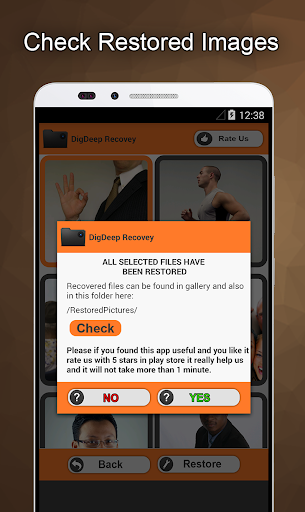
It is easy, just launch the app. A loading screen will show up. Just be patient and wait until it scans all folders and files for erased photos. It may take a while depending on how large your memory is. After searching is complet , it will show a new screen with …
Read the full description
A powerful Recovery tool that Search your internal storage and SD card for deleted images and recover them again easily. Sometimes it happens when you delete accidently a photo from your phone, and start looking for a good tool that can restore it for you can bring you a headache. To solve this problem all what you have to do is the download this app and let it Scan all your phone’s internal and external memory. HOW TO USE : It is easy, just launch the app. A loading screen will show up. Just be patient and wait until it scans all folders and files for erased photos. It may take a while depending on how large your memory is. After searching is complet , it will show a new screen with folders, each folder contains pictures from a specific location. check them one by one looking for you photos, each folder contains a list of images inside it. Check images you want to restore and when you finish doing that hit restore button to recover them. Now a dialog will show up telling you in wich folder to find recovered images. You can either browse this folder or browse the gallery where you can find them as well. FEATURES : 1 - Scan both internal and external memory ( SD Card ). 2 - Nice UI Design and Easy to use. 3 – Fast, Reliable, Best quality. 4 – No need to root the phone. 5 - Restore all images types: jpg,jpeg,png. N.B : This app may show some pictures even if they are not deleted yet. That because there is already an occurrence of this files in hidden folders scanned by this app. Just keep looking and you will find photos you are looking for. This is not a recycle bin, it a standalone app that can recover pictures even ones that have been deleted before the app was installed.
Installs, last 30 days Measured
Exact Google Play install counts, collected daily
Ratings
359,900 ratings, 5,919 reviews
- 5 ★65%
- 4 ★9.2%
- 3 ★3.6%
- 2 ★2.3%
- 1 ★20%
Recent reviews
Latest public reviews from the store
- 21 Apr 2026
okay
- 29 Sep 2025
bhai se koi tagada
- 10 Feb 2025
Worst app
- 3 Nov 2024
Nambar
What reviewers bring up
Topics mentioned in the latest 50 reviews, by how many reviews mention them
Liked in good reviews (25 reviews)
No topic comes up twice.
Raised in bad reviews (24 reviews)
- recover 5
- contacts 3
- download 2
- deleted 2
- fraud 2
- waste 2
Top chart positions
Latest Google Play chart ranks by country, last 10 days
Not in any tracked top chart in the last 10 days.
DigDeep Image Recovery history
Release, install milestones, listing and store changes
- Reached 10,000,000+ installs 9 Dec 2017
- Reached 5,000,000+ installs 10 Mar 2017
- Reached 1,000,000+ installs 10 Jun 2016
- Reached 500,000+ installs 26 Apr 2016
- Reached 100,000+ installs 6 Mar 2016
- Reached 50,000+ installs 21 Feb 2016
- First released on the store 8 Jan 2016
Update frequency
How often DigDeep Image Recovery ships a new version, month by month
4 updates in the last 12 months. About as often as similar apps, which shipped a median of 4 updates in the same year.
Recent versions
Current version Varies with device
- Version 2.3.0.319 Apr 2026
- Version 2.3.0.217 Apr 2026
- Version 2.3.0.114 Apr 2026
- Version 2.2.5.518 Jan 2026
Listing keywords
Words and phrases DigDeep Image Recovery repeats most in its store listing
Top phrases: sd card (3), card for deleted (2), internal and external (2), search your internal (2), storage and sd (2).
Highlighted words also appear in the title. Counts cover the title, short description and description.
Business model and tech
From the store listing, the SDKs in the app package and its declared permissions
- Business model
- Free to downloadShows ads
- Built with
- No cross-platform framework or game engine detected
- Ad networks (1)
- AdMob
- Analytics and crash reports
- Firebase
- Sign-in and social
- Sensitive access
- Photos, videos and filesAdvertising ID
2 ad, attribution and analytics SDKs detected. SDKs are read from the app package and permissions from the store listing, so code that loads later is not seen.
Technology
14 SDKs found in the app package
Ad networks
Advertising and install-attribution SDKs found in the app package
- AdMob
21 permissions
1 special access, 5 sensitive, 15 standard
- Change system settingsWRITE_SETTINGSSpecial access
- Change or delete shared storageSensitive
- Read photosREAD_MEDIA_IMAGESSensitive
- Read shared storageSensitive
- Read videosREAD_MEDIA_VIDEOSensitive
- Show notificationsPOST_NOTIFICATIONSSensitive
- Ad attribution (Privacy Sandbox)ACCESS_ADSERVICES_ATTRIBUTIONStandard
- Ad topics (Privacy Sandbox)ACCESS_ADSERVICES_TOPICSStandard
- Read the advertising IDAD_IDStandard
- Read the advertising ID (Privacy Sandbox)ACCESS_ADSERVICES_AD_IDStandard
- App icon badge countsBADGE_COUNT_READStandard
- Control vibrationStandard
Compliance
What the listing and the app package show
- Store status
- Live
- Upkeep
- Updated 19 Aug 2026
- Registered in
- United States
- Privacy policy
- Linked on the listing
- Advertising
- Shows ads
- In-app purchases
- None declared
- Age rating
- Everyone
- Sensitive permissions
- 5 sensitive, 1 special access of 21
- Location access
- No
- Camera and microphone
- Neither
Apps like DigDeep Image Recovery
Mp3 Music downloader all songsFast Mp3 Music Download Offline Apps11.4M installs★ 4.72
Link2SDBülent Akpınar42.7M installs★ 3.42
Surfshark: Secure VPN serviceSurfshark B.V.28.4M installs★ 4.6
Game Remote Play ControllerMethods Studio19M installs★ 4.48
FreeScan© QR Code ScannerEasy to Use QR Code Scanner & Barcode Reader52.9M installs★ 4.4
Girls Skins for Minecraft PECrone26.9M installs★ 4.5
Status Saver- Video DownloaderNative Craft - Status Images, Photo & Video Saver77.9M installs★ 4.64
TunnelBear VPNTunnelBear, LLC47.8M installs★ 3.4
WiFimanUbiquiti Inc.10.2M installs★ 4.75
DigDeep Image Recovery: questions and answers
How many downloads does DigDeep Image Recovery have?
DigDeep Image Recovery has 38,270,247 installs on Google Play, measured from the store's own count on 19 Nov 2026.
Who makes DigDeep Image Recovery?
DigDeep Image Recovery is published by GreatStuffApps, a developer based in US.
When was DigDeep Image Recovery last updated?
The latest version (Varies with device) was released on 19 Aug 2026.
Is DigDeep Image Recovery free?
Yes. DigDeep Image Recovery is free to download, and it shows ads.
Is DigDeep Image Recovery still available?
Yes. DigDeep Image Recovery is live on Google Play as of 19 Nov 2026.
Track DigDeep Image Recovery and its competitors
Watch any app for new versions, rating drops, chart moves and removals. Free plan, no card.