Doc Scanner - Image to PDF
Free & easy Document Scanner app - Image to PDF.
- Installs
- 30
- Measured
- Rating
- —
- Ratings
- —
- Version
- Varies with device
- Updated 12 Jan 2026
- Released
- 24 Jul 2023
- Tracked since 12 May 2026
- Size
- —
Screenshots


About Doc Scanner - Image to PDF
The description on the store listing
Welcome to Doc Scanner - Image to PDF, your ultimate solution for easily converting images into PDF files! Whether you need to scan documents, receipts, or images and save them as PDFs, our app provides a seamless experience with powerful features.
Key Features:
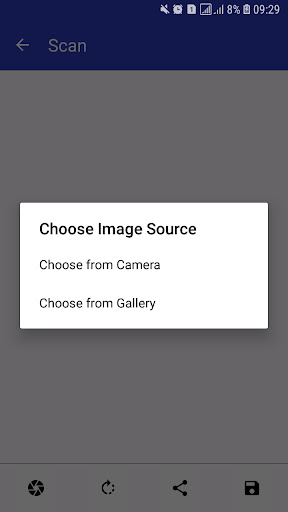
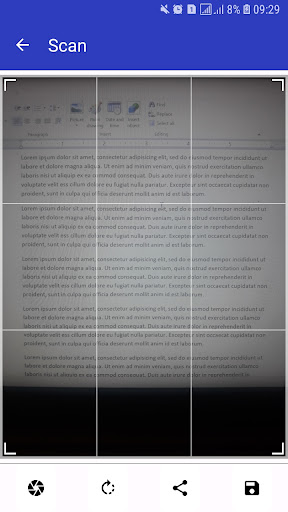
Effortless Image Capture: Easily capture images from your gallery or directly using your device's camera. We understand that convenience is key, so we've made sure that the process of capturing images is simple and user-friendly.
Crop and Rotate Images: Our app allows you to crop or rotate the captured images to ensure they are perfectly aligned and optimized for your PDF files. Get your documents in the right orientation …
Read the full description
Welcome to Doc Scanner - Image to PDF, your ultimate solution for easily converting images into PDF files! Whether you need to scan documents, receipts, or images and save them as PDFs, our app provides a seamless experience with powerful features. Key Features: Effortless Image Capture: Easily capture images from your gallery or directly using your device's camera. We understand that convenience is key, so we've made sure that the process of capturing images is simple and user-friendly. Crop and Rotate Images: Our app allows you to crop or rotate the captured images to ensure they are perfectly aligned and optimized for your PDF files. Get your documents in the right orientation with just a few taps. Create PDF Files: Doc Scanner - Image to PDF empowers you to convert your images into high-quality PDF files quickly. Say goodbye to cumbersome manual conversions - we handle it all for you. Organize Scanned Items: Your scanned items are neatly displayed in a dedicated page, making it easy to access and manage your documents. You can add items to favorites, share them, or delete them with a simple swipe. Favorites Page: We understand that some documents are more important than others. That's why we have a dedicated Favorites page where you can keep your most frequently accessed PDFs. Easily manage your favorite items with options to delete, remove, or share them. User-Friendly List View: Each list view in the app comes with a thumbnail for the PDF file, its title, creation date, and file size in MB. This way, you can quickly identify and locate the document you need. Interactive PDF Viewer: When you click on an item, our interactive PDF viewer opens up, allowing you to view your PDF files with ease. You can zoom in, zoom out, adjust the view, and even share the PDFs effortlessly. Drawer Menu: Our app features a user-friendly drawer menu that makes navigation between pages a breeze. Switch between different sections of the app with just a swipe. Doc Scanner - Image to PDF is designed to be your go-to tool for handling all your document scanning and PDF conversion needs. It's perfect for students, professionals, or anyone who wants to simplify their document management. Download Doc Scanner - Image to PDF now and experience the ultimate convenience of having a portable document scanner and PDF creator right in your pocket! Simplify your life and digitize your documents today.
Installs since 17 Nov 2026 Measured
Exact Google Play install counts, collected daily
Daily history starts once this app is in our daily install sample.
Ratings
- 5 ★0.0%
- 4 ★0.0%
- 3 ★0.0%
- 2 ★0.0%
- 1 ★0.0%
Recent reviews
Latest public reviews from the store
No reviews in our sample for this app yet.
Top chart positions
Latest Google Play chart ranks by country, last 10 days
Not in any tracked top chart in the last 10 days.
Doc Scanner - Image to PDF history
Release, install milestones, listing and store changes
- Reached 10+ installs 12 Jan 2026
- Reached 5+ installs 15 Aug 2024
- First released on the store 24 Jul 2023
Recent versions
Current version Varies with device
- Version 1.0.122 Aug 2025
Listing keywords
Words and phrases Doc Scanner - Image to PDF repeats most in its store listing
Top phrases: image to pdf (6), doc scanner image (5), doc scanner (5), pdf files (5), scanner image (5).
Highlighted words also appear in the title. Counts cover the title, short description and description.
Business model and tech
From the store listing and declared permissions
- Business model
- Free to downloadShows ads
- Sensitive access
- CameraPhotos, videos and filesAdvertising ID
11 permissions
0 special access, 2 sensitive, 9 standard
- Take photos and videosSensitive
- Read photosREAD_MEDIA_IMAGESSensitive
- Ad attribution (Privacy Sandbox)ACCESS_ADSERVICES_ATTRIBUTIONStandard
- Ad topics (Privacy Sandbox)ACCESS_ADSERVICES_TOPICSStandard
- Read the advertising IDAD_IDStandard
- Read the advertising ID (Privacy Sandbox)ACCESS_ADSERVICES_AD_IDStandard
- Keep the phone awakeStandard
- Run a foreground serviceFOREGROUND_SERVICEStandard
- Full internet accessStandard
- See network connectionsStandard
- Internal app permissionDYNAMIC_RECEIVER_NOT_EXPORTED_PERMISSIONStandard
Compliance
What the listing and the app package show
- Store status
- Live
- Upkeep
- Updated 12 Jan 2026
- Privacy policy
- Linked on the listing
- Advertising
- Shows ads
- In-app purchases
- None declared
- Age rating
- Everyone
- Sensitive permissions
- 2 sensitive of 11
- Location access
- No
- Camera and microphone
- Camera
Apps like Doc Scanner - Image to PDF
목포해양대학교 도서관wiseneosco7.6K installs★ 4.8
Aza-e-HussainSyed Mehdi Raza5.2K installs★ 4.8
Jewish QuoteChabad.org Jewish Apps8K installs★ 4.85
Car Engine SoundsSboard.pro29K installs★ 4.17
Garland County LibrarySolus UK Ltd5.9K installs★ 4.78
Món Ngon 3 Miền - Nau an ngonWeOnline.VN9.1K installs★ 4.1
CARPORTPop-Pulse4.3K installs★ 4.06
블랙 심플 카톡테마은수우우45.4K installs★ 4.6
WMS WebControlWAREMA Renkhoff SE13.1K installs★ 3.5
Doc Scanner - Image to PDF: questions and answers
How many downloads does Doc Scanner - Image to PDF have?
Doc Scanner - Image to PDF has 30 installs on Google Play, measured from the store's own count on 17 Nov 2026.
Who makes Doc Scanner - Image to PDF?
Doc Scanner - Image to PDF is published by AppsLib.
When was Doc Scanner - Image to PDF last updated?
The latest version (Varies with device) was released on 12 Jan 2026.
Is Doc Scanner - Image to PDF free?
Yes. Doc Scanner - Image to PDF is free to download, and it shows ads.
Is Doc Scanner - Image to PDF still available?
Yes. Doc Scanner - Image to PDF is live on Google Play as of 17 Nov 2026.
Track Doc Scanner - Image to PDF and its competitors
Watch any app for new versions, rating drops, chart moves and removals. Free plan, no card.