
Document scanner, PDF scanner
Scan all document pages into a PDF file and print it easily by document scanner
- Installs
- 3.88M
- Measured
- Rating
- 4.59
- Ratings
- 14.3K
- 56 reviews
- Version
- 1.6.6
- Updated 20 Oct 2026
- Released
- 25 Jan 2024
- Tracked since 13 May 2026
- Size
- —
Screenshots


About Document scanner, PDF scanner
The description on the store listing
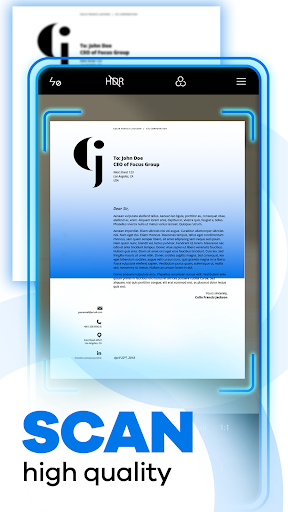
If you need to quickly scan multiple documents to JPG or PDF at the same time with one click on your phone, this document scanner app is designed for you.
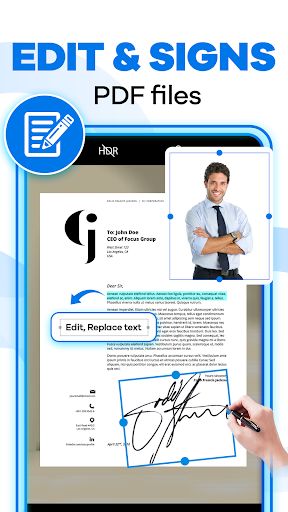
Besides, this document scanner app provides you with various features, such as smart scanning, importing photos to text, id cards, adding signatures, adding watermarks, and merging PDF.
And, quickly scan any kind of document in your office, at home, at universities, or anywhere else that needs to be there. Turn your phone into a portable scanner and use it anytime, anywhere.
⭐Huge benefits of scan document you must know:
- PDF scanner app help easily and increase the productivity of searchable documents.
- Accessible pdf …
Read the full description
If you need to quickly scan multiple documents to JPG or PDF at the same time with one click on your phone, this document scanner app is designed for you. Besides, this document scanner app provides you with various features, such as smart scanning, importing photos to text, id cards, adding signatures, adding watermarks, and merging PDF. And, quickly scan any kind of document in your office, at home, at universities, or anywhere else that needs to be there. Turn your phone into a portable scanner and use it anytime, anywhere. ⭐Huge benefits of scan document you must know: - PDF scanner app help easily and increase the productivity of searchable documents. - Accessible pdf document files through various devices you have. Say goodbye with a pile of paperwork in your briefcase - Wherever you are in the world, you can access your digital files from literally the palm of your hands - Forget the expensive cost of renting a big office to store your hardcopy documents with camera scanner - Scan pdf helps the cost of printing, photocopying, or buying paper, for example, is significantly reduced. The cost of physical space and maintenance is also removed - A lot of hours are removed when trying to find and access files, which cuts significant hours off your day-to-day work - Limit the risks of physical documents that are vulnerable beyond your control, such as fire, flooding, misplacing, losing documents, paper degrading, and ink fading out - Share your pdf image files across networks without losing the original formatting - Help to preserve your documents for years to come - Protect important information from physical deterioration ⭐ What you can get: - Scan all document pages into a PDF file - Scan all hard copies of documents and convert them to PDF files on your phone - Import multiple images and convert them to PDF or JPG in this document scanner app - Convert any images from your camera or gallery to PDF files with pdf camera scanner - Extract texts from image, transfer image to text so you can search, edit or share - ID scanner scans ID cards, passports, driving licenses, visas, and other identity documents in a second and saves them into your devices - Easy to create a signature or watermark and then place it or your initials anywhere in the PDF document, JPG - Enhance the scan quality automatically and manually - Easy to share your scanned documents via email, WhatsApp, Telegram, or any other apps - Arrange your docs in folders which easy to follow ⭐Getting free “Document scanner, PDF scanner app” helps you to 1️⃣Convenience - Scan pdf document anytime and anywhere using just your phone by this pdf camera scanner - Don't need to access a traditional scanner - Fast to convert paper Doc into digital format, even when you’re in meetings or organizing files 2️⃣Space saving - Reduced the amount of physical storage needed for documents with this pdf scanner application - Rather than taking up space in bulky file cabinets, thousands of pdf image files can be stored on a single server instead 3️⃣Easy sharing - Scan, send, and share documents with colleagues or friends with a click, even when you're in remote working scenarios. 4️⃣Enhanced Security - Adds an extra layer of security, such as encryption, compared to keeping sensitive information on paper 5️⃣Cost-Effective - There's no need for a large, expensive piece of equipment or ongoing maintenance costs - This app is always free for you - This scanner scan pdf has many name other such as scanner app free, free pdf converter, ocr text recognition, free scanner app, pdf scanning app
Installs, last 30 days Measured
Exact Google Play install counts, collected daily
Ratings
14,282 ratings, 56 reviews
- 5 ★81%
- 4 ★11%
- 3 ★0.5%
- 2 ★0.0%
- 1 ★6.8%
Recent reviews
Latest public reviews from the store
- 1 Jun 2022
Fine !
- 28 Nov 2021
Great app, easy to use, simple UI, pro features are free such as OCR image to text. Bestest document scanner - scan to PDF app ever. Highly recomended.
- 21 Nov 2021
Wow multiple features in a single app. One of the best app for document scanner i have used now. The free version of this app is better than CamScanner. This Doc Scan is recommended to all. Excellent performance by the team.
- 21 Nov 2021
Love using this document scanner app. So easy to use. Scan to pdf features are great. Pro features are available free in this app. I would recommend everyone to use this app.
What reviewers bring up
Topics mentioned in the latest 8 reviews, by how many reviews mention them
Liked in good reviews (7 reviews)
- document scanner 6
- pdf 5
- features 4
- ocr 4
- highly recomended 3
- scanner scan 3
- bestest 3
- image 3
Raised in bad reviews (1 reviews)
No topic comes up twice.
Top chart positions
Latest Google Play chart ranks by country, last 10 days
Not in any tracked top chart in the last 10 days.
Document scanner, PDF scanner history
Release, install milestones, listing and store changes
- Reached 1,000,000+ installs 9 Nov 2024
- Reached 500,000+ installs 23 Aug 2024
- Reached 100,000+ installs 12 Jun 2024
- Reached 50,000+ installs 15 May 2024
- Reached 10,000+ installs 19 Mar 2024
- Reached 5,000+ installs 5 Mar 2024
- Reached 1,000+ installs 20 Feb 2024
- Reached 500+ installs 8 Feb 2024
Update frequency
How often Document scanner, PDF scanner ships a new version, month by month
8 updates in the last 12 months. More often than most similar apps: they shipped a median of 0 updates in the same year.
Recent versions
Current version 1.6.6
- Version 1.6.620 Oct 2026
- Version 1.6.019 Aug 2026
- Version 1.5.912 Aug 2026
- Version 1.5.81 Jun 2026
Listing keywords
Words and phrases Document scanner, PDF scanner repeats most in its store listing
Top phrases: document scanner (6), pdf scanner (4), camera scanner (3), pdf document (3), scan pdf (3).
Highlighted words also appear in the title. Counts cover the title, short description and description.
Business model and tech
From the store listing and declared permissions
- Business model
- Free to downloadIn-app purchasesShows ads
- Subscriptions and payments
- Google Play billing
- Sensitive access
- CameraMicrophonePhotos, videos and filesNearby devicesAdvertising ID
23 permissions
0 special access, 6 sensitive, 17 standard
- Record audioSensitive
- Take photos and videosSensitive
- Change or delete shared storageSensitive
- Read photosREAD_MEDIA_IMAGESSensitive
- Read shared storageSensitive
- Show notificationsPOST_NOTIFICATIONSSensitive
- Ad attribution (Privacy Sandbox)ACCESS_ADSERVICES_ATTRIBUTIONStandard
- Ad topics (Privacy Sandbox)ACCESS_ADSERVICES_TOPICSStandard
- Read how it was installed (install referrer)BIND_GET_INSTALL_REFERRER_SERVICEStandard
- Read the advertising IDAD_IDStandard
- Read the advertising ID (Privacy Sandbox)ACCESS_ADSERVICES_AD_IDStandard
- Keep the phone awakeStandard
Compliance
What the listing and the app package show
- Store status
- Live
- Upkeep
- Updated 20 Oct 2026
- Registered in
- Vietnam
- Privacy policy
- Linked on the listing
- Advertising
- Shows ads
- In-app purchases
- Offered
- Age rating
- Everyone
- Sensitive permissions
- 6 sensitive of 23
- Location access
- No
- Camera and microphone
- Both
Apps like Document scanner, PDF scanner
Light Flow Pro - LED Controlandrewpmoore341K installs★ 3.11
Vault, App Lock: Security PlusKewlApps3M installs★ 4.39
One Hand Operation +Samsung Electronics Co., Ltd.4M installs★ 4.26
- Access Dots - Android 12/iOS 14 privacy indicatorsIJP2.7M installs★ 4.05
Manic Emulator - GBA RetroCoolDev Co Ltd1.3M installs★ 4.22
Google TV HomeGoogle LLC201M installs★ 3.62
- Tweet2gifNaevtamarkus903K installs★ 2.73
Micro Qibla (old)muscat.dev1.7M installs★ 4.65
QR Scanner2kit consulting504K installs★ 4.36
Document scanner, PDF scanner: questions and answers
How many downloads does Document scanner, PDF scanner have?
Document scanner, PDF scanner has 3,876,359 installs on Google Play, measured from the store's own count on 19 Nov 2026.
Who makes Document scanner, PDF scanner?
Document scanner, PDF scanner is published by Merryblue, a developer based in VN.
When was Document scanner, PDF scanner last updated?
The latest version (1.6.6) was released on 20 Oct 2026.
Is Document scanner, PDF scanner free?
Yes. Document scanner, PDF scanner is free to download and offers in-app purchases, and it shows ads.
Is Document scanner, PDF scanner still available?
Yes. Document scanner, PDF scanner is live on Google Play as of 19 Nov 2026.
Track Document scanner, PDF scanner and its competitors
Watch any app for new versions, rating drops, chart moves and removals. Free plan, no card.