
Docusign - Upload & Sign Docs
Fill, sign & send docs, forms, agreements & contracts via electronic signature.
- Installs
- 23.58M
- Measured
- Rating
- 4.76
- Ratings
- 179K
- 28K reviews
- Version
- 3.65.0
- Updated 23 Oct 2026
- Released
- 11 Jan 2012
- Tracked since 12 May 2026
- Size
- 81 MB
- Needs 5.0
Also on App Store: Docusign - Upload & Sign Docs (834K ratings)
Screenshots




About Docusign - Upload & Sign Docs
The description on the store listing
Docusign is now the Intelligent Agreement Management company. We’re bringing the ease and delight of eSignature to the whole agreement process.
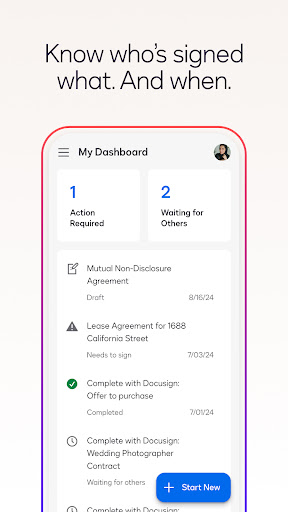
Docusign eSignature is the world’s #1 way for businesses and individuals to securely send and sign agreements from practically anywhere, at any time, from almost any device. The Docusign app is easy to use, includes unlimited free signing for all parties, and is trusted by millions of people worldwide.
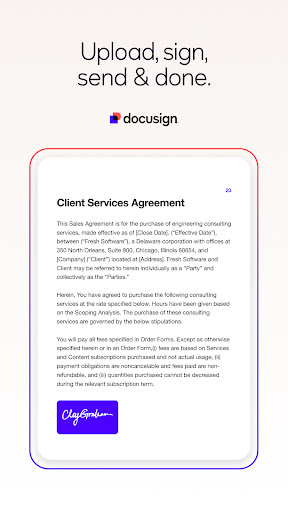
HOW DOCUSIGN WORKS | e-Sign PDFs, forms, and contracts on the go.
• Step 1: Create your customized digital signature directly on your device.
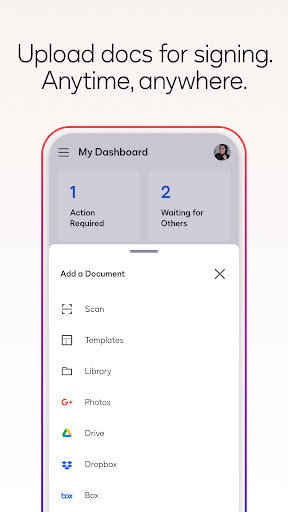
• Step 2: Upload documents easily via email, Google Drive, DropBox, Box, Evernote, Salesforce, or …
Read the full description
Docusign is now the Intelligent Agreement Management company. We’re bringing the ease and delight of eSignature to the whole agreement process. Docusign eSignature is the world’s #1 way for businesses and individuals to securely send and sign agreements from practically anywhere, at any time, from almost any device. The Docusign app is easy to use, includes unlimited free signing for all parties, and is trusted by millions of people worldwide. HOW DOCUSIGN WORKS | e-Sign PDFs, forms, and contracts on the go. • Step 1: Create your customized digital signature directly on your device. • Step 2: Upload documents easily via email, Google Drive, DropBox, Box, Evernote, Salesforce, or photo scanning. • Step 3: E-sign your documents for free with no monthly limit. STREAMLINED, SIMPLIFIED MANAGEMENT | Send and monitor agreements straight from your device. • Step 1: Import files to prepare and send them out for signature. • Step 2: Prepare your document with “Sign Here” tags that show precisely where to sign, initial, or add additional information and invite others to sign. You can set the signing order and workflow for multiple signers. Docusign supports both in-person and remote signing. Responsive signing functionality automatically adapts documents for mobile to the size and orientation of the signer’s device. • Step 3: Remind signers to sign with a single tap or void a document that has already been sent for signature. • Step 4: Receive real-time push notifications when a document has been signed. E-SIGNATURE THROUGH DOCUSIGN IS LEGAL AND SECURE. Docusign’s complies with the eSign Act, which means: • Agreements are legally binding. • There is a complete audit trail to track who signed when and where. • Documents are encrypted; this is safer and more secure than paper. • Docusign is ISO 27001 SSAE16 compliant. Docusign’s free eSignature app supports multiple document types and formats, including: • PDF • Word • Excel • Images (JPEG, PNG, TIFF) • Text-Based Files Common documents to digitally sign with Docusign: • Non-disclosure agreements (NDAs) • Sales contracts and proposals • Health care documents • Financial agreements • Waivers • Permission slips • Lease agreements PREMIUM PLANS In addition to the free signing experience, Docusign offers advanced features through subscription plans: Standard Plan • Send documents out for signature. • Access to advanced fields including Docusign’s most popular. • Manage signing on-the-go. Remind, void, in-person signing, and reusable templates. Real Estate Plan • Send documents out for signature. • Powerful real estate features including zipForm Plus integration and web branding. • Managing signing on-the-go. Remind, void, in-person signing, and reusable templates. Personal Plan • Limited document sending. Send up to 5 documents monthly. • Access to essential fields. Request signature, date, and name. • Reusable templates so you can standardize your documents. Email your questions or feedback to: [email protected] Find out more about Docusign and electronic signatures: https://www.docusign.com/products/electronic-signature/how-docusign-works Subscription Plan Information: • Payment is charged to Google Play at the time a user confirms purchase. • Subscriptions automatically renew unless auto-renew is turned off at least 24 hours before the end of the current period. Account will be charged for renewal within 24-hours prior to the end of the current period, and identify the cost of the renewal. • Subscriptions may be managed by the user and auto-renewal may be turned off by going to the user's account settings after purchase. • Cancellation of the current subscription is not allowed during the active subscription period. Privacy Policy: https://www.docusign.com/privacy/ Agreements and Terms: https://www.docusign.com/legal/agreements/
Installs since 29 Aug 2026 Measured
Exact Google Play install counts, collected daily
Ratings
179,029 ratings, 28,042 reviews
- 5 ★82%
- 4 ★8.6%
- 3 ★3.1%
- 2 ★1.2%
- 1 ★4.8%
Recent reviews
Latest public reviews from the store
No reviews in our sample for this app yet.
Top chart positions
Latest Google Play chart ranks by country, last 10 days
- Countries ranked
- 6
- Best rank
- #29
- Top 10 placements
- 0
- of 10 chart placements
- Average rank
- #86.4
Best countries on Google Play
- 🇺🇸 United States · Top grossing, Productivity#29
- 🇨🇦 Canada · Top grossing, Productivity#36
- 🇦🇺 Australia · Top grossing, Productivity#47
- 🇧🇷 Brazil · Top grossing, Productivity#55
- 🇬🇧 United Kingdom · Top free, Productivity#107
- 🇫🇷 France · Top free, Productivity#180
| Country | Chart | Category | Rank | Best (10 days) | Date |
|---|---|---|---|---|---|
| 🇺🇸 United States | Top grossing | Productivity | #29 | #29 | 19 Nov 2026 |
| 🇨🇦 Canada | Top grossing | Productivity | #36 | #36 | 18 Nov 2026 |
| 🇦🇺 Australia | Top grossing | Productivity | #47 | #47 | 18 Nov 2026 |
| 🇧🇷 Brazil | Top grossing | Productivity | #55 | #52 | 19 Nov 2026 |
| 🇦🇺 Australia | Top free | Productivity | #63 | #63 | 19 Nov 2026 |
| 🇺🇸 United States | Top free | Productivity | #80 | #77 | 19 Nov 2026 |
| 🇨🇦 Canada | Top free | Productivity | #82 | #78 | 19 Nov 2026 |
| 🇬🇧 United Kingdom | Top free | Productivity | #107 | #106 | 19 Nov 2026 |
| 🇫🇷 France | Top free | Productivity | #180 | #175 | 19 Nov 2026 |
| 🇧🇷 Brazil | Top free | Productivity | #185 | #170 | 19 Nov 2026 |
Docusign - Upload & Sign Docs history
Release, install milestones, listing and store changes
- First released on the store 11 Jan 2012
Update frequency
How often Docusign - Upload & Sign Docs ships a new version, month by month
9 updates in the last 12 months. More often than most similar apps: they shipped a median of 1 updates in the same year.
Recent versions
Current version 3.65.0
- Version 3.65.023 Oct 2026
Bug fixes and performance improvements.
- Version 3.63.119 Aug 2026
Bug fixes and performance improvements.
- Version 3.59.19 Apr 2026
Users can now view and download the Certificate of Completion (CoC) directly within the Docusign mobile app. This allows users to download the CoC as a standalone file or combined with other envelope documents, enabling users to manage their business efficiently from their mobile devices.
- Version 3.59.07 Apr 2026
Listing keywords
Words and phrases Docusign - Upload & Sign Docs repeats most in its store listing
Top phrases: device step (3), reusable templates (3), go remind void (2), plan send documents (2), signing and reusable (2).
Highlighted words also appear in the title. Counts cover the title, short description and description.
Business model and tech
From the store listing, the SDKs in the app package and its declared permissions
- Business model
- Free to downloadIn-app purchasesTakes payments outside the store
- Built with
- No cross-platform framework or game engine detected
- Ad networks (0)
- None detected
- Subscriptions and payments
- StripeGoogle Play billing
- Attribution and measurement
- AppsFlyer
- Analytics and crash reports
- Firebasemixpanel
- Sensitive access
- LocationCameraContactsPhone and callsPhotos, videos and filesAccounts on the deviceAdvertising ID
3 ad, attribution and analytics SDKs detected. SDKs are read from the app package and permissions from the store listing, so code that loads later is not seen.
Technology
52 SDKs found in the app package
Ad networks
Advertising and install-attribution SDKs found in the app package
- AppsFlyer
28 permissions
0 special access, 9 sensitive, 19 standard
- Take photos and videosSensitive
- Read contactsSensitive
- See accounts on the deviceSensitive
- Change or delete shared storageSensitive
- Read shared storageSensitive
- Approximate locationSensitive
- Precise locationSensitive
- Show notificationsPOST_NOTIFICATIONSSensitive
- Read phone status and identitySensitive
- Ad attribution (Privacy Sandbox)ACCESS_ADSERVICES_ATTRIBUTIONStandard
- Read how it was installed (install referrer)BIND_GET_INSTALL_REFERRER_SERVICEStandard
- Read the advertising IDAD_IDStandard
Compliance
What the listing and the app package show
- Store status
- Live
- Upkeep
- Updated 23 Oct 2026
- Registered in
- United States
- Privacy policy
- Linked on the listing
- Advertising
- No ads declared
- In-app purchases
- Offered
- Age rating
- Everyone
- Sensitive permissions
- 9 sensitive of 28
- Location access
- Yes, while in use
- Camera and microphone
- Camera
Apps like Docusign - Upload & Sign Docs
Free VPN by Free VPN .org™Free VPN LLC11.1M installs★ 4.58
DigiCal Calendar AgendaDigibites11M installs★ 4.47
vFlat Scan - PDF Scanner, OCRVoyagerX19.7M installs★ 4.59
Text Fairy (OCR Text Scanner)Renard Wellnitz13.6M installs★ 4.51
Digital Korlantas POLRIKORLANTAS POLRI11.5M installs★ 3.82
Easy Uninstaller App UninstallINFOLIFE LLC18.6M installs★ 4.51
Alice AIDirect Cursus Computer Systems Trading LLC22.6M installs★ 4.36
Ginger Keyboard - Emoji, GIFsGingerSoftware Inc.10.5M installs★ 3.85
Samsung Link (Terminated)Samsung Electronics Co., Ltd.596M installs★ 3.74
Docusign - Upload & Sign Docs: questions and answers
How many downloads does Docusign - Upload & Sign Docs have?
Docusign - Upload & Sign Docs has 23,583,838 installs on Google Play, measured from the store's own count on 7 Nov 2026.
Who makes Docusign - Upload & Sign Docs?
Docusign - Upload & Sign Docs is published by Docusign, a developer based in US.
When was Docusign - Upload & Sign Docs last updated?
The latest version (3.65.0) was released on 23 Oct 2026.
Is Docusign - Upload & Sign Docs free?
Yes. Docusign - Upload & Sign Docs is free to download and offers in-app purchases.
Is Docusign - Upload & Sign Docs still available?
Yes. Docusign - Upload & Sign Docs is live on Google Play as of 7 Nov 2026.
Track Docusign - Upload & Sign Docs and its competitors
Watch any app for new versions, rating drops, chart moves and removals. Free plan, no card.