
Docuslice - Poster Printing
Tiled Printing | Grid Maker | Block Poster | Giant Poster
- Installs
- 425K
- Measured
- Rating
- 4.58
- Ratings
- 3.4K
- 24 reviews
- Version
- 2.60
- Updated 31 Oct 2026
- Released
- 15 Aug 2023
- Tracked since 12 May 2026
- Size
- —
Also on App Store: Docuslice - Poster Printing (318 ratings)
Screenshots



About Docuslice - Poster Printing
The description on the store listing
Want to create massive posters, banners, or wall art without a giant printer?
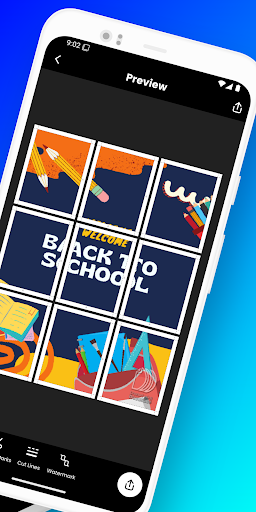
Docuslice lets you turn any image or PDF into a stunning, multi-page masterpiece using your regular home printer! Tiled printing is easier than ever — simply print image on multiple pages and assemble them into one giant poster.
Here’s how it works:
- Choose your layout:
- Grid Mode – set poster size using rows and columns (fixed number of papers).
- Size Mode – set exact width and height for your poster.
- Import any image or PDF.
- Customize it to perfection: Resize and add text with ease.
- Docuslice magically slices your design into printable tiles.
- Export tiles as PDF or images for …
Read the full description
Want to create massive posters, banners, or wall art without a giant printer? Docuslice lets you turn any image or PDF into a stunning, multi-page masterpiece using your regular home printer! Tiled printing is easier than ever — simply print image on multiple pages and assemble them into one giant poster. Here’s how it works: - Choose your layout: - Grid Mode – set poster size using rows and columns (fixed number of papers). - Size Mode – set exact width and height for your poster. - Import any image or PDF. - Customize it to perfection: Resize and add text with ease. - Docuslice magically slices your design into printable tiles. - Export tiles as PDF or images for flexible printing. - Print directly to your home printer or send to print shops if you don’t have one. Perfect for: - Eye-catching event posters (birthdays, holidays, etc.) - Educational charts, decorations, and classroom posters - Unique wall art for your home or office - Campaign posters that make a statement - Large banners for any occasion - Activism and protest posters Docuslice is: - FREE to download and use - Incredibly easy to learn - Compatible with any image or PDF - Exportable as PDF or images - Lets you print image on multiple pages for any size - Cost-efficient – no need for large format printers - Eco-friendly – save resources by using your home printer Ready to unleash your creativity and print giant posters with ease? Download Docuslice today!
Installs, last 30 days Measured
Exact Google Play install counts, collected daily
Ratings
3,440 ratings, 24 reviews
- 5 ★77%
- 4 ★5.9%
- 3 ★2.9%
- 2 ★2.9%
- 1 ★12%
Recent reviews
Latest public reviews from the store
No reviews in our sample for this app yet.
Top chart positions
Latest Google Play chart ranks by country, last 10 days
- Countries ranked
- 1
- Best rank
- #168
- Top 10 placements
- 0
- of 1 chart placements
- Average rank
- #168
Best countries on Google Play
- 🇲🇽 Mexico · Top free, Art & Design#168
| Country | Chart | Category | Rank | Best (10 days) | Date |
|---|---|---|---|---|---|
| 🇲🇽 Mexico | Top free | Art & Design | #168 | #134 | 20 Nov 2026 |
Docuslice - Poster Printing history
Release, install milestones, listing and store changes
- Reached 100,000+ installs 4 Aug 2025
- Reached 50,000+ installs 3 Feb 2025
- Reached 10,000+ installs 5 Feb 2024
- Reached 5,000+ installs 13 Nov 2023
- Reached 1,000+ installs 2 Oct 2023
- Reached 100+ installs 18 Sep 2023
- First released on the store 15 Aug 2023
Update frequency
How often Docuslice - Poster Printing ships a new version, month by month
17 updates in the last 12 months. More often than most similar apps: they shipped a median of 0 updates in the same year.
Recent versions
Current version 2.60
- Version 2.5731 Oct 2026
- Paragraphs: text that wraps to its box. - Align left, center or right; justify paragraphs. - Bullets, numbered lists, line and letter spacing. - Mix fonts, sizes and colors in one text. - 1,900+ free fonts, with search and all their weights. - PDF Vector Export: Razor-sharp vector PDFs at any size. - Size Mode: Set your poster’s exact width and height. - Performance improvements and bug fixes.
- Version 2.5315 Aug 2026
- SVG Import: Add scalable vector graphics — logos, icons, line art. - PDF Vector Export: Razor-sharp vector PDFs at any size. - Landscape Mode: Edit and print in landscape. - Size Mode: Set your poster’s exact width and height. - Performance improvements and bug fixes.
- Version 2.5229 Jul 2026
- SVG Import: Add scalable vector graphics — logos, icons, line art. - PDF Vector Export: Razor-sharp vector PDFs at any size. - Landscape Mode: Edit and print in landscape. - Size Mode: Set your poster’s exact width and height. - Performance improvements and bug fixes.
- Version 2.5127 Jul 2026
- SVG Import: Add scalable vector graphics — logos, icons, line art. - PDF Vector Export: Razor-sharp vector PDFs at any size. - Landscape Mode: Edit and print in landscape. - Size Mode: Set your poster’s exact width and height. - Performance improvements and bug fixes.
Listing keywords
Words and phrases Docuslice - Poster Printing repeats most in its store listing
Top phrases: image or pdf (3), home printer (3), image on multiple (2), pdf or images (2), giant poster (2).
Highlighted words also appear in the title. Counts cover the title, short description and description.
Business model and tech
From the store listing and declared permissions
- Business model
- Free to downloadShows ads
- Sensitive access
- Photos, videos and filesAdvertising ID
14 permissions
0 special access, 2 sensitive, 12 standard
- Change or delete shared storageSensitive
- Read shared storageSensitive
- Ad attribution (Privacy Sandbox)ACCESS_ADSERVICES_ATTRIBUTIONStandard
- Ad topics (Privacy Sandbox)ACCESS_ADSERVICES_TOPICSStandard
- Read how it was installed (install referrer)BIND_GET_INSTALL_REFERRER_SERVICEStandard
- Read the advertising IDAD_IDStandard
- Read the advertising ID (Privacy Sandbox)ACCESS_ADSERVICES_AD_IDStandard
- Keep the phone awakeStandard
- Run a foreground serviceFOREGROUND_SERVICEStandard
- Download files without a notificationStandard
- Full internet accessStandard
- See network connectionsStandard
Compliance
What the listing and the app package show
- Store status
- Live
- Upkeep
- Updated 31 Oct 2026
- Registered in
- Philippines
- Privacy policy
- Linked on the listing
- Advertising
- Shows ads
- In-app purchases
- None declared
- Age rating
- Everyone
- Sensitive permissions
- 2 sensitive of 14
- Location access
- No
- Camera and microphone
- Neither
Apps like Docuslice - Poster Printing
Doodle Art Fun and DrawSupono Holdings LTD2.9M installs★ 4.17
Flowers Coloring BooksColorJoy655K installs★ 4.46
CorelDraw Design TemplatesEmpretus4.6M installs★ 2.39
Men Hair Style - Hair EditorDevabits Inc1.1M installs★ 1.83
How to make squishiesSkyWave1.2M installs★ 3.84
The UltimateDUWA STUDIO1.1M installs★ 4.0
Tracer! Lightbox tracing appAngel Koh893K installs★ 4.04
Fashion Illustration: DrawingAPPTERRA, TOO679K installs★ 3.6
Embroidery App: Stitch DesignRstream Labs212K installs★ 4.26
Docuslice - Poster Printing: questions and answers
How many downloads does Docuslice - Poster Printing have?
Docuslice - Poster Printing has 425,269 installs on Google Play, measured from the store's own count on 20 Nov 2026.
Who makes Docuslice - Poster Printing?
Docuslice - Poster Printing is published by Xystemize, a developer based in PH.
When was Docuslice - Poster Printing last updated?
The latest version (2.60) was released on 31 Oct 2026.
Is Docuslice - Poster Printing free?
Yes. Docuslice - Poster Printing is free to download, and it shows ads.
Is Docuslice - Poster Printing still available?
Yes. Docuslice - Poster Printing is live on Google Play as of 20 Nov 2026.
Track Docuslice - Poster Printing and its competitors
Watch any app for new versions, rating drops, chart moves and removals. Free plan, no card.