Door Lock Screen Wallpapers
Enhance your secure lock screen style with Door Wallpapers & Custom backgrounds
- Installs
- 1.60M
- Measured
- Rating
- 4.44
- Ratings
- 2.7K
- 10 reviews
- Version
- 11.8.2
- Updated 5 Jun 2026
- Released
- 28 Aug 2016
- Tracked since 12 May 2026
- Size
- 6 MB
- Needs 4.2
Screenshots


About Door Lock Screen Wallpapers
The description on the store listing
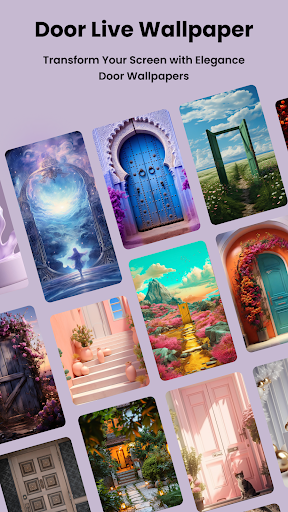
Introducing the Door Lock Wallpapers Screen – the ultimate themes and live clock experience offering a stunning array of door wallpaper patterns tailored for both winter and summer vibes. Featuring an extensive selection of wallpapers, photos, and stylish theme backgrounds, this lock screen theme and home screen widget boasts over unique collections to cater every taste. Whether you're into the sleek photo blender effect, the immersive blur effect with parallax, or the enchanting magic locker theme, this app has something special for everyone.
Languages:
We’re excited to announce the addition of 14 languages to our door lock wallpaper app, letting users customize their experience based on …
Read the full description
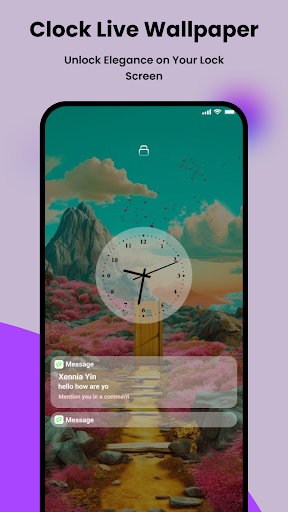
Introducing the Door Lock Wallpapers Screen – the ultimate themes and live clock experience offering a stunning array of door wallpaper patterns tailored for both winter and summer vibes. Featuring an extensive selection of wallpapers, photos, and stylish theme backgrounds, this lock screen theme and home screen widget boasts over unique collections to cater every taste. Whether you're into the sleek photo blender effect, the immersive blur effect with parallax, or the enchanting magic locker theme, this app has something special for everyone. Languages: We’re excited to announce the addition of 14 languages to our door lock wallpaper app, letting users customize their experience based on their location and language preferences. This app is packed with tons of exciting features designed to enhance user interaction and personalization. When you first launch the app, you'll start by creating a template of live wallpaper combination such as Astral, Radiant, Night, Neon, Vintage and Wall-mounted. Navigate to a new screen with a selection of stunning and sophisticated wallpapers, before setting it as your lock screen you can explore four remarkable customization options: Features: 1. Clock Selection. 2. Clock Hands. 3. Clock Color, Background Color, and Background Opacity. 4. Clock Size. Detailed Features: 1. Clock Selection: - Users can choose from a variety of unique clock designs before applying the theme. Our diverse collection includes clocks with both digit and Roman numeral displays, so you can pick the style that best matches your chosen wallpaper. 2. Clock Hands Customization: - This feature allows users to personalize the clock hands to their liking. Whether you prefer thick, bold hands or thin, delicate ones, you have the flexibility to choose the style that best fits your aesthetic clock dials. Adjust the size and appearance of the clock hands to get the perfect look. 3. Clock Color, Background Color, and Background Opacity: - Our third feature is super versatile, offering extensive customization options. Users can choose from a wide range of vibrant clock colors to match or contrast with their wallpaper. Additionally, users can select beautiful and bright background (BG) colors that provide a soothing effect. The BG opacity setting lets users control the visibility of the clock, allowing them to display the clock fully or only show the clock numbers, depending on their preference. 4. Clock Size Adjustment: - The final feature allows users to adjust the size of the clock, from large to small accordingly to their phone screen size. This feature is especially important since the clock size can significantly impact the overall look of the wallpaper. Users can experiment with different sizes to find the perfect balance that enhances their wallpaper. We’re confident you’ll love the extensive customization options available in our app and enjoy using them to personalize your lock screen and home screen. Explore these features and personalized your lock screen that truly reflects your taste, style and preferences. Settings: Customizing your Home and Lock screen background has never been easier. Simply navigate to the settings screen, pick your preferred theme, and set it as the backdrop. From chic and imaginative door backgrounds to complementing your smartphone lock pattern password, the options are endless. Whether you fancy a single or double-door background theme, you can effortlessly elevate your phone's wallpaper game. Utilize the convenient slider feature to browse through various theme backgrounds and choose the one that speaks to you. The Door Lock Screen Wallpaper Theme ensures a seamless user experience with its intuitive app design and easy-to-navigate features. Customize your phone screen effortlessly by selecting background themes without effecting your phone pattern, pin password and finger print setting. Stay tuned for future updates as we continue to roll out exciting new features!
Installs, last 30 days Measured
Exact Google Play install counts, collected daily
Ratings
2,718 ratings, 10 reviews
- 5 ★75%
- 4 ★4.2%
- 3 ★12%
- 2 ★4.2%
- 1 ★4.2%
Recent reviews
Latest public reviews from the store
No reviews in our sample for this app yet.
Top chart positions
Latest Google Play chart ranks by country, last 10 days
Not in any tracked top chart in the last 10 days.
Door Lock Screen Wallpapers history
Release, install milestones, listing and store changes
- Reached 1,000,000+ installs 27 Nov 2018
- Reached 500,000+ installs 24 Feb 2018
- Reached 100,000+ installs 6 Dec 2016
- Reached 50,000+ installs 19 Nov 2016
- Reached 10,000+ installs 27 Oct 2016
- Reached 5,000+ installs 16 Oct 2016
- Reached 1,000+ installs 23 Sep 2016
- Reached 500+ installs 17 Sep 2016
Update frequency
How often Door Lock Screen Wallpapers ships a new version, month by month
2 updates in the last 12 months. More often than most similar apps: they shipped a median of 1 updates in the same year.
Recent versions
Current version 11.8.2
- Version 11.8.25 Jun 2026
Address crashes....!!! Improve user interaction....!!! Live clock customizations....!!!
- Version 11.8.12 May 2026
Address crashes....!!! Improve user interaction....!!! Live clock customizations....!!!
- Version 11.7.916 Jun 2025
- Version 11.7.720 Jan 2025
Listing keywords
Words and phrases Door Lock Screen Wallpapers repeats most in its store listing
Top phrases: lock screen (8), clock hands (4), door lock (4), clock size (3), customization options (3).
Highlighted words also appear in the title. Counts cover the title, short description and description.
Business model and tech
From the store listing and declared permissions
- Business model
- Free to downloadIn-app purchasesShows ads
- Sensitive access
- No sensitive permission declared
Compliance
What the listing and the app package show
- Store status
- Live
- Upkeep
- Updated 5 Jun 2026
- Registered in
- Pakistan
- Privacy policy
- Linked on the listing
- Advertising
- Shows ads
- In-app purchases
- Offered
- Age rating
- Mature 17+
Apps like Door Lock Screen Wallpapers
Recover Everything: Photo&DataGIYASTAR2.9M installs★ 3.67
مواقيت الآذان المغرب بدون نتTLAPPS1.2M installs★ 3.8
Mulugu Astro - Panchangam 2024Kameshwari e Services Pvt Ltd582K installs★ 3.36
Russian - English TranslatorAloha Std320K installs★ 4.41
Craft Lucky Block Mods MCPEWira N Dev281K installs★ 4.54
TaskarioRichaMiguel307K installs★ 4.66
SaveTok - Video DownloaderCynt Maxwell Apps243K installs★ 4.39
ShamimYas CalendarVesalsabz681K installs★ 4.41
2D3D ThailandYuWaddy304K installs★ 4.65
Door Lock Screen Wallpapers: questions and answers
How many downloads does Door Lock Screen Wallpapers have?
Door Lock Screen Wallpapers has 1,604,707 installs on Google Play, measured from the store's own count on 22 Nov 2026.
Who makes Door Lock Screen Wallpapers?
Door Lock Screen Wallpapers is published by Goshiapps, a developer based in PK.
When was Door Lock Screen Wallpapers last updated?
The latest version (11.8.2) was released on 5 Jun 2026.
Is Door Lock Screen Wallpapers free?
Yes. Door Lock Screen Wallpapers is free to download and offers in-app purchases, and it shows ads.
Is Door Lock Screen Wallpapers still available?
Yes. Door Lock Screen Wallpapers is live on Google Play as of 22 Nov 2026.
Track Door Lock Screen Wallpapers and its competitors
Watch any app for new versions, rating drops, chart moves and removals. Free plan, no card.