
Drawboard PDF - Pro
Mark up, store and share your PDFs for Drawboard Pro subscribers
- Installs
- 168K
- Measured
- Rating
- 1.68
- Ratings
- 1.2K
- 130 reviews
- Version
- Varies with device
- Updated 24 Aug 2026
- Released
- 19 Dec 2022
- Tracked since 12 May 2026
- Size
- —
Screenshots


About Drawboard PDF - Pro
The description on the store listing
Early access to Drawboard PDF for Pro users is here!
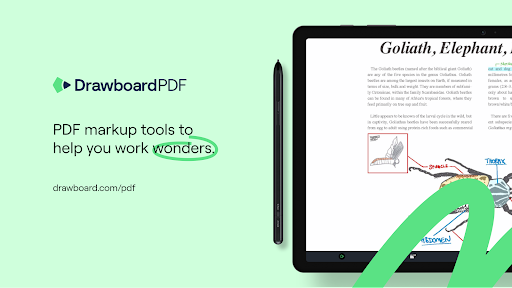
Drawboard PDF is the world’s first multi-platform PDF app with live sync and share capabilities.
After the overwhelming success of the Drawboard PDF Windows application with over 10 million users, Drawboard PDF is now available on Android as well as iOS, Mac, and Web.
Drawboard PDF for Android is intended as an extension of the powerful Windows application for Pro users.
Pro users can now access the Drawboard PDF app, where they can view their Drawboard Cloud Synced docs, and apply markup and changes with their touchscreen and stylus.
Features offered:
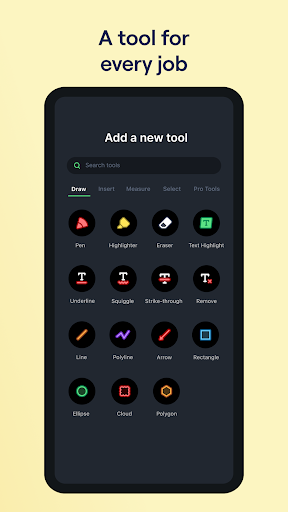
- Clean clear canvas with fast and easy navigation
- Markup your …
Read the full description
Early access to Drawboard PDF for Pro users is here! Drawboard PDF is the world’s first multi-platform PDF app with live sync and share capabilities. After the overwhelming success of the Drawboard PDF Windows application with over 10 million users, Drawboard PDF is now available on Android as well as iOS, Mac, and Web. Drawboard PDF for Android is intended as an extension of the powerful Windows application for Pro users. Pro users can now access the Drawboard PDF app, where they can view their Drawboard Cloud Synced docs, and apply markup and changes with their touchscreen and stylus. Features offered: - Clean clear canvas with fast and easy navigation - Markup your PDF with Drawboard ink, via finger touch or stylus - Create new documents with lined templates - Calibrate and take accurate measurements - Highlight, underline, place callouts, and more - Insert shapes, lines, and text NOTE: you will require a Drawboard PDF Pro license to use this application. Trials and purchases are available in the app.
Installs, last 30 days Measured
Exact Google Play install counts, collected daily
Ratings
1,224 ratings, 130 reviews
- 5 ★12%
- 4 ★0.5%
- 3 ★2.9%
- 2 ★6.9%
- 1 ★78%
Recent reviews
Latest public reviews from the store
- 15 Mar 2026
awesome. truly great and affordable
- 9 Mar 2026
very good ap for annotating pdf such as plans, drawings... i use it everyday. and for more complex annotations i can use voice recording for annotating internal documents so that others can correct them properly. for a basic suscription it is very usefull to me.
- 6 Nov 2025
I kid u not the windows version is amazing now. idk wat y'all did to finally fix the lagging and some look updates but it's amazing I love it!
- 24 Oct 2025
I have an upgraded account to use this awesome app on IOS and other platforms. They are requiring a higher paid level account to use on Android. This is problematic, to add upcharge simply to use on a popular platform like android. This is what is preventing a 5 star rating and wider adoption.
What reviewers bring up
Topics mentioned in the latest 50 reviews, by how many reviews mention them
Liked in good reviews (3 reviews)
No topic comes up twice.
Raised in bad reviews (46 reviews)
- without 8
- subscription 7
- pro 7
- features 6
- paid 6
- pay 6
- android 5
- install 4
Top chart positions
Latest Google Play chart ranks by country, last 10 days
Not in any tracked top chart in the last 10 days.
Drawboard PDF - Pro history
Release, install milestones, listing and store changes
- Reached 100,000+ installs 13 Mar 2025
- Reached 50,000+ installs 30 Nov 2023
- Reached 10,000+ installs 5 Feb 2023
- Reached 5,000+ installs 22 Jan 2023
- Reached 1,000+ installs 23 Dec 2022
- First released on the store 19 Dec 2022
Update frequency
How often Drawboard PDF - Pro ships a new version, month by month
1 updates in the last 12 months. More often than most similar apps: they shipped a median of 0 updates in the same year.
Recent versions
Current version Varies with device
- Version 3.4.124 Aug 2026
Added page scales, set the scale for a page once and all measurements within that page will use it automatically. Enhances length, polylength, perimiter, area tools. Adds the ability to measure wall area and volume. Add subjects to annotations. Improves markup list filtering, grouping, sum measurements of the same subject. Adds snapshot tool to copy and paste parts of the PDF.
- Version 2.10.116 Mar 2025
- Version 2.8.118 Feb 2025
- Version 2.7.028 Jan 2025
Listing keywords
Words and phrases Drawboard PDF - Pro repeats most in its store listing
Top phrases: drawboard pdf (8), pro users (3), drawboard pdf pro (2), pdf pro (2), windows application (2).
Highlighted words also appear in the title. Counts cover the title, short description and description.
Business model and tech
From the store listing, the SDKs in the app package and its declared permissions
- Business model
- Free to download
- Built with
- Cordova
- Ad networks (0)
- None detected
- Sensitive access
- Photos, videos and files
0 ad, attribution and analytics SDKs detected. SDKs are read from the app package and permissions from the store listing, so code that loads later is not seen.
Technology
19 SDKs found in the app package
4 permissions
0 special access, 2 sensitive, 2 standard
- Change or delete shared storageSensitive
- Read shared storageSensitive
- Full internet accessStandard
- Internal app permissionDYNAMIC_RECEIVER_NOT_EXPORTED_PERMISSIONStandard
Compliance
What the listing and the app package show
- Store status
- Live
- Upkeep
- Updated 24 Aug 2026
- Registered in
- Australia
- Privacy policy
- Linked on the listing
- Advertising
- No ads declared
- In-app purchases
- None declared
- Age rating
- Teen
- Sensitive permissions
- 2 sensitive of 4
- Location access
- No
- Camera and microphone
- Neither
Apps like Drawboard PDF - Pro
Appointments Planner SchedulerLaurentiu Popa395K installs★ 3.99
PDF Editor: Remove Page & PassSmartapps store109K installs★ 4.38
PDF Scanner & Doc Scanner AppWdream Limited480K installs★ 4.64
Hindi Thoughts (Suvichar)Arvind Chand Katoch116K installs★ 3.5
note book - daily writingLixi LLC112K installs★ 4.42
Pdf Studio: Reader & ListenerSAT One Plus150K installs★ 3.51
Direct Messages, Delete ChatSuper Ludo™ Games430K installs★ 3.88
All Document Reader & ViewerApp Bulls Inc - Office Suite330K installs★ 4.05
Breeding WheelEmbrapa168K installs★ 4.32
Drawboard PDF - Pro: questions and answers
How many downloads does Drawboard PDF - Pro have?
Drawboard PDF - Pro has 167,542 installs on Google Play, measured from the store's own count on 20 Nov 2026.
Who makes Drawboard PDF - Pro?
Drawboard PDF - Pro is published by Drawboard, a developer based in AU.
When was Drawboard PDF - Pro last updated?
The latest version (Varies with device) was released on 24 Aug 2026.
Is Drawboard PDF - Pro free?
Yes. Drawboard PDF - Pro is free to download.
Is Drawboard PDF - Pro still available?
Yes. Drawboard PDF - Pro is live on Google Play as of 20 Nov 2026.
Track Drawboard PDF - Pro and its competitors
Watch any app for new versions, rating drops, chart moves and removals. Free plan, no card.