Droid Screenshot
Capture, edit and share screenshots on the go
- Installs
- 15.91K
- Measured
- Rating
- 4.24
- Ratings
- 1.1K
- 100 reviews
- Version
- 3.0.0_pro
- Updated 7 Mar 2019
- Released
- 18 Dec 2013
- Tracked since 12 May 2026
- Size
- 23 MB
- Needs 4.0
Screenshots



About Droid Screenshot
The description on the store listing
<b>3 different screenshot methods!</b>
As you wish: Take a screenshot by using the floating screenshot button, the button inside the notification or by hardware key combination.
<b>Capture, edit and share screenshots on the go</b>
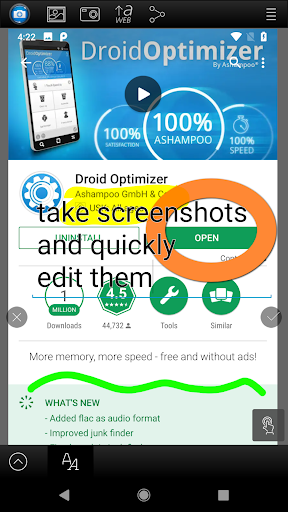
Ashampoo Droid Screenshot is a fully-fledged mobile application to capture, edit and share screenshots and images on your Android device.<p>Capture screen contents, take photos with your built-in camera or simply load existing images and add stylable arrows, shapes, stamps and texts to get your point across. And when you're finished, share your images through any installed file services (E-Mail, Picasa, Google+, etc.).
<b>Save and store what you see</b> …
Read the full description
<b>3 different screenshot methods!</b> As you wish: Take a screenshot by using the floating screenshot button, the button inside the notification or by hardware key combination. <b>Capture, edit and share screenshots on the go</b> Ashampoo Droid Screenshot is a fully-fledged mobile application to capture, edit and share screenshots and images on your Android device.<p>Capture screen contents, take photos with your built-in camera or simply load existing images and add stylable arrows, shapes, stamps and texts to get your point across. And when you're finished, share your images through any installed file services (E-Mail, Picasa, Google+, etc.). <b>Save and store what you see</b> Imagine you are browsing social media and come across a hilarious post or chat message that could very well be the next epic chat fail. Just take a screenshot and remove sensitive information with Droid Screenshot and come back to it later. <b>Record and document unforeseen events on the spot</b> Don't just rely on your memory alone! Use Droid Screenshot to record and document unfavorable situations such as car crashes and add arrows and notes to detail the sequence of events that caused them. <b>Record thoughts and ideas right in your photos</b> Droid Screenshot gives you a set of creative tools to draw and write on your images. Enhance your vacation photos and tell your friends exactly where your room was during your last stay or which places you particularly liked on that beach. Just mark the spots right in your photos with Droid Screenshot. <b>Share images with anyone</b> Use the integrated Ashampoo Web upload and share unique Internet links with others. Your images will be accessible through any web browser and automatically expire after 30 days so your images won't stay online forever. Of course, Droid Screenshot also supports all built-in sharing capabilities including Facebook and Google+. <b>Capture</b> • Instant-ready: No manual launching required (background service) • Notification Bar status messages wtih a screenshot button • Smart trigger: Screenshots taken through Android-default hardware key combination auto-open in Droid Screenshot • Floating screenshot button: Keep taking screenshots and edit them later • System integration: Use "Open with Droid Screenshot" in other apps, import and edit images through Gallery, take and modify camera snapshots <b>Screenshot Manager</b> • Select multiple screenshots to share or delete them all at once <b>Edit</b> • Pan/Zoom • Draw arrows • Draw rectangle/ellipse/line shapes • Stamps (cliparts) • Marker • Pen • Add text • Crop image • Scale canvas • Shadow/outline support: Arrows, Texts, rectangles, ellipses, lines <b>Share</b> • Set edited images as wallpaper in launcher • Supports all installed sharing capabilities (Facebook, Google+, Picasa, Twitter etc.) • No ads • Image scaling supported • AshWeb upload: Upload images to AshWeb and share unique links • Enable/disable Notification Bar messages • Many additional stamps/cliparts FAQ: https://www.ashampoo.com/lpa/droid_screenshot_help <b>Free version: https://play.google.com/store/apps/details?id=com.ashampoo.snap.screenshot.free</b></p>
Installs since 23 Jul 2026 Measured
Exact Google Play install counts, collected daily
Ratings
1,133 ratings, 100 reviews
- 5 ★62%
- 4 ★8.7%
- 3 ★13%
- 2 ★4.3%
- 1 ★11%
Recent reviews
Latest public reviews from the store
- 26 Oct 2024
Love it
- 3 Feb 2022
Been using this app for a while now and on three different phones with no issues
- 1 Jan 2022
Great clear shoots.
- 5 Mar 2021
Fantastic!
What reviewers bring up
Topics mentioned in the latest 50 reviews, by how many reviews mention them
Liked in good reviews (32 reviews)
- android 4
- snap 4
- screenshot 3
- ashampoo 3
- editing 3
- found 3
- take 3
- appreciate 2
Raised in bad reviews (11 reviews)
- screen 5
- shot 3
- refund 2
- photo 2
Top chart positions
Latest Google Play chart ranks by country, last 10 days
Not in any tracked top chart in the last 10 days.
Droid Screenshot history
Release, install milestones, listing and store changes
- Reached 10,000+ installs 8 Jul 2017
- Reached 5,000+ installs 19 Nov 2015
- Reached 1,000+ installs 13 Jul 2014
- Reached 500+ installs 31 Mar 2014
- First released on the store 18 Dec 2013
Recent versions
Current version 3.0.0_pro
- Version 3.0.06 Mar 2019
- Version 3.0.0_pro6 Mar 2019
- Renamed to "Droid Screenshot"
- Version 2.1.310 Jan 2019
- Version 2.1.226 Oct 2018
Listing keywords
Words and phrases Droid Screenshot repeats most in its store listing
Top phrases: droid screenshot (9), edit and share (3), capture edit (3), screenshot button (3), share screenshots (3).
Highlighted words also appear in the title. Counts cover the title, short description and description.
Business model and tech
From the store listing, the SDKs in the app package and its declared permissions
- Business model
- Paid, $0.99Shows ads
- Built with
- No cross-platform framework or game engine detected
- Ad networks (2)
- AdMobAppNext
- Analytics and crash reports
- FirebaseGoogle Analytics
- Sensitive access
- Photos, videos and filesDraws over other apps
4 ad, attribution and analytics SDKs detected. SDKs are read from the app package and permissions from the store listing, so code that loads later is not seen.
Technology
9 SDKs found in the app package
Ad networks
Advertising and install-attribution SDKs found in the app package
- AdMob
- AppNext
9 permissions
1 special access, 2 sensitive, 6 standard
- Draw over other appsSpecial access
- Change or delete shared storageSensitive
- Read shared storageSensitive
- Keep the phone awakeStandard
- Start when the phone turns onStandard
- Change network connectivityStandard
- Full internet accessStandard
- See network connectionsStandard
- Action manage overlay permissionACTION_MANAGE_OVERLAY_PERMISSIONStandard
Compliance
What the listing and the app package show
- Store status
- Live
- Upkeep
- No update since 7 Mar 2019
- Registered in
- Germany
- Privacy policy
- Linked on the listing
- Advertising
- No ads declared
- In-app purchases
- None declared
- Age rating
- Everyone
- Sensitive permissions
- 2 sensitive, 1 special access of 9
- Location access
- No
- Camera and microphone
- Neither
Apps like Droid Screenshot
BatteryAlarmGoldLokik Soni58.2K installs★ 3.33
Photo Watch Face ProTiny Watch21.4K installs★ 4.42
GPS Location Sharing & LocatorNeo Utilities796K installs★ 4.2
Views Fans: CommunityaAa Designer36.5K installs★ 3.67
Space Clean ToolkitStarlume Tech597K installs★ 3.85
Calculator+ Photo&Video vaultGreen Water420K installs★ 4.37
Red Panic ButtonUltimate Communication Software LTD257K installs★ 3.31
Cutting Paper CalculatorTasikWeb.com84.5K installs★ 3.92
FORMSThe App Master848K installs★ 2.78
Droid Screenshot: questions and answers
How many downloads does Droid Screenshot have?
Droid Screenshot has 15,912 installs on Google Play, measured from the store's own count on 19 Nov 2026.
Who makes Droid Screenshot?
Droid Screenshot is published by Ashampoo®, a developer based in DE.
When was Droid Screenshot last updated?
The latest version (3.0.0_pro) was released on 7 Mar 2019.
Is Droid Screenshot free?
No. Droid Screenshot is a paid app priced at $0.99.
Is Droid Screenshot still available?
Yes. Droid Screenshot is live on Google Play as of 19 Nov 2026.
Track Droid Screenshot and its competitors
Watch any app for new versions, rating drops, chart moves and removals. Free plan, no card.