
DroidKit:ADB Terminal Toolkit
All-in-one ADB tool: apps, terminal, remote, input, files & advanced features!
- Installs
- 176K
- Measured
- Rating
- 3.99
- Ratings
- 251
- 25 reviews
- Version
- 4.6.11
- Updated 7 Aug 2026
- Released
- 9 Jul 2025
- Tracked since 13 May 2026
- Size
- —
Screenshots


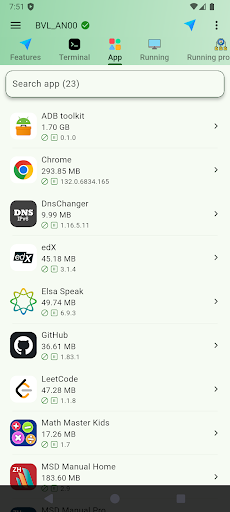


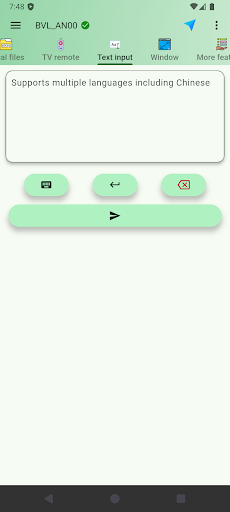
About DroidKit:ADB Terminal Toolkit
The description on the store listing
🚀DroidKit: ADB Terminal Toolkit
Professional Android device management made simple. The complete ADB solution trusted by developers worldwide.
Transform your Android experience with DroidKit - the comprehensive toolkit that replaces multiple apps with one powerful solution. From app management to system monitoring, everything you need is here.
🚀 Why Choose DroidKit?
All-in-One Solution: Manage applications, transfer files, control devices, and monitor systems - all from one intuitive interface.
Professional Grade: Built by developers for developers, yet simple enough for everyday users.
📱 Complete Feature Set
Application Management
Apps - Install, uninstall, and manage …
Read the full description
🚀DroidKit: ADB Terminal Toolkit Professional Android device management made simple. The complete ADB solution trusted by developers worldwide. Transform your Android experience with DroidKit - the comprehensive toolkit that replaces multiple apps with one powerful solution. From app management to system monitoring, everything you need is here. 🚀 Why Choose DroidKit? All-in-One Solution: Manage applications, transfer files, control devices, and monitor systems - all from one intuitive interface. Professional Grade: Built by developers for developers, yet simple enough for everyday users. 📱 Complete Feature Set Application Management Apps - Install, uninstall, and manage applications with detailed information including version, size, and permissions. Running Apps - Monitor active applications in real-time, force-stop unresponsive apps, and optimize device performance. Running Processes - View all system processes, monitor CPU and memory usage, identify resource-intensive applications. Visual & Control Tools Screenshot - Capture device screens in full resolution, schedule delayed screenshots, set automatic intervals. TV Remote - Universal remote control for Android TV devices with multiple layouts and precise navigation. Text Input - Type on devices using your computer keyboard with full multilingual support including Chinese, Japanese, Korean. Window - Adjust screen resolution, density, orientation, and display settings for optimal viewing. File Management Device Files - Browse and pull files from device storage with detailed file information and sorting options. Local Files - Push files from computer to device with drag-and-drop support and batch operations. System Tools Terminal - Full-featured terminal emulator with multi-tab support, command history, and syntax highlighting. System Monitoring - Real-time CPU, memory with detailed performance metrics. System Information - Complete hardware specifications, Android version, build details, and device capabilities. Export System Info - Generate comprehensive system reports for troubleshooting and documentation. Properties - View and edit system properties safely with search functionality and custom configurations. More Features - Device power management, network controls, system settings shortcuts, and diagnostic tools. 🎯 Perfect For Developers IT Professionals Smart TV Users Power Users Android Users 🌝 Supports dark mode for a better viewing experience in low light. 🌐 Available in over 80 languages to serve users worldwide. 🛡️ Security & Privacy Local Processing: All operations performed on your device - no data transmitted externally Minimal Permissions: Only essential permissions requested Transparent Operations: Every action clearly displayed with user confirmation Privacy First: No personal data collection or tracking 🔄 Continuous Updates & Innovation We're constantly evolving DroidKit based on your feedback: ✨ Regular Feature Updates - New capabilities added monthly 🐛 Quick Bug Fixes - Rapid response to user-reported issues 📱 Device Compatibility - Support for latest Android versions and devices 💡 User-Driven Development - Features requested by our community 🛡️ Security Enhancements - Ongoing security improvements and optimizations Stay Connected: Follow us for the latest updates, feature announcements, and tips to get the most out of DroidKit. Your feedback drives our development roadmap! 📥 Download Now Ready to experience the most comprehensive Android device management solution? Download DroidKit today and discover why thousands of users worldwide choose us for their ADB toolkit needs. Professional tools. Simple interface. Continuous innovation. Keywords: ADB toolkit, Android management, developer tools, TV remote, file transfer, terminal, system monitor
Installs since 29 Aug 2026 Measured
Exact Google Play install counts, collected daily
Ratings
251 ratings, 25 reviews
- 5 ★71%
- 4 ★2.1%
- 3 ★2.1%
- 2 ★0.0%
- 1 ★25%
Recent reviews
Latest public reviews from the store
No reviews in our sample for this app yet.
Top chart positions
Latest Google Play chart ranks by country, last 10 days
Not in any tracked top chart in the last 10 days.
DroidKit:ADB Terminal Toolkit history
Release, install milestones, listing and store changes
- Reached 100,000+ installs 27 Mar 2026
- Reached 50,000+ installs 12 Dec 2025
- Reached 10,000+ installs 2 Sep 2025
- Reached 5,000+ installs 12 Aug 2025
- Reached 1,000+ installs 17 Jul 2025
- Reached 500+ installs 14 Jul 2025
- First released on the store 9 Jul 2025
Update frequency
How often DroidKit:ADB Terminal Toolkit ships a new version, month by month
7 updates in the last 12 months. More often than most similar apps: they shipped a median of 2 updates in the same year.
Recent versions
Current version 4.6.11
- Version 4.6.117 Aug 2026
• Improved Android 17 compatibility, including local network permissions and wireless ADB discovery. • Enhanced device pairing, connection recovery, and terminal workflows. • Added shell environment profiles and smarter command suggestions. • Improved app, process, startup, screenshot, and file management. • General stability and UI improvements.
- Version 4.3.327 Jun 2026
A smarter Android companion is here: • New Storage overview to understand space usage at a glance • Refined app startup insights for a clearer device experience • Improved app filters, detail sharing, UI polish, localization, and stability
- Version 4.3.227 Jun 2026
Fixed an issue that could cause the app to freeze on launch.
- Version 4.1.226 May 2026
1. New Android Settings page: manage system, secure, and global settings in one place. 2. Smarter System Properties: favorites, history, search, quick edits, and safer validation. 3. Safer display changes: improved resolution/density presets with confirmation and auto rollback. 4. More reliable ADB connection: better heartbeat, recovery, reconnection, and device switching. 5. Improved stability for file transfers, unresponsive ADB requests, and background services.
Listing keywords
Words and phrases DroidKit:ADB Terminal Toolkit repeats most in its store listing
Top phrases: adb terminal toolkit (2), android device management (2), droidkit adb terminal (2), adb terminal (2), adb toolkit (2).
Highlighted words also appear in the title. Counts cover the title, short description and description.
Business model and tech
From the store listing and declared permissions
- Business model
- Free to downloadIn-app purchasesShows ads
- Subscriptions and payments
- Google Play billing
- Sensitive access
- Photos, videos and filesAdvertising ID
18 permissions
1 special access, 3 sensitive, 14 standard
- Manage all filesMANAGE_EXTERNAL_STORAGESpecial access
- Change or delete shared storageSensitive
- Read shared storageSensitive
- Show notificationsPOST_NOTIFICATIONSSensitive
- Ad attribution (Privacy Sandbox)ACCESS_ADSERVICES_ATTRIBUTIONStandard
- Ad topics (Privacy Sandbox)ACCESS_ADSERVICES_TOPICSStandard
- Read how it was installed (install referrer)BIND_GET_INSTALL_REFERRER_SERVICEStandard
- Read the advertising IDAD_IDStandard
- Read the advertising ID (Privacy Sandbox)ACCESS_ADSERVICES_AD_IDStandard
- Control vibrationStandard
- Keep the phone awakeStandard
- Run a foreground serviceFOREGROUND_SERVICEStandard
Compliance
What the listing and the app package show
- Store status
- Live
- Upkeep
- Updated 7 Aug 2026
- Privacy policy
- Linked on the listing
- Advertising
- Shows ads
- In-app purchases
- Offered
- Age rating
- Everyone
- Sensitive permissions
- 3 sensitive, 1 special access of 18
- Location access
- No
- Camera and microphone
- Neither
Apps like DroidKit:ADB Terminal Toolkit
Fit Tolerance ISOYaşar Yücel Yeşilbağ151K installs★ 4.83
ADL DMX CalculatorKirill Trofimov62K installs★ 5.0
Screenshot Expert: Markup ToolTasakiApps12.2K installs★ 4.25
TV Remote - Control Roku & AllLyra mob110K installs★ 4.03
Battery barABC.21.1K installs★ 3.18
Bubble LevelEONSOFT55K installs★ 4.8
Bubble LevelCrydata13.2K installs★ 4.85
M Calendar(calendar, schedule)Sunguy257K installs★ 3.56
Easy Homescreen LauncherSimple Palace studio69.2K installs★ 3.94
DroidKit:ADB Terminal Toolkit: questions and answers
How many downloads does DroidKit:ADB Terminal Toolkit have?
DroidKit:ADB Terminal Toolkit has 175,850 installs on Google Play, measured from the store's own count on 14 Nov 2026.
Who makes DroidKit:ADB Terminal Toolkit?
DroidKit:ADB Terminal Toolkit is published by ColorBox Technology.
When was DroidKit:ADB Terminal Toolkit last updated?
The latest version (4.6.11) was released on 7 Aug 2026.
Is DroidKit:ADB Terminal Toolkit free?
Yes. DroidKit:ADB Terminal Toolkit is free to download and offers in-app purchases, and it shows ads.
Is DroidKit:ADB Terminal Toolkit still available?
Yes. DroidKit:ADB Terminal Toolkit is live on Google Play as of 14 Nov 2026.
Track DroidKit:ADB Terminal Toolkit and its competitors
Watch any app for new versions, rating drops, chart moves and removals. Free plan, no card.