DSLR Controller
Full control of your Canon EOS DSLR from through USB or Wi-Fi !
- Installs
- 199K
- Measured
- Rating
- 3.0
- Ratings
- 6.5K
- 1K reviews
- Version
- 1.06
- Updated 18 Aug 2017
- Released
- 4 Aug 2011
- Tracked since 13 May 2026
- Size
- 1 MB
- Needs 2.2
Screenshots


About DSLR Controller
The description on the store listing
DSLR Controller was the first and remains the best app to fully control your Canon EOS DSLR from your Android device, through USB cable or Wi-Fi connection. No computer or laptop required, no root required, only a compatible mobile device, a compatible camera, and if connecting through USB, the right cable.
We strongly suggest you read up on the website ( http://dslrcontroller.com/ ) about what DSLR Controller can do, how it works, and how to use it, before purchasing. The website contains a wealth of information you should know before using.
Not all devices are compatible, especially if you want to use a USB connection. For a free app you can use to test compatibility, see the …
Read the full description
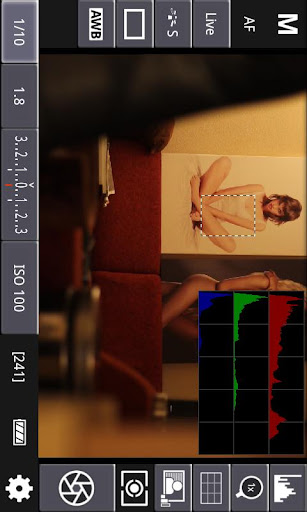
DSLR Controller was the first and remains the best app to fully control your Canon EOS DSLR from your Android device, through USB cable or Wi-Fi connection. No computer or laptop required, no root required, only a compatible mobile device, a compatible camera, and if connecting through USB, the right cable. We strongly suggest you read up on the website ( http://dslrcontroller.com/ ) about what DSLR Controller can do, how it works, and how to use it, before purchasing. The website contains a wealth of information you should know before using. Not all devices are compatible, especially if you want to use a USB connection. For a free app you can use to test compatibility, see the "Remote Release" app ( http://market.android.com/details?id=eu.chainfire.remoterelease ). If you need a refund, go to our website ( http://dslrcontroller.com/ ) and follow the instructions in the FAQ entry. We cannot process refunds through email. Usage notes, feature lists, device compatibility lists, changelogs, FAQs, can all be found on our website: http://dslrcontroller.com/ Most questions should go to the support and discussion thread at XDA-Developers.com: http://forum.xda-developers.com/showthread.php?t=1202082 <b>Features</b> Features include but are not limited to: - Live View - Auto Focus (tap Live View) - Manual focus adjustments (in AF mode) - Histogram - Zoom control - Grid and aspect ratio overlay - Bulb capture - Continuous capture - Image review (+ follow shot, gallery) - Image filters (peaking, contrast, channel mask, grayscale, 4 modes/filter) - Video recording - HDR/Auto Exposure Bracketing - Focus Bracketing (incl. HDR) - Focus A-B - Mirror Lockup support - Timelapse (incl. HDR) - Wi-Fi Passthrough - Extensive modification of settings -- Shutter speed -- Aperture -- ExpComp and Bracket -- ISO speed -- Auto-Focus Mode -- Focus and Zoom area (tap-and-hold Live View) -- Picture Style -- Drive Mode -- White Balance -- Color Temperature -- Auto-Lighting Optimizer -- Metering Mode -- Image and video quality and format Available options depend on the mode you have your camera set to (M, Av, Tv, etc) and camera model. Refer to the website ( http://dslrcontroller.com/ ) for further details. <b>Supported Android devices</b>: If you are connecting using Wi-Fi, virtually all modern Android devices are supported (your camera needs Wi-Fi support, though). If you are connecting over USB, your device needs USB host support - most recent devices do. Please see the 'Devices' section on our website ( https://dslrcontroller.com/devices.php ) for further information. If your camera only supports USB, you can modify a TL-MR3040 to provide a Wi-Fi connection ( http://dslrcontroller.com/guide-wifi_mr3040.php ) <b>Supported Canon EOS models</b>: Newer cameras than listed below are usually supported. Full support: - 1D Mark IV - 1D X - 1D X Mark II - 5D Mark II - 5D Mark III - 5D Mark IV - 5Ds(r) - 50D - 500D - 550D - 6D - 60D - 600D - 650D - 7D - 7D Mark II - 70D - 700D - 750D - 760D - 80D - 1100D - 1200D - 1300D - 100D Limited support: - 1D mk III - 1Ds mk III - 30D - 40D - 400D - 450D - 1000D No support: - pre-2006 models - EOS M mirrorless devices (work in progress) <b>Let us know which hardware you are using with DSLR Controller!</b>
Installs since 19 Jul 2026 Measured
Exact Google Play install counts, collected daily
Ratings
6,472 ratings, 1,027 reviews
- 5 ★36%
- 4 ★11%
- 3 ★8.0%
- 2 ★7.0%
- 1 ★38%
Recent reviews
Latest public reviews from the store
- 14 Jan 2023
I tried using it with an Olympus camera even though it is not compatible with that brand, and the app recognized the exact model. Is there a way to use this with my E-PL6 regardless? Activating the shutter does not work, but the camera model is being displayed at the top. Thank you!
- 15 Apr 2021
Pu Vlg Ho
- 29 Nov 2020
Nice
- 5 May 2019
Works well. I tried it out with my Huawei P10 with A MICRO USB OTG and MICRO USB to USB C adapter into Canon 650D and it worked! Had to try a couple of different OTG cables (I had anyway). Super happy. Many thanks!
What reviewers bring up
Topics mentioned in the latest 50 reviews, by how many reviews mention them
Liked in good reviews (26 reviews)
- cable 4
- usb 4
- otg 3
- compatible 2
- perfectly 2
- android 2
- xperia 2
- tried 2
Raised in bad reviews (19 reviews)
- camera 7
- canon 7
- wifi 3
- stays black 2
- connection 2
- bulb mode 2
- shutter 2
- guess 2
Top chart positions
Latest Google Play chart ranks by country, last 10 days
Not in any tracked top chart in the last 10 days.
DSLR Controller history
Release, install milestones, listing and store changes
- Reached 100,000+ installs 27 Jul 2015
- Reached 50,000+ installs 13 Dec 2013
- Reached 10,000+ installs 14 Apr 2012
- First released on the store 4 Aug 2011
Recent versions
Current version 1.06
- Version 1.0618 Aug 2017
v1.06: - Fixed crash when starting video playback with MX Player v1.05: Release notes: https://plus.google.com/+Chainfire/posts/duh4LAqcDMC (c) 2017 Added: - Night mode - Notice for disabled shuttercounter (5D4+?) Improved: - High speed shooting handling - Communication error notice Fixed: - Various 5D4 issues - Level circle sometimes no longer drawn filled on some devices while recording
- Version 1.051 Aug 2017
- Version 1.028 Nov 2016
- Version 1.0121 Oct 2016
Listing keywords
Words and phrases DSLR Controller repeats most in its store listing
Top phrases: wi fi (6), dslr controller (4), 5d mark (3), canon eos (3), live view (3).
Highlighted words also appear in the title. Counts cover the title, short description and description.
Business model and tech
From the store listing, the SDKs in the app package and its declared permissions
- Business model
- Paid, $7.99
- Built with
- No cross-platform framework or game engine detected
- Ad networks (0)
- None detected
- Sensitive access
- Photos, videos and files
0 ad, attribution and analytics SDKs detected. SDKs are read from the app package and permissions from the store listing, so code that loads later is not seen.
Technology
3 SDKs found in the app package
Development tools
12 permissions
0 special access, 2 sensitive, 10 standard
- Change or delete shared storageSensitive
- Read shared storageSensitive
- Keep the phone awakeStandard
- Turn off the screen lockStandard
- Control NFCStandard
- Change network connectivityStandard
- Connect to and disconnect from Wi-FiStandard
- Full internet accessStandard
- See network connectionsStandard
- See Wi-Fi connectionsStandard
- Allow Wi-Fi Multicast receptionStandard
- Google Play license checkStandard
Compliance
What the listing and the app package show
- Store status
- Live
- Upkeep
- No update since 18 Aug 2017
- Registered in
- Netherlands
- Privacy policy
- Linked on the listing
- Advertising
- No ads declared
- In-app purchases
- None declared
- Age rating
- Everyone
- Sensitive permissions
- 2 sensitive of 12
- Location access
- No
- Camera and microphone
- Neither
Apps like DSLR Controller
PicFrameActive Development233K installs★ 3.56
New Year Photo Frame 2026Ai Photo Labs1.5M installs★ 4.78
Marki: timestamp & GPS cameraMARKI TECHNOLOGY PTE.LTD.3.6M installs★ 3.55
Photo frames to share cute appRapeto Apps1.2M installs★ 4.83
Anniversary video makerVideo Effect Editor476K installs★ 5.0
AI Photo Enhancer UpscaleMediaPixelBin885K installs★ 3.63
ToonApp AI+ Viral Photo MakerLyrebird Studio205K installs★ 4.34
Flowers Photo FrameClickLab Technology2.3M installs★ 4.3
Photo Paint: Painting MakerGeniusTools Labs1.2M installs★ 4.28
DSLR Controller: questions and answers
How many downloads does DSLR Controller have?
DSLR Controller has 199,461 installs on Google Play, measured from the store's own count on 15 Nov 2026.
Who makes DSLR Controller?
DSLR Controller is published by Chainfire, a developer based in NL.
When was DSLR Controller last updated?
The latest version (1.06) was released on 18 Aug 2017.
Is DSLR Controller free?
No. DSLR Controller is a paid app priced at $7.99.
Is DSLR Controller still available?
Yes. DSLR Controller is live on Google Play as of 15 Nov 2026.
Track DSLR Controller and its competitors
Watch any app for new versions, rating drops, chart moves and removals. Free plan, no card.