
Easy PDF Tool
Scanner, Converter, Compressor, Merge, Split, Lock PDF & manage your documents.
- Installs
- 5.65K
- Measured
- Rating
- —
- Ratings
- —
- Version
- Varies with device
- Updated 18 Feb 2022
- Released
- 22 Oct 2021
- Tracked since 13 May 2026
- Size
- —
Screenshots


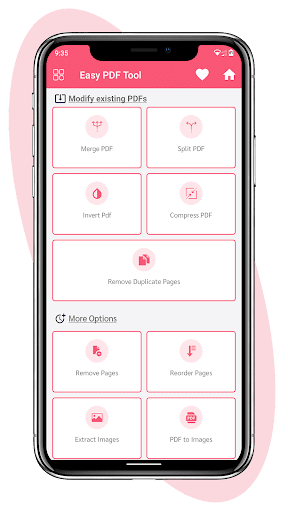


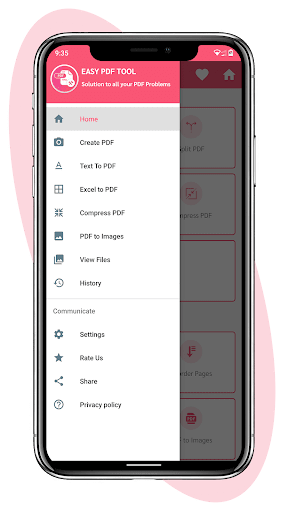


About Easy PDF Tool
The description on the store listing
👉🏻 <b>PDF Reader Viewer</b>
You can get a view of your PDF reader files.
👉🏻 <b>Images to PDF</b>
- JPG to PDF Converter
- PNG to PDF Converter
- BMP to PDF Converter
- TIFF to PDF Converter
- PSD to PDF Converter
- EPS to PDF Converter
- PDF to Image Converter.
👉🏻 <b>Files to PDF</b>
- Text to pdf
- Qr code & Barcode to pdf
- Excel to pdf
- Zip to pdf
👉🏻 <b>Protected PDF</b>
- Compress & Resize pdf file to save your device space.
- Add text to pdf.
- Add pdf password to protect your pdf.
- Add watermark.
- Insert a picture in pdf.
- Rotate the pdf page.
👉🏻 <b>Modify PDF</b>
- Split and Merge pdf maker.
- Invert pdf color.
- Reorder pdf …
Read the full description
👉🏻 <b>PDF Reader Viewer</b> You can get a view of your PDF reader files. 👉🏻 <b>Images to PDF</b> - JPG to PDF Converter - PNG to PDF Converter - BMP to PDF Converter - TIFF to PDF Converter - PSD to PDF Converter - EPS to PDF Converter - PDF to Image Converter. 👉🏻 <b>Files to PDF</b> - Text to pdf - Qr code & Barcode to pdf - Excel to pdf - Zip to pdf 👉🏻 <b>Protected PDF</b> - Compress & Resize pdf file to save your device space. - Add text to pdf. - Add pdf password to protect your pdf. - Add watermark. - Insert a picture in pdf. - Rotate the pdf page. 👉🏻 <b>Modify PDF</b> - Split and Merge pdf maker. - Invert pdf color. - Reorder pdf pages. - Remove duplicate pages. Key Features: - Save a PDF file with your text and drawing content - List of all PDF files in your device - Converts multiple images to PDF in the order you select them - PDF Reader - Great for converting large amounts of photos, turn a folder of photos to PDF - Different Text colors and sizes - Highlight Text or lines - Does not require internet to work - Share a PDF file - Easy enough for EVERYONE to use - Choose several folders for converting JPG to PDF - Protect your PDF with password - Can be used to convert WEBP and PNG to PDF - Very small PDF size with good image quality - Rotate PDF pages - Easy to share generated pdf file - Add Text or Image watermarks to PDF - Remove write protection from PDF - Split PDF into multiple PDFs - Merge PDF or Images into a single PDF - Remove any PDF page and recreate the PDF - Extract images from PDF - It also have feature of Zoom In and Zoom out EasyPDF image converter app has a very easy user interface. Just add pictures and run to combine multiple images or image folder to PDF. Using this JPG/PNG/WEBP to PDF converter you find that there is nothing to make things difficult. In time, extra features will be added according to what users request. This PDF converter has been made to be as easy and fast as possible to convert multiple images to PDF
Installs since 2 Sep 2026 Measured
Exact Google Play install counts, collected daily
Daily history starts once this app is in our daily install sample.
Ratings
- 5 ★0.0%
- 4 ★0.0%
- 3 ★0.0%
- 2 ★0.0%
- 1 ★0.0%
Recent reviews
Latest public reviews from the store
- 20 Jan 2024
This app has saved me in many instances. Originally, I wasn't gonna review it but...today I opened the app for some work and it automatically forces me to update...an app should never force people to update you know...just saying...and it also isn't letting me upload a photo to compress it 😕 dunno what's wrong with the app
- 26 Oct 2022
Soooo efficient!! It compressed my document in seconds!! I had to delete my previous App Which took me almost to hours trying to compressed, which ended up failing..i love this
- 9 Aug 2022
Yes, it's true the app is good. The app save me when I was given 200 pages of pictures in ms word document to send it through email over 300 mega byte. When I converted the file into PDF this app help me compress the PDF file into 11mb
- 5 Jul 2022
Nice app. Options for compression are good. Helpful when files occupying more space can't be sent to some agencies. Overall a good app.
What reviewers bring up
Topics mentioned in the latest 10 reviews, by how many reviews mention them
Liked in good reviews (6 reviews)
- compress 3
- file 3
- document 2
- trying 2
- took 2
- guys 2
- pdf 2
Raised in bad reviews (3 reviews)
- subscription 2
- off 2
Top chart positions
Latest Google Play chart ranks by country, last 10 days
Not in any tracked top chart in the last 10 days.
Easy PDF Tool history
Release, install milestones, listing and store changes
- Reached 5,000+ installs 18 Feb 2022
- Reached 1,000+ installs 27 Nov 2021
- Reached 500+ installs 24 Nov 2021
- First released on the store 22 Oct 2021
Recent versions
Current version Varies with device
- Version 10.03 Feb 2022
- Version 8.04 Jan 2022
- Version 6.023 Dec 2021
Listing keywords
Words and phrases Easy PDF Tool repeats most in its store listing
Top phrases: pdf converter (8), pdf file (4), images to pdf (3), multiple images (3), pdf reader (3).
Highlighted words also appear in the title. Counts cover the title, short description and description.
Business model and tech
From the store listing and declared permissions
- Business model
- Free to downloadShows ads
- Sensitive access
- CameraPhotos, videos and filesAdvertising ID
10 permissions
0 special access, 3 sensitive, 7 standard
- Take photos and videosSensitive
- Change or delete shared storageSensitive
- Read shared storageSensitive
- Read the advertising IDAD_IDStandard
- Keep the phone awakeStandard
- Run a foreground serviceFOREGROUND_SERVICEStandard
- Start when the phone turns onStandard
- Full internet accessStandard
- See network connectionsStandard
- See Wi-Fi connectionsStandard
Compliance
What the listing and the app package show
- Store status
- Live
- Upkeep
- No update since 18 Feb 2022
- Registered in
- India
- Privacy policy
- Linked on the listing
- Advertising
- Shows ads
- In-app purchases
- None declared
- Age rating
- Everyone
- Sensitive permissions
- 3 sensitive of 10
- Location access
- No
- Camera and microphone
- Camera
Apps like Easy PDF Tool
들어서 화면켜기Won3.5K installs★ 4.0
Height PredictionEcliptic App Ventures45.9K installs★ 2.4
Speicers`Pro VPNEldiablolucifer202021.2K installs★ 4.14
Lightning Tracker with AlertsYaksh Software4.3K installs★ 3.0
Mana Pathi (Unit Converter)Shirish Koirala2.2K installs★ 4.6
Multi-tab Calc - A simple app.Naoyuki Rikiji1.3K installs★ 5.0
Photo Recovery PlusBillApps7.1K installs★ 4.53
Just Silence. Scheduled.Akid Soft1.6K installs★ 5.0
- WoWp AssistantВиталий Робиновский2K installs★ 4.2
Easy PDF Tool: questions and answers
How many downloads does Easy PDF Tool have?
Easy PDF Tool has 5,653 installs on Google Play, measured from the store's own count on 2 Sep 2026.
Who makes Easy PDF Tool?
Easy PDF Tool is published by Unique Hunt, a developer based in IN.
When was Easy PDF Tool last updated?
The latest version (Varies with device) was released on 18 Feb 2022.
Is Easy PDF Tool free?
Yes. Easy PDF Tool is free to download, and it shows ads.
Is Easy PDF Tool still available?
Yes. Easy PDF Tool is live on Google Play as of 2 Sep 2026.
Track Easy PDF Tool and its competitors
Watch any app for new versions, rating drops, chart moves and removals. Free plan, no card.